Now you have proper sinr :). I not see any question then consider this case as solved.
Type question if you have any.
Remeber to log & track parameters of LTE: http://forum.mikrotik.com/t/r11e-lte6-2ca-not-staying-connected/136004/22
You can do some own watchdog for safe you to not stuck in offline:
Simple watchdog: http://forum.mikrotik.com/t/sxt-lte-4g-cat6/134468/1
Advance watchdog: http://forum.mikrotik.com/t/tx-rx-fp-rx-dropped-pppoe-account/132656/1
and maybe consider to enable incomming SMS with execure few scripts who can rescue you 
The question is how do I get better speeds, i feel the unit is not working as fast as it can, is there anything i can do to help it?
Adam
Why you think that ?
Remember that BTS can have own QoS policy… FAP (Fair access policy) / FUP (Fair Usage Policy) etc. and this can be differ per every Tower and time like Night/Day:
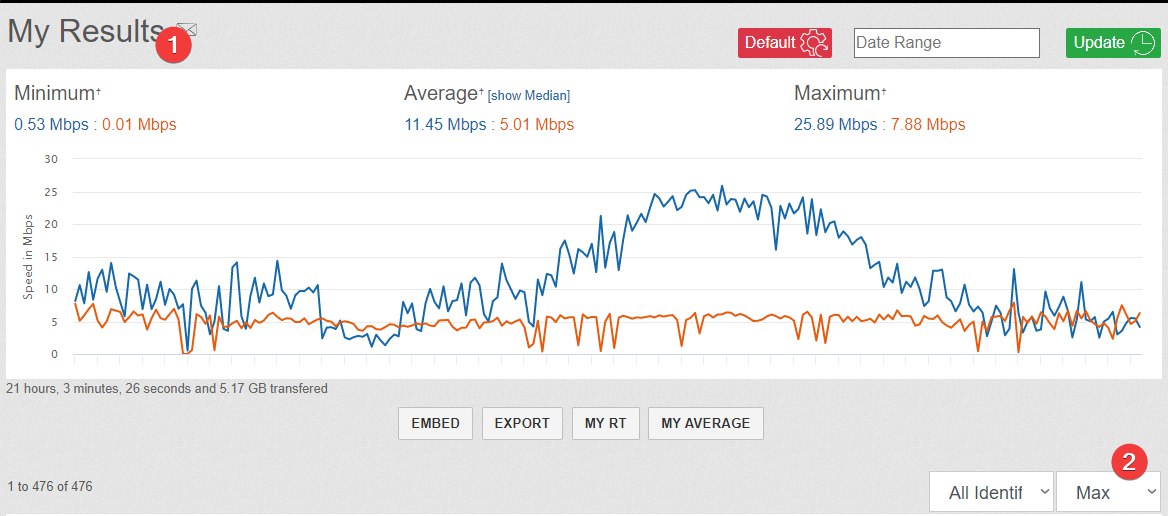
You have good antenna and signal, check what bands give you what speed from what towers.
If this is the same eNB then that Bands should connect each other as CA base of what your R11e-LTE6 can CA and what your BTS can CA.
Other way is do a cell-monitor, and cell lock to found all your possible Towers to connect. Sometimes we connect to “best signal” who is weaker then other one what we must lock by Cell Lock.
Did you check with the operator they support CAT-6? Sometime you might need to swap to a new SIM (as depends of what internal mgmt-system they use).
Try focus on B3 initially as B20 usually is crowded in rural areas since most devices auto connecto to this band. If you speed test B20 during the day you will probly notice a considerable slowdown at evening time. Btw, do you have an unobstructed line of sight ie is able to see the mast from your place?
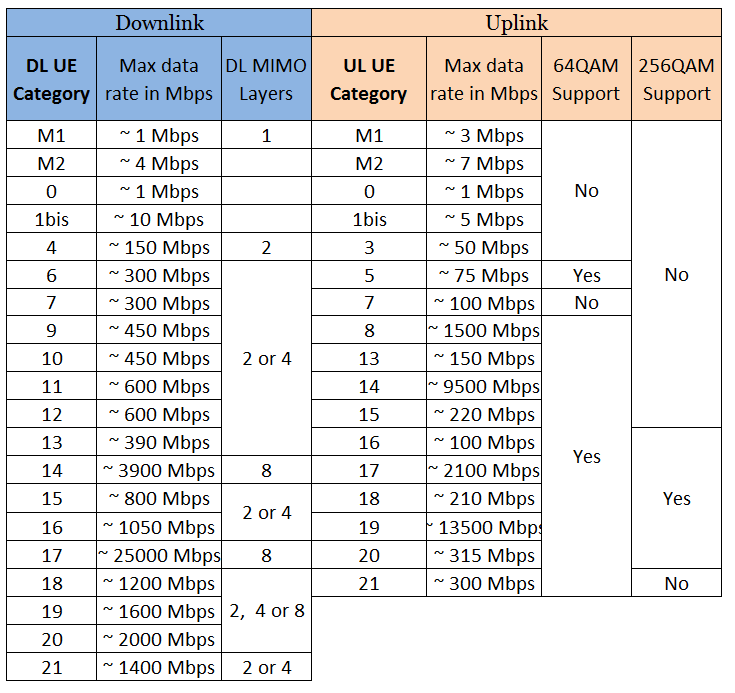
Examples of dl/ul speeds for the different categories. These are pure theoretic numbers. In practice you only get maximum of 70% of these even during optimal conditions.
EDIT:
Are you sure you’ve located all the available masts? The reason I’m asking is that it may be possible that you are trying to point the antenna at a different mast than the mobile initially was connected to when you conducted the tests.
If you have access to an Android there are plenty of good apps that are able to display cell id’s and signal strength for the different masts. You may also try field test mode (ie “3001#12345#”) on some older iPhone models. Avoid the new ones as they have removed much of the detailed info nowadays.
To locate some useful masts, first create a directional antenna by taping the phone inside a colander/strainer, an aluminum pie pan or aluminum foil with a shape that resembles of a satellite dish. For ease of use, start the app and run screen mirroring to a PC connected with an USB-cable. Then try find any masts with good enough signal strength and write down relevant info such as compass direction, cell ID, frequency band, signal strength etc. Use the respective frequency band and cell ID and test the unit to find out which mast that may offer the best speed.
This also give you the opportunity to check what level of carrier aggregation it’s possible to achieve as smartphones are rather good to configure and utilize that functionality (IMHO much smarter than the RoS controller and device driver for the LTE modules which is the main reason you have to conduct all these settings manually)
I’m in contact with my the two networks, I’m thinking for going with EE because it has CA from the cell tower, I can see the cell tower from my location. its about 4KM from me on top of a hill. i have a 30 foot pole been installed then the antenna is going on the top.
i will check in later, when i found out if the cell network restricted the speed.
thanks again, i which LTE was easier.
I would like to start the reply with a good note, i have managed to get my setup to download speed thst match my phone dwonload speed.
Im only getting LTE cat 2 speeds from my network ( this is a network thing not a unit limatation thing ), i went with EE/BT not O2 because they are the only netwrok with CA, a B3 and a B20 signal,
the only question i would like to ask is, should i lock my unit to the cell tower?, i have done acell monitoring and only get the cell tower im pointing to, could this help speeds?
I was a happy bunny when i got 75mbps download speeds, it settles around 69mbps.
again thanks for your time,
Adam,
If your eNB is the same, means the same Tower.
if your Current Cell ID is not change with the same eNB this meas you not hop/flap between differ sector-antennas at your tower.
Then, CL to stg what is stable not give you any benefit.
CL is ok when you can connect to other tower or antenna and give more speed or force that tower with worse signal but not many customers on it and thats why have more speed.