Hi I have a sxt lte and lhg lte and I would like to upgrade the internal modem. I wish I could do CA (carrier aggregation) for more speed and 4g+. Which modem should I buy so that everything works? Anyone has experience?
Thanks
Igor
The modem inside the Audience LTE6?
Now waiting for Mikrotik to sell the modem separately.
I have got “SXTR rev2 & R11e-LTE6 kit” by 1 day.
SIM are not up/down but a/b.
2CA works. Cell/SectorID lock works for primary band and second one “ca-band” works automatical. This lock is now save inside modem, we not must use modem-init.
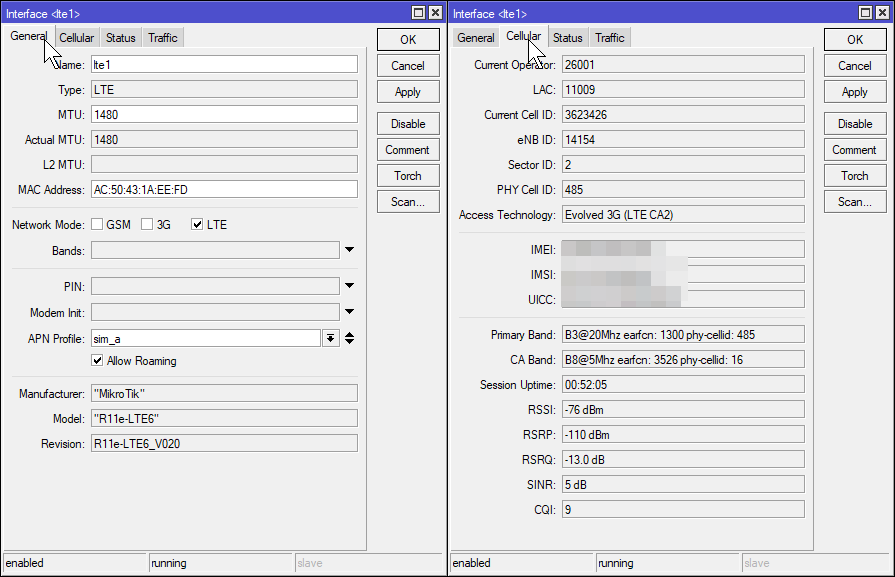
It’s inside house now. I prepare place outsite at 5m up.
My BTS is 3km at 80m up.
I have 2 LHG LTE6 and I notice when several clients are connected after a certain time aggregation does not work more and there is just one band left? if you disable and enable LTE the band aggregation comes back but not long?
the 2 lhg have the same problem.
I fixed the primary band but the aggregation is always lost after a while.
An idea ?
i noticed my LTE6 modem always connects to just 1 (highest) band at start, but later at download/stress it connects to 2nd. Dont know how exactly CA works, but maybe some BTS drops idle connections to don’t hold resources?
LTE works like you say, CA begin only if it needed.
I add some information.
One time I do a table of possible 2xCA in EMEA Band’s for EP06 and R11e-LTE6:
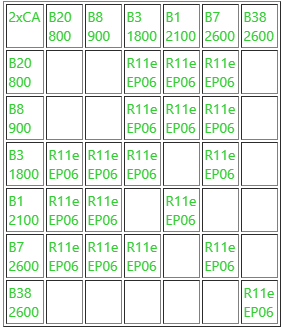
Modem Firmware v20 is very often use the ca-band on normal and CellLock situation.
Signal levels we see from a primary band.
Both bands in my testing not give many acceleration speed but for sure connection is more stable.
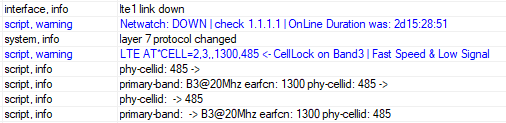
To monitor change of parameters/signals and own watchdog, I write and still do upgrade-s of my script’s.
Example:
.
NetWatch witch a Duration counting check every 10s the 1.1.1.1 host and have both Up and Down script’s.
UP:
.
do {ip firewall layer7-protocol add name=NetWatchTimeSince comment=[/system resource get uptime] } on-error={};
/local NetWatchDuration ([/system resource get uptime] - [/ip firewall layer7-protocol get [find name=NetWatchTimeSince] comment])
/log warning ("Netwatch: UP | check 1.1.1.1 | OffLine Duration was: ".$NetWatchDuration)
/ip firewall layer7-protocol set [find name=NetWatchTimeSince] comment=[/system resource get uptime];
.
DOWN:
.
do {ip firewall layer7-protocol add name=NetWatchTimeSince comment=[/system resource get uptime] } on-error={};
/local NetWatchDuration ([/system resource get uptime] - [/ip firewall layer7-protocol get [find name=NetWatchTimeSince] comment])
/log warning ("Netwatch: DOWN | check 1.1.1.1 | OnLine Duration was: ".$NetWatchDuration)
/ip firewall layer7-protocol set [find name=NetWatchTimeSince] comment=[/system resource get uptime];
/system script run RestoreInternet
.
and of course the RestoreInternet script must have permision for Netwatch.
.
/system script set RestoreInternet dont-require-permissions=yes
.
Hi people!
Is there any way to bond ether1 and ether2 interfaces on sxt lte6 to gain internet speeds above 100Mbps?
385esantic
SXTR have switch chipset Atheros 8227 means ~197Mbps transfer is possible. Main question if R11e-LTE6 have got USB magistral >100Mb and the Atheros8227 have got to CPU >100Mbps because Qualcomm 9531 have internal switch 100Mb and this can be our bottleneck.
Bonding means you must connect two devices and from this second device receive internet. Like: SXTR + hAP ac2
You must
- disable PoE on Ether2
- connect via mac address, enable romon.
- delete bridge port like ether1,ether2 and bridge itself
- create bonding
- Add IP + DHCP Server + NAT … OR Passthrough
I have this setup but no time to drive to BTS and do testing with some ISP.
Please provide speedtest’s and bandwitch test.
Good Luck
For this specific device, DL speed is up to 300 mbps but ethernet port can handle only 100 mbit, what’s the point in purchasing this device then?
Easy, all person who are not in city who are happy when reach 20/5Mb. For them and me a limit of 100Mb is not problem.
I have R11e-LTE6 with 2xCA and now very good stability of internet connection via two band.
And of course antenna is directly connected to modem, without meters of “low noise” cable.
When I drive to my BTS and have best signal ~600m from BTS then I cannot reach >70Mb then you can see in my ISP and only one BTS even 600m from BTS I cannot reach 100Mb. Even in M11G with external antena I Cannot reach >70Mb then sorry but your theory is false.
I have SXT LTE 3-7, SXTR&R11e-LTE6 and wait for LHGR&R11e-LTE6.
Those device have got a purpose in not only my scenario.
Thank you SiB ! Not sure i understand, where is the RestoreIntenet script ? Is the script restore Carrier aggregation if it lost ? I try to make just a copy/paste on Netwatch but i keep going to loose CA…
dad2312
.
You welcome.
.
Not sure i understand, where is the RestoreIntenet script ?
This is script with do stg what if the best for you. For example you can do at*cell=0 or do celllock or maybe at+reset or maybe system reboot - you choose what is the best for you.
You can add # and disable this one line too because if you not have got this script=exaclyName then the down-script of netwatch will fail.
.
Is the script restore Carrier aggregation if it lost ?
If this fix your internet connection then yes. I give you a concept.
.
try to make just a copy/paste on Netwatch but i keep going to loose CA…
r11e-lte6 is only modem who remember the cell lock settings. All other devices must be initialized every time when they up. For this ROS have got a parameter like “modem-init=” - this info is in wiki lte.
NetWatch is only check access to internet and in down-script the last line try run external script who can do stg with lte interface.
I don’t understand why you loose your settings from CellLock - give more information - or write to support@mikrotik.com
Thank You again SiB, i understand it’s your own watchdog with the action you choose.
I never lose the Celllock but I lose CA (LTE CA2) the second band sleeps for a while and never wakes up if I don’t do an action like you say “celllock or maybe at + reset or restart the system”.
may be i have to make a script every hour like at+reset to wake up CA ?
which action is faster not to cut the internet too long ?
you never lost CA ??
thank you again SiB
I also note that I lost 30ms of ping compared to LHG LTE Cat4 (exactly the same configuration in the same place with the same first band)
Do you make the same observation?
Well, on a remote location I can get 150-250 Mbps on my phone. I was looking at Mikrotik LTE hardware but since their ethernet port can’t give more than 100 mbps it’s no use for me.
Don’t get me wrong, 100 Mbps is a big upgrade to the wired connection I can get on remote location (10 mbit DL, 1 mbit UL) but if I can get more than 100 mbps why not 
I lose CA (LTE CA2) the second band sleeps for a while
i read somewhere on forums, that CA works on demand only(?)
so, if you make some downloads, speedtest or something, will it never come back?
What you mean?
SXTR have got example 33ms to 1.1.1.1 but LHGR have 63ms or 3ms ?
30ms difference in ping replay?
Please be sure that you have a newest modem firmware.
The best version of ROS now is 6.45.7 but on 6.46.x are some speaks like “slow wifi, slow network”. I not proof but maybe you have different ROS version at both?
That behavior should be checked and send to support@mikrotik.com .
I wait for my new lhgr, currently I have sxtr and old one sxt lte 3-7 but on both the ping’s are the same like ~40ms to internet host’s, datacenters and 1.1.1.1 and 9.9.9.9 .
.
Thank You again SiB, i understand it’s your own watchdog with the action you choose.
One of few what I use.
.
I never lose the Celllock
at R11e-LTE6 who save a celllock setting inside him the upgrade ROS reset me a CellLock setting and I must setup it again.
.
but I lose CA (LTE CA2) the second band sleeps for a while and never wakes up if I don’t do an action like you say “celllock or maybe at + reset or restart the system”.
you never lost CA ??
I have differ situation because I use a modem fw v22celllock and MikroTik Support Team are connecting to my SXTR sometimes…
But I understand this behavior and have got it like you.
After reboot / at+reset the CA is always existing, often works very well.
After atcell=2,3,x,y the CA is only sometimes connected but this is lover then 20% of connection, ca-band can be disconnect and not connect - it’s not used often..
After atcell=0 with disable CellLock the CA is sometimes connected. I think in v22 is less times connected compare to official v20 (v20 is better in this field).
You have the same feeling?
.
may be i have to make a script every hour like at+reset to wake up CA ?
This is that imported? Better is like this… when ca-band not exist for last 5 minuts then do action who repair that.
.
which action is faster not to cut the internet too long ?
The best and fasted will be build-in function in modem firmware - this is job for MikroTik team to fix.
at+reset will be faster then power-reset who is faster then ros reboot.
.
thank you again SiB
I share you a two script’s.
- This is a some watchdog scheduler who monitor if script’s is currently running, if not then he run it.
Create a scheduler with interval=1m with this script:
#Script WatchDog for script name:
local ScriptName lteLogger2

local ScriptRuningInstances [:len [system script job find script=$ScriptName]]
if ( $ScriptRuningInstances = 0) do={/system script run $ScriptName};
if ( $ScriptRuningInstances = 1) do={};
if ( $ScriptRuningInstances >= 2) do={system script job remove [find script=$ScriptName]};
.
Create a script with name=lteLogger2 and content:
:local watchItems pin-status,functionality,registration-status,current-cellid,enb-id,sector-id,phy-cellid,access-technology,primary-band,ca-band
:local watchFreq 2s
:local lteInfo
:local prevLteInfo ({})
:while (true) do={
	:do {:set lteInfo [/interface lte info lte1 once as-value]} on-error={}
	:foreach m in=$watchItems do={
		:if (($lteInfo->$m)!=($prevLteInfo->$m)) do={
			:put ($m.": ".($prevLteInfo->$m)." -> ".($lteInfo->$m))
			:log info ($m.": ".($prevLteInfo->$m)." -> ".($lteInfo->$m))
			:set ($prevLteInfo->$m) ($lteInfo->$m)
			}
		}
	:delay $watchFreq
	}
This will help you to monitor change’s of parameters from “info lte1” command.
You can do simple modification in first line and just have only ca-band to monitor.
EDIT:
Corrected script line:
:do {:set lteInfo [/interface lte info lte1 once as-value]} on-error {}
:do {:set lteInfo [/interface lte info lte1 once as-value]} on-error> => {}
There are two things about CA: serving cell capability and actual performance. If serving cell is CA-capable, it’ll broadcast certain SIBs (System Information Blocks) containing identification of secondary cells (eARFCN and PCI) … and detecting these SIBs makes phone display corresponding pictogram (could be LTE**+** or LTE**-A** or something). At this point phone only listens/communicates to serving cell.
When phone (modem) goes into connected mode (as in: radio resources are dedicated … as opposed to no radio resources allocated to idle device which is registered to the network), then serving cell will allocate resources on secondary cell(s) and instruct terminal to use them (terminal will also perform measurements on secondary carrier(s) to provide feedback on radio channel quality).
Allocation of resources on secondary cell(s) very much depends on availability of those resources and on feedback provided by terminal (e.g. if serving cell is on B20 and secondary is B7 or B3, then quite likely terminal receives secondary cells shitty- because of higher pathloss on higher bands - and eNodeB may decide against using CA for that particular terminal for that particular petiod of time)
What you mean?
SXTR have got example 33ms to 1.1.1.1 but LHGR have 63ms or 3ms ?
With LHG LTE cat4 ping is 40ms with LHG LTE cat6 i have 70ms (test make several days) test with mikrotik tools to 8.8.8.8 or 1.1.1.1
The best version of ROS now is 6.45.7 but on 6.46.x are some speaks like “slow wifi, slow network”. I not proof but maybe you have different ROS version at both?
all is on 6.46.1 i don’t feel a slow wifi or slow network do you think i have to downgrade firmware ?
After reboot / at+reset the CA is always existing, often works very well.
After atcell=2,3,x,y the CA is only sometimes connected but this is lover then 20% of connection, ca-band can be disconnect and not connect - it’s not used often..
After atcell=0 with disable CellLock the CA is sometimes connected. I think in v22 is less times connected compare to official v20 (v20 is better in this field).
You have the same feeling?
work with officlal v20, no choice for me…
after reboot or at+reset or atcell=2.3… or atcell=0 i always retrieve CA but not long, some time i loose CA after 30mn or 7h, don’t understand why. I loose much bandwidh like 20 or 30 Mb/s (with CA i have near 70mb/s). There is 30 to 40 clients who is connected (with QOS at 3mb/s down and 2 up => i have near 30mb/s on upload but CA is don’t use with upload…) then loose 20 or 30Mb/s is much and clients feel it.
.
may be i have to make a script every hour like at+reset to wake up CA ?
This is that imported? Better is like this… when ca-band not exist for last 5 minuts then do action who repair that.
.
which action is faster not to cut the internet too long ?
The best and fasted will be build-in function in modem firmware - this is job for MikroTik team to fix.
at+reset will be faster then power-reset who is faster then ros reboot.
unfortanly even at+reset is a bit too long 1mn30s it’s too much if i have to do action script every 5mn to execute at+reset
.
thank you again SiB
I share you a two script’s.
- This is a some watchdog scheduler who monitor if script’s is currently running, if not then he run it.
Create a scheduler with interval=1m with this script:
#Script WatchDog for script name:
local ScriptName lteLogger2

local ScriptRuningInstances [:len [system script job find script=$ScriptName]]
if ( $ScriptRuningInstances = 0) do={/system script run $ScriptName};
if ( $ScriptRuningInstances = 1) do={};
if ( $ScriptRuningInstances >= 2) do={system script job remove [find script=$ScriptName]};
.
Create a script with name=lteLogger2 and content:
:local watchItems pin-status,functionality,registration-status,current-cellid,enb-id,sector-id,phy-cellid,access-technology,primary-band,ca-band
:local watchFreq 2s
:local lteInfo
:local prevLteInfo ({})
:while (true) do={
	:do {:set lteInfo [/interface lte info lte1 once as-value]} on-error {}
	:foreach m in=$watchItems do={
		:if (($lteInfo->$m)!=($prevLteInfo->$m)) do={
			:put ($m.": ".($prevLteInfo->$m)." -> ".($lteInfo->$m))
			:log info ($m.": ".($prevLteInfo->$m)." -> ".($lteInfo->$m))
			:set ($prevLteInfo->$m) ($lteInfo->$m)
			}
		}
	:delay $watchFreq
	}
This will help you to monitor change’s of parameters from “info lte1” command.
You can do simple modification in first line and just have only ca-band to monitor.
[/quote]
you are GREAT SiB i test it to see
a beer for Sib !
and thanks a lot to mkx for precision for CA it’s help !!