Hex E50UG

At least fast-track seems to be working. At least that’s nice.

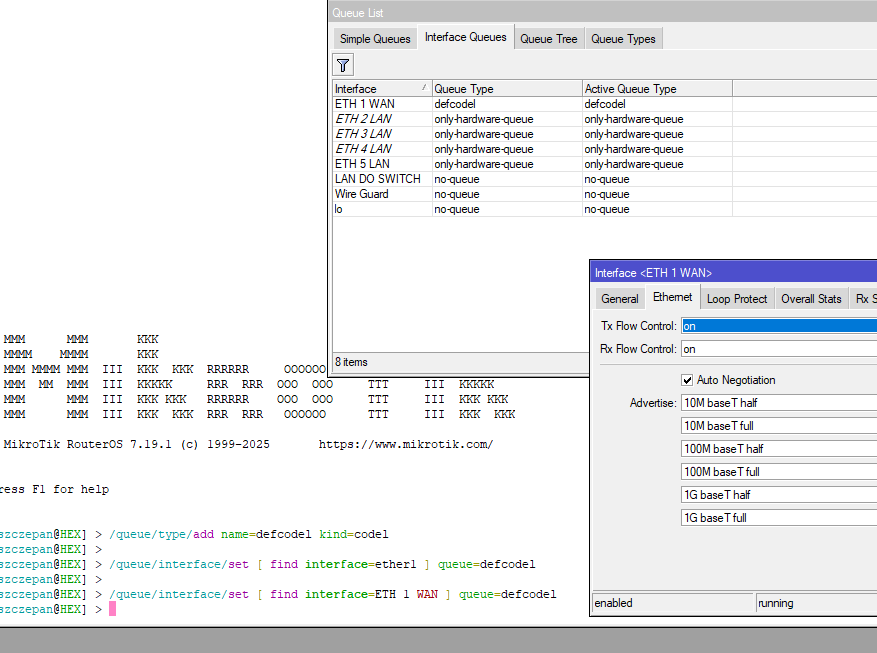
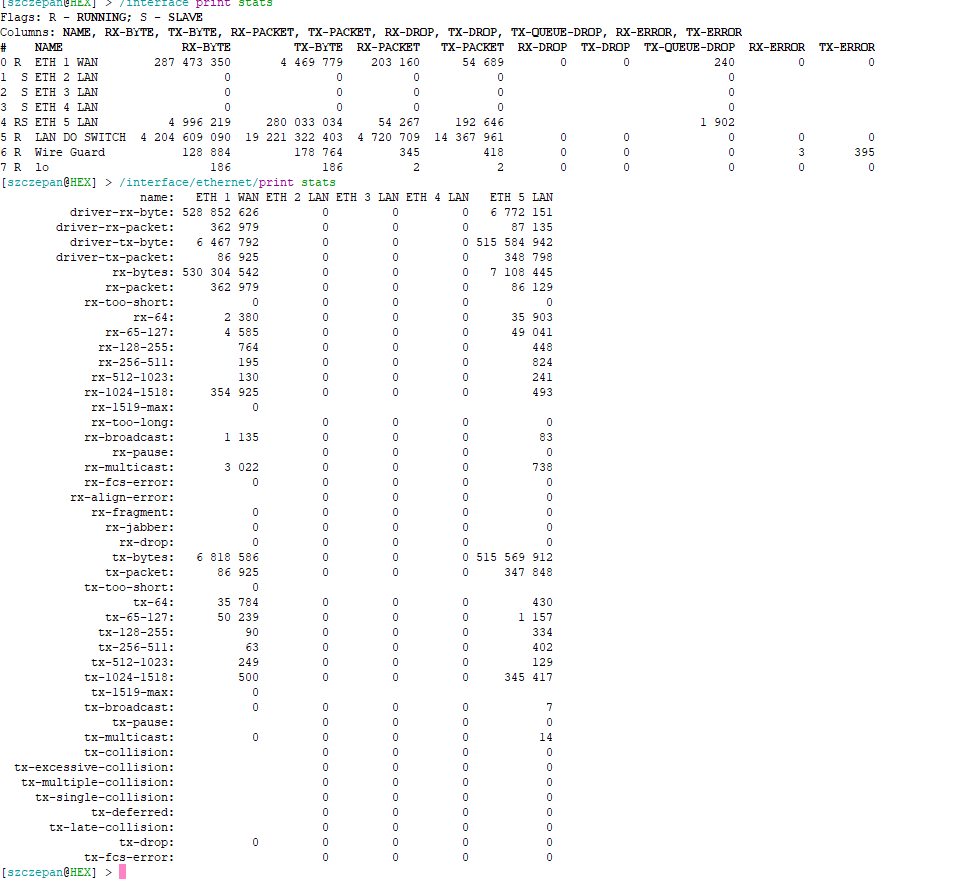
The scripts, including the one for printing the stats won’t work for you, because you renamed the ports. (Apparently, ether1 to “ETH 1 WAN”.) You can either set the things in Winbox / Webfig, replace the interface name with yours in quotes or simply rename the interface back to ether1.

Make sure you do all of these:

/queue/type/add name=defcodel kind=codel
/queue/interface/set [ find interface=ether1 ] queue=defcodel
/interface/ethernet/set [ find name=ether1 ] tx-flow-control=on rx-flow-control=on

Please post the result of the stats in code tags (the syntax can be generated with the button labeled </>)

Also, could you please post an export. (With anything sensitive redacted, of course.)

Also, apply a defcodel interface queue to ETH5 as well. TX drops seem huge.

Also, please do a “reset counters” on both eth1 and eth5 before redoing the test.

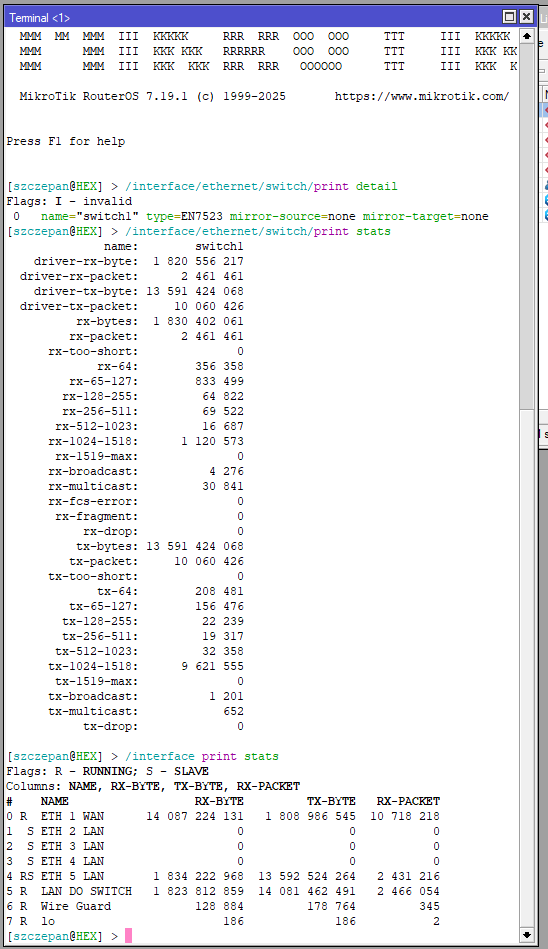
And it would be really nice to see a result for
/interface/ethernet/switch/print detail

also:
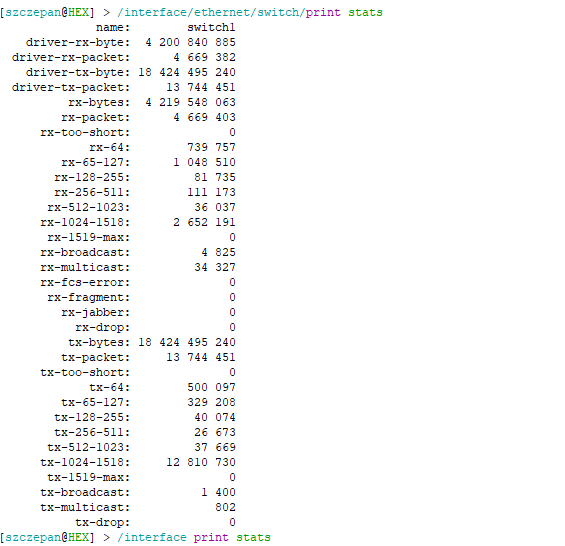
/interface/ethernet/switch/print stats

these can be reset with:
/interface/ethernet/switch/reset-counters

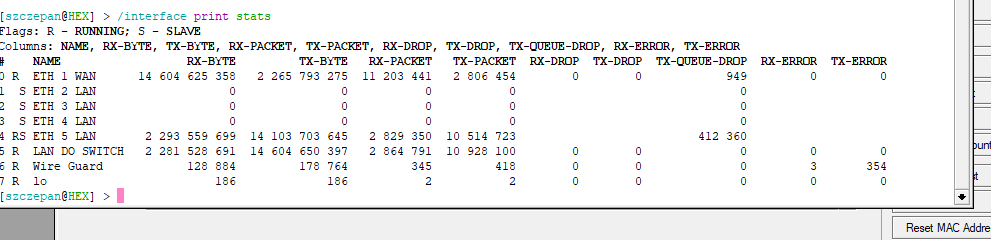
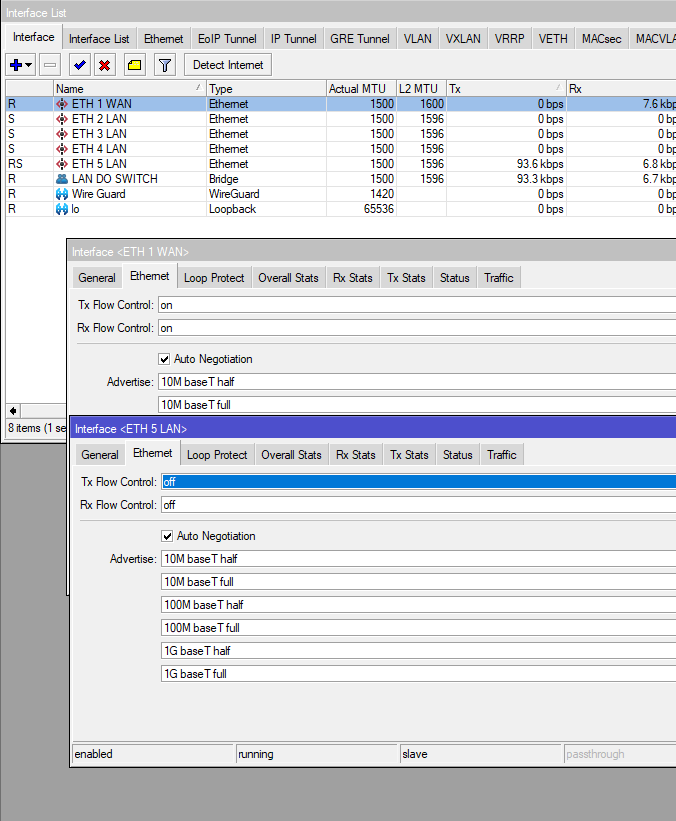
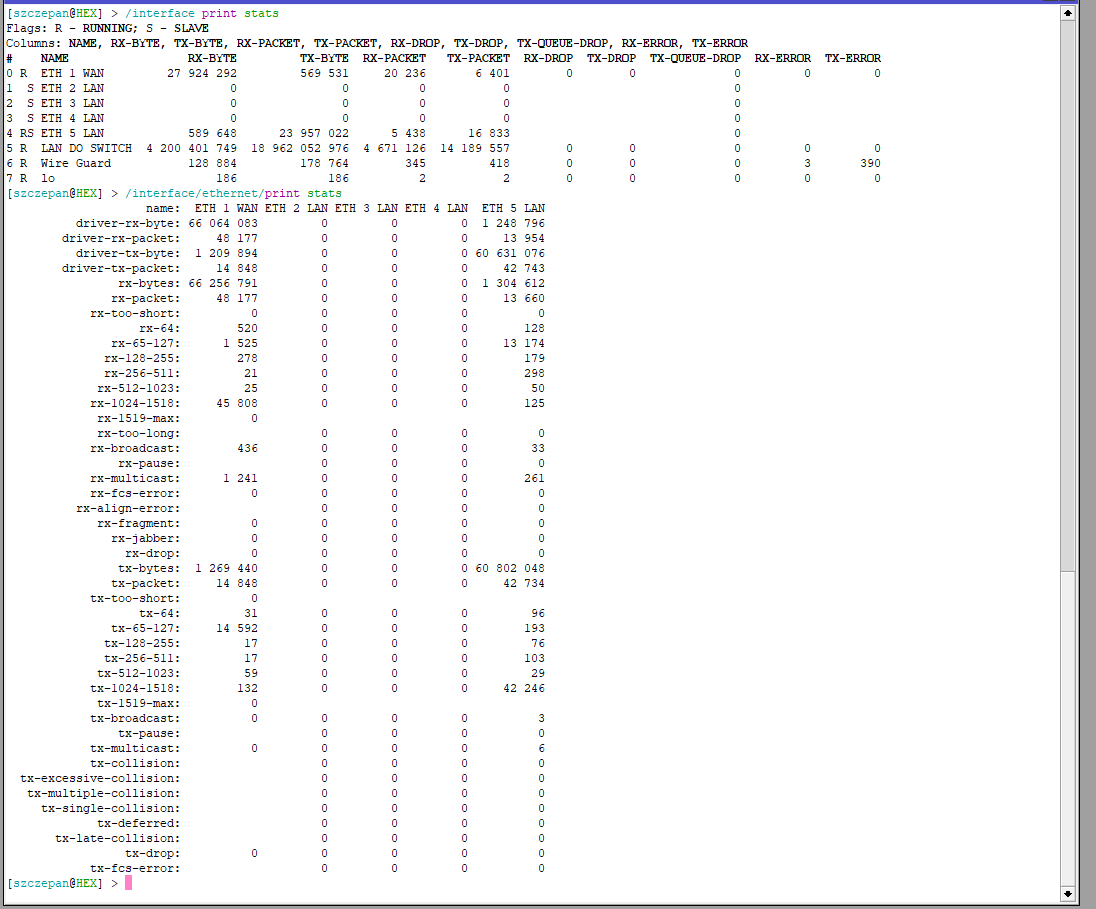
Export in file + print screen after reset counter on ETH 1 and ETH 5
To ETH 5 is connected CRS226 in full bridge mode/ swich mode without any Vlant etc for testing


1 printscreen is after one run speedtest
Zrzut ekranu 2025-05-29 211155.png
Zrzut ekranu 2025-05-29 210057.png
Zrzut ekranu 2025-05-29 205659.png
Zrzut ekranu 2025-05-29 204314.png
konfiguracja.rsc (6.55 KB)

Obviously,

  1. “reset counters”, “reset traffic counters”
  2. run bw test
  3. print stats, also please include both /interface/print stats, and /interface/ethernet/print stats

You also don’t have any queues. You will probably not need one for eth1, but you will probably need one for eth5.

You can easily copy-paste terminal output into code tags, it will not get messed up.

Printscreen after reset counter and reset trafic counter in ETH1 and ETH5
1- after reset counter and trafic with 1 speed test
2 - after reset counter and trafic without speed test
Zrzut ekranu 2025-05-29 212138.png
Zrzut ekranu 2025-05-29 211938.png
Zrzut ekranu 2025-05-29 211948.png

Well, it seems eth1 either doesn’t support pause frames or doesn’t report them. Leave flow control on anyway.

Next:

  1. Do a speedtest. Record results.
  2. Add codel queue type (default settings: 1000 packets, 5 ms delay, 100 ms interval) and assign this to every ethernet interface as interface queue
  3. Repeat speedtest.

Ok but tommorow - must go to job.

Hello @Normis

Sorry to say this has being talked about very long time ago, not just this week.
Skeptical messages about how the new one will handle the speed as well as the older one RG750Gr3, such as this threads:

http://forum.mikrotik.com/t/hex-refresh-e50ug-router-for-gigabit-internet/180511/8
http://forum.mikrotik.com/t/internet-speed/182962/7
http://forum.mikrotik.com/t/hex-refresh-download-speed/182770/19

Yes patrikg, but talking here does not necessarily precipitate action by MT, its not the process used to do so.

I’m kind of optimistic. If you look at the testing, it reveals around 1.5% round-trip packet loss as tx queue drops. It is roughly documented that such a loss can lead to a decrease from about 800-900 Mbps to 200-250 Mbps in typical internet rtt situations on an 1 Gbps link. This seems to provide a reasonable explanation.

@lurker888

More tests have been ran, results are unfortunate - really no change at all in behavior. Same setup as before:

300/300 Mbps symmetric internet service, provided by Verizon FiOS, FTTH.
Testing client is 2020 MacBook Air M1 laptop.
E50UG was upgraded to 7.19.1 (package/routerboard) and reset to complete factory defaults.

Control Test - MacBook Air M1, hooked directly into provider ONT via dongle/ethernet cable.

Speedtest by Ookla

      Server: Cox - Nova
         ISP: Verizon Fios
Idle Latency:     8.77 ms   (jitter: 0.19ms, low: 8.61ms, high: 8.84ms)
    Download:   305.57 Mbps (data used: 316.9 MB)
                109.22 ms   (jitter: 28.78ms, low: 8.66ms, high: 162.99ms)
      Upload:   341.07 Mbps (data used: 402.8 MB)
                 22.54 ms   (jitter: 0.80ms, low: 9.04ms, high: 52.23ms)
 Packet Loss:     0.0%

So, normal behavior (full CIR bandwidth) with the MacBook hooked up by itself, as expected.

Test #1 - MacBook Air M1, plugged into E50UG port 2, E50UG port 1 is plugged directly into provider ONT.
NOTE: Router left at factory defaults.

   Speedtest by Ookla

      Server: Cox - Nova
         ISP: Verizon Fios
Idle Latency:    13.60 ms   (jitter: 0.49ms, low: 13.08ms, high: 14.10ms)
    Download:   310.19 Mbps (data used: 317.7 MB)
                123.55 ms   (jitter: 44.93ms, low: 8.83ms, high: 653.65ms)
      Upload:     9.74 Mbps (data used: 15.7 MB)
                 11.73 ms   (jitter: 23.11ms, low: 9.54ms, high: 625.87ms)
 Packet Loss:     1.3%

Same results as before - upload speed between ~10-12 Mbps.

Test #2 - MacBook Air M1, plugged into E50UG port 2, E50UG port 1 is plugged directly into provider ONT.
NOTE: fq-codel queue created w/ defaults, and assigned to ether1 interface.

   Speedtest by Ookla

      Server: Cox - Nova
         ISP: Verizon Fios
Idle Latency:     9.13 ms   (jitter: 0.05ms, low: 9.07ms, high: 9.18ms)
    Download:   306.81 Mbps (data used: 321.5 MB)
                122.21 ms   (jitter: 45.28ms, low: 13.10ms, high: 546.59ms)
      Upload:     8.05 Mbps (data used: 4.2 MB)
                 10.67 ms   (jitter: 5.91ms, low: 8.72ms, high: 360.89ms)
 Packet Loss:     5.0%

Latency a little lower, maybe - but packet loss higher

Test #3 - MacBook Air M1, plugged into E50UG port 2, E50UG port 1 is plugged directly into provider ONT.
NOTE: fq-codel queue created w/ defaults, and assigned to ether1 interface.
NOTE: tx and rx flow control forced to ON for ether1
NOTE: Test ran five or six times per your request; below is the final run

   Speedtest by Ookla

      Server: Verizon
         ISP: Verizon Fios
Idle Latency:     9.14 ms   (jitter: 0.11ms, low: 8.92ms, high: 9.19ms)
    Download:   309.25 Mbps (data used: 292.7 MB)
                107.61 ms   (jitter: 29.51ms, low: 8.74ms, high: 160.26ms)
      Upload:    10.28 Mbps (data used: 17.3 MB)
                  6.07 ms   (jitter: 15.43ms, low: 3.70ms, high: 353.99ms)
 Packet Loss:     0.0%

No change at all, really.

Very depressing. I was hoping for at least some improvement :frowning:

EDIT: My results are basically identical to the person that started the reddit thread I linked originally here. He tried everything he could, eventually gave up and bought Ubiquiti device. Also notable some people claim sticking a dumb switch in front of E50UG magically makes problems go away. I do not have spare dumb switch unfortunately.

Just going to leave this here:

reddit.jpg

@codelogic: Thanks for the test. With the results from @Szczepan showing no RX and TX PAUSE counters for the interface, one can suspect that flow control is not actually working on that port. In your limited upload case that would mean that the ONT is issuing pauses, which the E50UG ignores. Verifying this is majorly time intensive, and may require additional gear. Anyway, this is basically a driver level fix. (Although there are specific instances where not using flow control is suggested, a WAN uplink is one of the situations where this is not true.)

Am I correct that if you negotiate the link down to 100 Mbps (full duplex) by disabling the advertisement of the 1 GbE mode, you get full (100 Mbps) speeds?

What you can attempt - but this is very much a workaround - is to add a queue tree item, with parent=ether1, type=[default codel], packet-mark=no-mark and max-limit=10M, (verify that the queue is matching,) and increase the max-limit gradually to 50M, 100M, 200M, 300M, 500M.

According to what I’ve seen here this should allow full bandwidth, but again: this is a specific workaround and would need to be tuned for whatever speed someone has from their ISP.

Perhaps best to use this device as a 4-port router with ether1 as a dedicated management port, and ether2 as Wan.
Unfortunately, the interface changes required have to be configured somewhat manually :frowning:

Though a script to do this and only this from the default configuration shouldn’t be very difficult.

I also think that basically looking at the device as a 4-port device with an additional low bandwidth port works fine. (For most of the practical applications either not all ports are strictly necessary, or there is a printer, smart TV, etc. that can be used fully with a somewhat reduced bandwidth.) I think the uproar has more to do with it being a “higher powered drop-in replacement” for the rb750gr3, rightly beloved by many.

The issue will almost certainly get further attention due to the release of the improved hex S, here a similar logic cannot be applied to the SFP (2.5G) port.

Did anyone test the speed between Port1 and Port-2-5 ROUTED in fastpath ?

What? Are you both bonkers?
The answer is absolutely not, its a five port device as advertised, folks would get either a:
a. software patch to fix the issue ( most likely and should be doable promptly if root cause found )
b. replaced gratis new 50EG with different hardware ( may have to wait a while )
c. replaced gratis with a new RB5009 ( resolution quickly )

Anav, I’ve found a lot of your forum correspondence to be grating/glaring at times.

However, this is not one of those times and I could not agree more with you!

I was so sad to see the new hex-s refresh also has this turd of a cpu inside. To be completely blunt, this port.1 problem simply piles on to the existing container stupidity.

@anav: I think you take my comment a bit out of context. I have said that the issue should be addressed. It probably will be, especially because of the “S” version, which I have a strong suspicion uses the same family of chips for the SFP port. (And the hEX series was always a big seller amongst MT devices.)

While I would like to see this resolved sooner rather than later, this doesn’t change my opinion that if I were using one right now (I’m not), I wouldn’t lose sleep over using the other ports while they sort this out.

I would find it interesting to see how the sales of the E50 vs E60 go, the price difference is so minimal for the option of using optics. If I buy any additional units, they will most certainly be the E60, if they are available. The larger input voltage range is also nice.

Until MT addresses this in a proper fashion I will not be purchasing any such “refresh” equipment, and every person I come into contact with will be advised the same - either consider L009, or consider entirely different hardware manufacturer altogether. And I don’t mean intentionally vague release note like:

*) ethernet - improved E50UG ether1 hurrdurr

I mean someone from MT needs to come into this very thread and give detailed explanation of exact nature of problem along with specific explanation of what is done to address it. MikroTik has a bunch of our money, and a bunch of us have faulty device, which can not be trusted to work as expected.

Only hope is fast respond from MIKROTIK Support and new firmware release !
Or someone have any idea ?