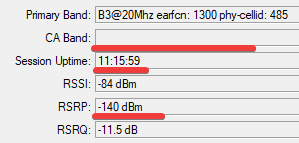
We not have internal logs… and reason of that behavior… you have a separate “lte” logs and probably here can be some clue.
About that change:
good, the eNB is still the same = the same eNB give you B3 & B20 with the most strong signal.
You could do a CellLock to that B3 by
/interface lte at-chat lte1 input=“2,3,1392,92”
to lock earfcn=1392 & pci=92 what give you no option to hop to other one cells.
r11e-LTE6 have a unconfirmed error with stuck offline when the CellLock is setup, I have that at my unit and thats why I buy ldfr+lte6 to confirm that in all Poland ISP… check is the RSRP not go frezz = -140… and ca is leave
Plus: CellLock give you a constance connection with the same cell… when I have good signal then it’s work by days as session-uptime.
Regarding cell-lock I did try this and it ended up offline as described above and I had to talk customer through removing it. So yes I have experienced the cell-lock issue resulting in system being offline.
LAC - your region should be the same, or maybe you have some roaming… or change SIM slot… ?
0e13 hex → 3 603 dec
1c4c hex → 7 244 dec
This is very strange, this should be the same LAC/TAC - your region.
Probably every Band have other LAC… bcs other cmd have ending "05c"hex=92dec phy-cell-id and next one for B20…
next params are CurrentCellID
001ee402 hex → 2 024 450 dec CurrentCellID who /256 give 7 908 eNB/Tower
001ee408 hex → 2 024 456 dec CurrentCellID who /256 give 7 908 eNB/Tower - the same Tower from the same ISP
additionally
001ee4 hex → 7 908 dec - without last two digit you have a eNB in hex
last two digits 02 and 08 are a SectorID.
@Ferrograph - so sorry, I not see your answer and I not Give additional help.
What is your current status with latest 027 firmware, problem is still exist ?
@SiB I did get Mikrotik support looking at this and made remote access available, but unfortunately they weren’t able to debug it because when the connection dropped they lost their debug connection. I was going to setup an additional connection so they could debug but then covid lockdown meant I couldn’t return. Maybe I can soon.
The site reports that things have settled somewhat with fewer drops but the problem does still exist. Additionally I saw the drops to single band when workable bands were available on another site with SXT-LTE6. Same situation cell monitor shows only one band when I know there are two suitable for 2CA.
I did install the script but the owner of the gear was already on instruction how to reset the card and so I wanted to know how often it was happening, which at the time was every few hours. Now its every few days so maybe the operator made a change that prevents the circumstances that cause the crash happening.
@SiB and all.
Hi, I recently joined the forum. But the problems with LHGG I have equally serious. This device I have connected to Hap ac3, configured by IT guy. Unfortunately, the transmission parameters (PLAY) are hopeless. Previously I had a Huawei B818, which max gave in aggregation of three bands of 150 Mbs, but encouraged to switch to reliable professional equipment MIkroTik I was convinced to take turns. When LHGG works (after logging into the network – from getting a public IP to an Internet connection can pass to no availy even an hour …) the max speed is 70 (which is not bad).
After a while – it can be a day or 30 minutes after lhgg synchronization disconnects (ca band falls out) or loses bandwidth up to 0.5 Mbs.
After the LTE reboot, the modem is sequenced:
connects to CAT2 - B20 as main B3 as CA, immediately (after 2 disconnects, only B20 is left and waits for CA
-How well it goes ca joins and the Internet appears -) takes with 10 min.
Today, after 1h after the LTE reboot, there was no connection to the network.
Sometimes reboot helps, and sometimes turning off the 3G band
Is this a problem with this model?
What to do about it?
What you describe is my experience too. There’s definitely some issues with the product - either the internal cell card or main firmware.
It’s a shame because when it works, it works very very well.
I’m still having issues even on v27 cell card firmware exactly like you describe and mikrotik support were going to debug it on my site but I need to somehow get a second connection up there which has not been easy but your comment reminds me to do this!
I am very very disappointed with such LTE 6 modem.
I can not understand why any crappy Huawey or ZTE provided almost for free by local TelCo performs far better than these MikroTIk
I can forget for a moment perfomances and look at stability: it is a nightmare
Have you gotten the v28 ? I would need it as well. It seems this problem is pretty common and its absolutely unacceptable that it not has been fixed. I am starting to get disappointed at mikrotik. I have wrote to support 7 days ago and still no answer.
I bough mikrotik rather then any ISP provided modem that i would have gotten it cheaply specifically because i believed it would perform better then them or at least in the same level. But its not as it seems, especially with performance and stability. Perhaps it will be fixed and will perform well. As i don’t see a reason in terms of hardware on how it could under perform.
Mikrotik have been doing some diagnostics remotely on one site that was getting CA but now does not get CA at all and this has been the case for months now. Ive also got a dish setup at the office to do some tests pointing at a tower with bands 1,3,20. Same - no CA. At one point we had v29 firmware in the card.
I see odd behaviour in cell-monitor. If I specify one of bands 1,3 or 20 individually with the checkboxes, in cell monitor I will only see that band, although sometimes I see nothing. When I have all bands enabled I only ever see the band currently connected.
I also spoke to cell provider at length because MT support suggested it was the tower. Provider said there are no issues with the tower.
Ive also seen passthru stops working and traffic grind to a halt. lte interface shows solid connection (RSSI -47db) but no traffic.
Ready to give up on Mikrotik LTE solutions, but I don’t see anyone else that has anything similar to the LHG.
I just decided to try a couple of test at the office setup to confirm suspicions that R11e-LTE6 is the problem so I checked which cell tower it was connecting to and it was the expected tower locally with bands 1,3 & 20. A speed test shows 5Mbps download.
I put the sim card in my phone and checked with cell mapper that my phone was connecting to the same tower (eNB 13364) and I noticed straight away that phone says 4G+, did a speed test and got 70+MBps.
This isnt a new story. Ive read here and in other forums of similar experiences. What more proof do we need that this product isnt fit for purpose? Its very frustrating that MT are blaming towers when clearly something is wrong with the card.
I confirm what you say. For me, R11-LTE6 “pulls out” 30-40 MB, and the old HUAWEI B525 connected to the same antennas 60-90 MB. It is a pity the money spent on the R11-gadget.