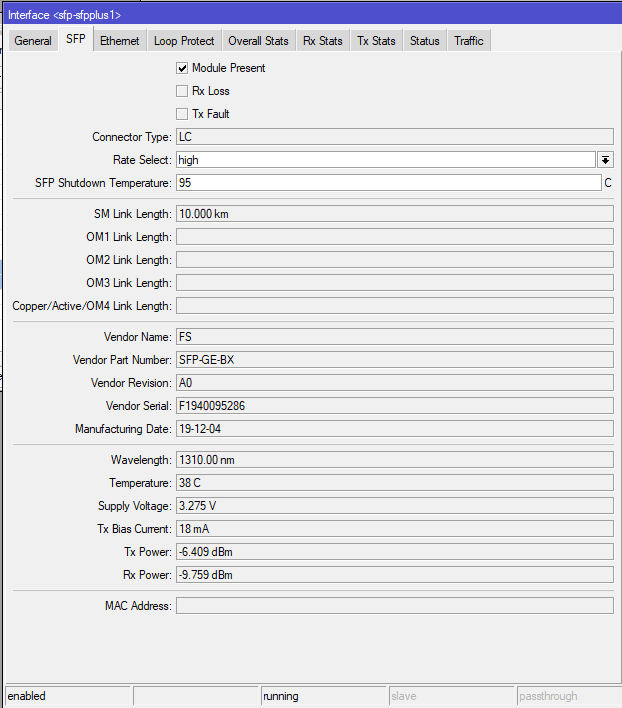
A number of users owning an RB5009 are unable to connect to delta fiber networks using their existing sfp adapter (adapter and config are running fine with a HexS) so we are wondering whether the RB5009 would only work with sfp+ adapter? Is there anyone who can shed a light on this?
My RB5009UPr (should be identical in terms of SFP+ Port) is working fine wit a regular 10Gtek SFP RJ45 Module. However, as jookraw suggested, Auto negotiation did not work, had to set it to 1Gb/s manually.
First make sure you are running / upgrade to latest RouterOS on the RB5009.
Do you mean “Delta Networks”: French ISP hardware, Freebox Delta?
It is well-known that the Fiber cable in the SFP+ on theFreebox Delta side is too hot and is underpowered.
When the SFP+ fiber module gets too hot, it disconnect to cool down.
I own a Freebox Delta and SFP+ port on the Freebox Delta side does work very well.
You should use a 10Gtek Direct Attach Cable (DAC) and not a Fiber cable.
A direct attach cable consumes less that 1W and will stay cool.
No, i am talking about the Dutch Delta Fiber network company - which owns Caiway. They also offer a 8GB fiber connection which will probably move up to 25Gbps on the long term - but for now i’m aimaing at 1Gbps
Anyway - i am using a generic FS.com adapter (this one: https://www.fs.com/de-en/products/75339.html - Generic Compatible 1000BASE-BX BiDi SFP 1310nm-TX/1550nm-RX 10km DOM Simplex LC SMF Transceiver Module - ) which works fine in a Mikrotik HexS - but simply refuses to work in the RB5009.
As for 10GB adapters - i have not found one yet with the correct wavelength yet (FS.com).
I’m tempted to open up the Delta router and retrieve the provided fsp and put this one into the RB5009 to see what happens…
Addition: there are at least three other users suffering from the same problem - and one these has successfully established a connection with another piece of his own hardware - effectively ruling out the possibility of a faulty RB5009 - the problem seems to located in the hardware compatiblity between (generic) sfp’s and the RB5009.
I’m pretty sure this will be solved in the near future, but for now the RB5009 is being used as a very expensive paperweight…
I have a working generic 1G SFP module from fs.com (SFP1G-SX-85) in the RB5009 ROS 7.7rc2
The peer is a mikrotik CRS112 with the same sfp multimode module.
But it seems to be not 100% reliable.
During my tests with unplugging/plugging sometimes I needed to disable/enable the interface of the RB5009 to get it working again.
Thanks - i will try that one. I was considering a 10G sfp+ module but that is not available as a BiDi with the required wavelenghts. I also got confirmation that my existing 1G sfp is also EEE compliant so it all seems to point back to the RB5009 not accepting the my sfp. I will compare it to yours today and also load RouterOs 7.7rc2 today to see if that makes any difference.
@prmfeddema I only wanted to point out that the RB5009 will work with a sfp adapter (1G) ; no sfp+ adapter (10G) needed.
My test scenario was 2 identical 850nm 1G multimode adapters; you probably need 1310nm singlemode.
What I do not understand:
In your screenshot it says “running”.
Rx Power says -9.759 dBm, so it seems to receive a signal from the other end.
Why do you think that the RB5009 does not accept your sfp module?
Just noticed your reponse - yes it’s quite puzzling.. the DB values show something, but there is no data coming through (it seems to be sending though)…
Up to further investigation…
Did you ever manage to solve this problem. I just got my rb5009 and i am facing almost the exact same problem. I have a SFP-GE-BX40 from fs.com and my isp is also Delta. I am seeing RX power on the sfp but there are no RX packets coming in. I have also tried the sfp module that Delta suplied me with (GENEXIS 99618002) but that one also shows the same problems.
I have the same problem on mine, and I have just gotten intel 10gb sfp+ but the idea that it is heat has made me get a platform fan to place underneath it.
But I have tried like 3 or 4 models of SFP+ and finally picking supported ones.
I don’t think it is the heat in my case. In the interface it shows the temperature of the sfp around 30 celcius while it shuts down at 95. Maybe it is worth checking this for you too.
I don’t think it is the heat in my case. In the interface it shows the temperature of the sfp around 30 celcius while it shuts down at 95
No, it’s not. The RB5009 is quite picky with SFP(+) modules. Many do not work, but do work on RB4011 (which also required many ROS upgrades to solve SFP problem back when it was new).
The most annoying thing is everything looks fine for not working SFPs: It is present and shows RX power, but here is no RX data moved.
MT should work with Marvell to finally get the 88E6393 SerDes config right. Or ask the guys who ported Openwrt to RB5009. Because they managed to get all of my SFPs working in the exact same RB5009 box.
Hi Luca - no the problem still persists - no solution yet (very very frustrating). In the meantime i am using the RB5009 as a paperweight and fiddling with my HexS and the hap AX3 - only to find out that the Capsman menu entry has disappeared on my HexS running ROS 7.7 …
This was indeed the case. I bought a cheap Media converter ( The TP-Link MC220L for anyone interested) and after plugging everything in everything worked as i expected. Thank you for everyone who shared their thoughts and ideas. Now lets hope the update that fixes this issue comes soon.