Hello everyone
I want to make a router to router iKEV2 tunnel but one of the router got dynamic IP. I was wondering how I can manage to do this in this case, maybe using DDNS provided by MicroTik on routers?
I heard with some script it will be doable but I’m a bigginner so maybe you guys can help with this or got other solutions which I will appreciate if you tell me.
yes, I think you could activate DDNS
https://wiki.mikrotik.com/wiki/Manual:IP/Cloud
/ip cloud set ddns-enabled=yes
and then use the dns-name instead of static IP
Thanks man, The server got static IP but not the client is this a same situation as your first given link?
Thank you, but how to set it up for IKEV2?
If you’ve got a static public IP at at least one peer, just make that one a responder only (passive=yes) and that’s it. You only need to use dynamic DNS if none of the peers has a static public IP. And if none of them has a public IP, not even a dynamic one, it’s yet another challenge which may or may not be resolved using dynamic DNS, depending on the behaviour of the NAT devices between each peer and the internet.
Yeah one of them got static ip (server one) but IDK how to set them up for IKEV2, So I would highly appreciate a guide or link to a guide for that.
Set them exactly as you would if both had a static public IP, using the site to site example from the manual, but set passive=yes address=0.0.0.0/0 in the peer properties at the one with static IP. And set exchange-mode to ike2 rather than main at both. That’s all.
Thanks man, I will try this one as well. Is using passive=yes address=0.0.0.0/0 in the peer properties is safe?
I tried this one at the link below but somehow didn’t worked for me. (got Active on client but no phase 2)
The safer authentification method you use, the less you have to care about the address of the remote peer. With properly generated certificates (CSR generated at the device that will use the certificate to authentify itself to others, signing the CSR by a CA, and importing the signed certificate to the device, so that the private key to the certificate never leaves the device), it’s cheaper to bribe a coworker than to break the IPsec security. With a pre-shared secret, if you use a long, randomly generated one, and do not deliver it to the remote device via an open channel, you are still quite safe. Linking the peer to a particular IP or subnet is actually the least safe way, as the IP of the peer can be easily spoofed by a “man in the middle” - anyone controling a router anywhere on the network path between your two peers.
Can you link me a guide or manual in beginners level cause I couldn’t understand the manual which mikrotik provided.
Thanks in advance
This one was quite useful for me back in 2016 when I knew almost nothing about RouterOS. Just bear in mind that certificate-based authentication is an add-on to this or, better to say, just a small change to the IPsec configuration but an additional area to study when it comes to creating the certificates.
Also, the Mikrotik manuals mostly assume you know the protocol standard, and only tell you how to configure it on RouterOS in particular, so if you don’t know the basics, many settings may be pythic to you. A bright example is the “send-initial-contact” parameter of the peer, which causes something totally different than common sense would suggest.
@sindy @erkexzcx
Thanks man, But it didn’t worked with this on you send the link and I tried This one but didn’t worked as well. So I thought maybe I’m setting something wrong, This is the configurations for both routers and xy.xy.xy.xy is the static IP of the server.
Client configuration (without static IP).txt (10.1 KB)
Server configuration (with static IP of (xy.xy.xy.xy)).txt (3.69 KB)
You have combined multiple configuration methods that don’t play well with each other. Namely:
- at the initiator (“client”) side, you use mode-config and generate-policy different from no on the /ip ipsec identity row but at the same time you have a static policy linked to the peer, and there is no policy template in the group “My group” to which the identity refers.
- at the responder (“server”) side, the situation is the same, except that there, the static policy referring to a responder peer should be marked as invalid because no particular address is configured for the peer it is linked to so the policy has to be generated in order to inherit the sa-dst-address from the actual address of the remote peer.
So I’d say set template=yes for the policy at both devices (which will make the peer and tunnel properties irrelevant) and you should be good - both peers will generate the policy from this template.
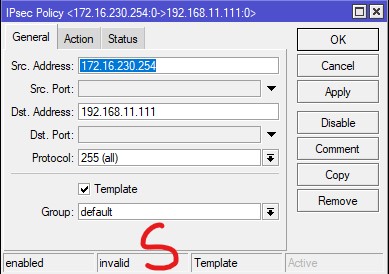
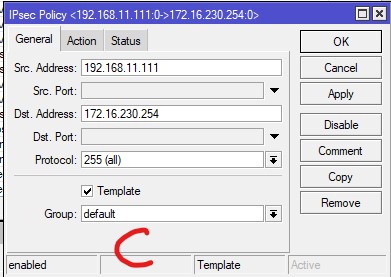
The group value default is wrong at both, unless you’ve changed also the policy template group on the identity row to default. According to the configurations you’ve posted, it should be My group.
In fact, the group parameter is useless for a non-template policy, so as you’ve converted a static policy into a template, Winbox may have ignored the value set previously and assigned the default to the drop-down.
NAT as such doesn’t constitute a problem if there is sufficient port-forwarding (UDP port 4500) at all the routers between the internet and the responder (server).
On both side now I set it to my group but no change.
How can I check if (UDP port 4500) is open I both side? cause on my client I cannot connect with L2TP to server
On the server, run /tool sniffer quick port=4500 while trying to connect from the client. If you can see something to come, the port forwading outside the Mikrotik works fine.
But with L2TP, you need both UDP port 500 and UDP port 4500 to be forwarded, as the IPsec connection is always initiated at 500 and only migrates to 4500 once presence of NAT is discovered. With IKEv2, it is mandatory that the responder accepts initial requests also at port 4500, so Mikrotik as an initiator does exactly that, whereas e.g. Windows start at 500 also for IKEv2.
Since I’ve noticed a configured L2TP with IPsec at the server side, I didn’t dive deep into your firewall rules, assuming that whoever wants to set up any kind of VPN should understand how firewalls work first, but now as I look at your rules, there indeed is no rule in chain input of filter that would permit incoming connections to UDP ports 500 and 4500. So add, just before the last action=drop rule in chain input, the following two rules:chain=input in-interface-list=WAN protocol=udp dst-port=500,4500 action=accept
chain=input in-interface-list=WAN protocol=udp dst-port=1701 ipsec-policy=in,ipsec action=accept
Your firewall rules at the initiator side are really leaky, but I assume there is a firewall on the outer router (the one between that Mikrotik and the internet), am I right?
Thanks man, but it didn’t show anything.

After and before adding the firewall rules the results are the same.
After I added those firewall rules on both side (on the server side there was no WAN in the in-interface-list so I set it to all) there was no change for IPsec IKEV2 or even L2TP.
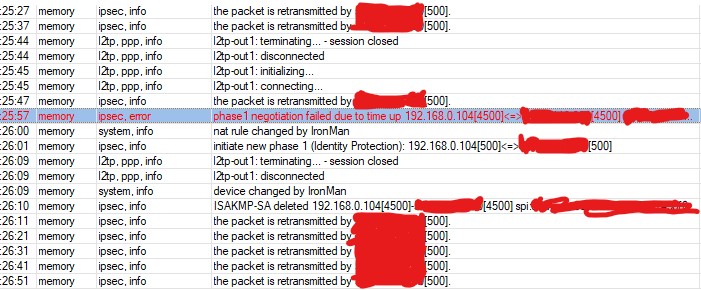
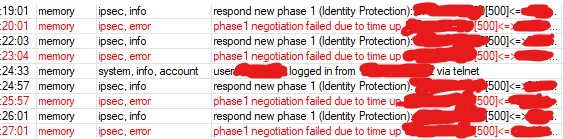
I tried to connect with client to server again with L2TP but got these logs:
on client:

on server:
Well I don’t know and the guy setup the client (home) and the server (he is the owner(I got the server for 1 month to see if it’s any good for sha512 IPsec IKEV2 (he supposed to setup that but since I didn’t had the static IP on the client side he refused and said find a way and do it yourself. so here I am  ))) and another router in other place, so if there is anything wrong with the firewall and the settings and configurations or there are leaks to fix I would highly appreciate it if you tell me how to fix them.
About the server side I don’t know about the client (home) there is just a TD LTE modem with default settings from ISP (the modem is locked) about my another router which is connected to a ADSL modem (bridge) also with default settings on the modem.
OK, the title says IKEv2 but we’ve silently moved to L2TP. Never mind, just run /tool sniffer quick port=500 on the server, and try connecting from the client. If it shows nothing, the problem is not in the server-side Mikrotik but most likely on the router(s?) standing between that Mikrotik and the internet, where the port forwarding is not configured at all or is configured incorrectly. Another possibility is that you’re connecting to a wrong address.
Since the client side is LTE, chances are close to zero you could use pinhole punching to create the “port forwarding” rules dynamically.
So until you manage to set the port forwarding properly, it won’t work.