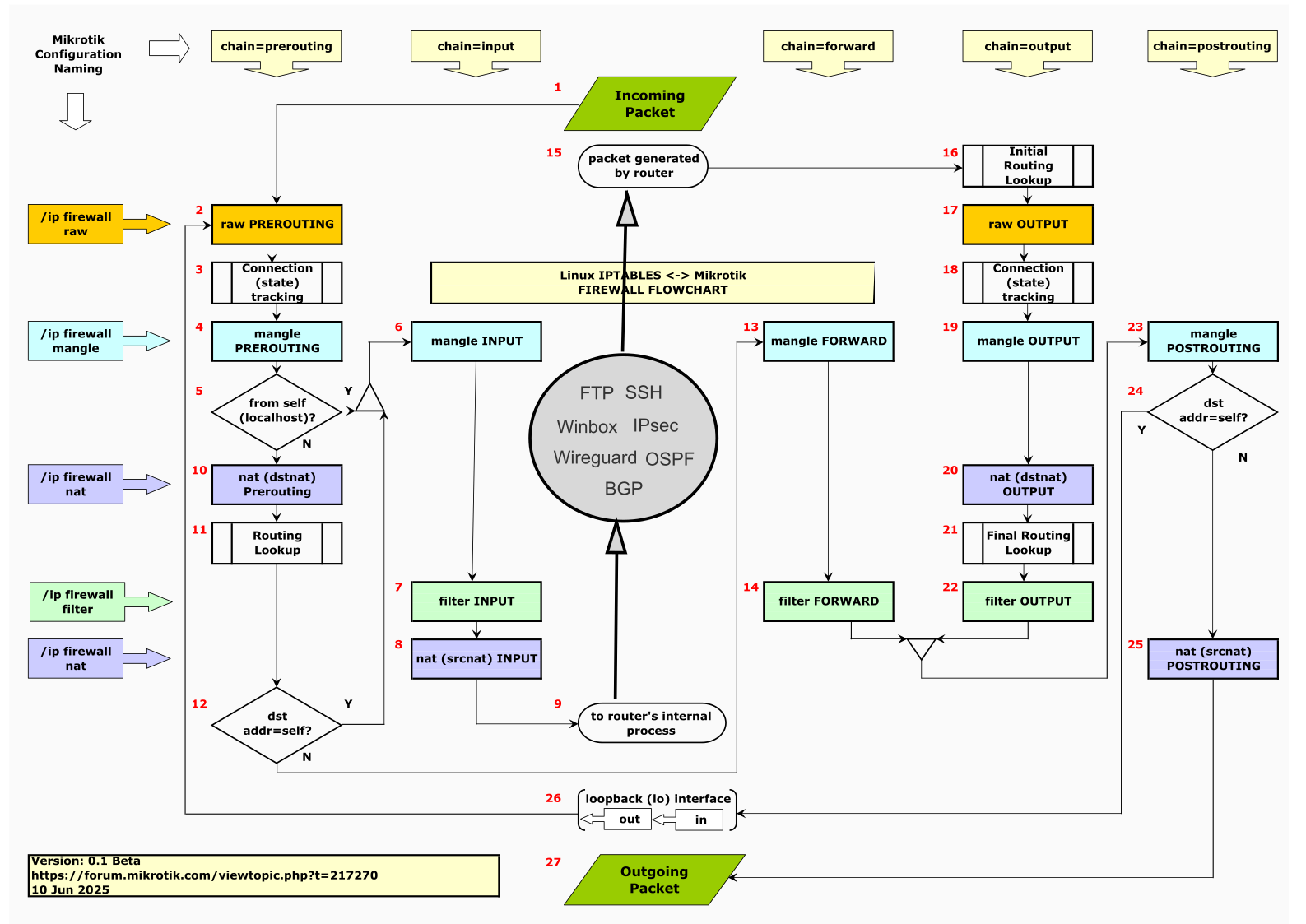
One way to make the traffic to and from the router more visual might be to add a symbol right in the middle of the diagram that represents the router itself and its different services.
Jinx @jaclaz.  Yours was way more professional!
P.S.
Just noticed the picture in your first post - cracked me up! 
I actually like this. It’s definitely a step away from the sterile view of presenting only the kernel subsystem. But it could very well be way easier to understand.
Maybe even go further, and have the “router’s internal processes” as one entity, with packets entering and leaving it. The symbol should be something “cloudy” to suggest that various things can go on inside. I would still label the input/output arrows with the current “to router’s internal process” and “generated by router”, just so the diagram can be easily linked to the more conventional depictions.
Thoughts?
Are you talking about something like the gray circle (with services) in my suggestion, or are you referring to a completely different approach?
Added some semi-random graphics in the middle.
It seems to me like better representing the idea that there is some mechanism inside the router that will take some decision.
Yes. 
I was referring to something very much like yours, with the gray circle. My suggestion was to basically just have the gray circle, and give the things that are now rounded rectangley less focus. Simply because it’s pointless to write “to local process”, when we have a box labeled “local processes” and an arrow pointing to it…
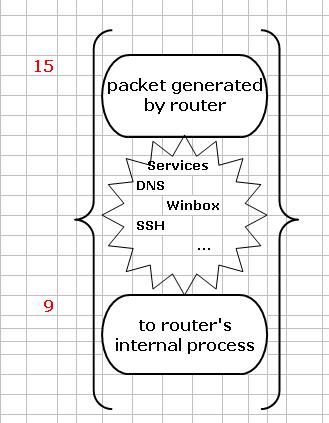
Upon seeing it, I like jaclaz’s the best: the packet entrance/exit points are preserved (and on second thought that was not nice about my previous approach, it looked like just another processing step, which it is not). But with things grouped in the braces, all this is clear.
I would only suggest that instead of the assorted kitchen utensils, actual text could be included, like “services”, and while I’m a bit “put off” by it, I think actually including some well-known examples, such as “DNS, Winbox, SSH” there would certainly help in making the idea immediately recognizable. (Maybe with small letter?) Maybe these labels don’t deserve their own box? Maybe they should be in some sort of “cloud” symbol to show that they are sort of indefinite (or a loose assortment), at least from the POV of the diagram.
Just an important note: IPSec should never be put in there. IPSec, especially policy-based (the only one Mikrotik does) is not done there. If we want to be pedantic, the IKE service does run there, but actual encryption/decryption does not.
Only little problem being that we don’t have “a box labeled “local processes” and an arrow pointing to it.”  , nor we have written anywhere (on the flowchart) “to local process”
  .
.
We do have a box labeled “to router’s internal process” with an arrow pointing to it, though  .
.
Make an exact list of those services.
I have about six lines available in Excel that should be enough for about 6 or so (maybe a few more if three or four letters) of them in 10 points characters (they will become roughly 8 points in the final svg/png A3 version), small but still readable:
1.
2.
3.
4.
5.
6.
7.
8.
9.
Then I will find a suitable symbol to enclose them.
Loosely something like:
Now you’re just being cruel… 
I think as a symbol something like this is fine.
It wasn’t my intention to list all the services, because obviously we could start at OpenVPN and end at file sharing like SMB, NFS, etc. My thought was just to give a few (maybe 2-3-4?) well-known examples. Those were the first that came to my mind, but if someone has a more universally recognized selection, I’m all for it.
Thanks again for tolerating all the “little ideas”.
One of the example processes should be something that actively initiate connections (such as fetch, traceroute, or netwatch, that start with #15), not only those that normally first listen for incoming connections.
Why exactly do you think that the example has three dots last? I could even change those to “etc.”
Your mission, should you accept it, is to list a number (no less than 6, no more than 12) of the most commonly used things, those that can be considered exemplary for the concept to be easily graspable, in an order similar as much as possible as their usage in the real world.
To make an example[*] with the the three services mechanisms (as fetch, netwatch or traceroute are not services AFAICT) mentioned by CGGXANNX:
- traceroute - used before or later by 100% of users ← RELEVANT
- netwatch - used very often later by 45% of users ← MARGINAL
- fetch - used only later by 17.8% of users ← fetch WHAT?
[*] I simply love to cite freshly invented statistic data
1 Like
This post does self-destruct within 5 seconds, doesn’t it ? 
Naah, it uses Mikrotik v 6 date/time format, but runs on v 7 so it will self-destruct at a random instant between last week and next year.
Okay:
- DNS (a usual well-known service)
- Winbox (an example of an admin interface)
- SSH (don’t know really, I just think it’s so ubiquitous that it’s somehow worth mentioning)
- traceroute (a diagnostic function)
- OpenVPN (a well known user-space VPN)
- detect internet
I have no idea for no. 6, actually, but by listing everyone’s favorite feature, it can at least be ensured that you get plenty of suggestions
I would personally refrain from mentioning scripting functionality, and netwatch, not because it’s not a perfect example, but the naming is absolutely Mikrotik-specific.
I think CGGXANNX at least deserves to be given no. 6, and also to replace SSH if he thinks there’s a better example.
- DNS
- DHCP
- NTP
- Winbox
- WebFig
- Rest API
- SSH
- IPSec
- L2TP/PPTP/SSTP
- Wireguard
- ZeroTier
- OpenVPN
- SNMP
- BGP/OSPF/RIP/MPLS
- FTP
- CAPsMAN
- RoMON
@Larsa: I get your point, just please don’t go overboard:
- IPSec is not handled this way, only the IKE daemon runs as an actual process, the policies are matched elsewhere
- MPLS is not handled according to this diagram at all (other than in the sense that the routing protocols that signal it do)
- RoMON also fundamentally works in a way not described in this diagram
Well, maybe they’re at different levels in the stack, but they still have to be handled by the internal services to work, so they definitely belong in the box. But those were just examples, so just throw in whatever you think fits best. Personally, I’d go with a few that are pretty well known and recognized even by people who are new to ROS.
LOL, @Larsa’s list is list the “hard mode” of the MikroTik forum’s password challenge (where they ask you identify routers in a list as captcha)… Except, @Larsa list is “which of the following do NOT involve the Layer3 IPv4 firewall”…
The value, I think, of @jaclaz’s work is X and Y axis, configuration section vs chain. Something like IPSec is just complex, and already covered by MikroTik existing ones & full fidelity would likely make jaclaz work just as confusing.
Now WireGuard… is not covered in either case— but I’m not sure anyone could definitely describe its flow . That seems like it should have its own diagram one day — since it’s even more confusing from packet flow than IPSec.
(From photo, I guess I was typing: “We have another hole to dig after this one is done”)
You must be joking , that is Rule #5 of the Mikrotik Club:
http://forum.mikrotik.com/t/the-twelve-rules-of-mikrotik-club/182164/1
no way it will be mentioned on the flowchart as people might believe that it actually does something (useful).
Not detect internet, please…
@Larsa: MPLS and RoMON do not interact with the ip firewall and are not shown; IPSec of course does, but it is explicitly excluded due to the complexity/confusion that it adds.
@Amm0: Actually Wireguard is fully covered. The only strange thing about wg regarding the firewall diagram is that it runs in kernel space, but it has a fully functional and equivalent user space implementation (written in Go no less). The peculiarities around its routing are not because it’s different as a service but because of certain design decisions that were made during its development. (It may be hard to believe, but sometimes they are actually to your advantage.)
@jaclaz & @holvoetn: Read the sentence immediately following the quote. I was trolling - apparently successfully