MPLS uses Protocol 138 along with LDP/OSPF/BGP ie whatever routing protocol you’re using and needs to be managed with the firewall. Yeah, RoMON is Layer 2 but still counts as a ROS service.
Personally, I’d stick to more familiar services like DNS, FTP, etc..
You’re right actually. I’ve just been skared by the multiwan routing of the tunnel - the firewall is actually not hard.
IMO, the only reason to include “IPSec” is that the default firewall has “matchers” on ipsec-policy=. But again to your point, IPSec actually no different – at least from firewall POV – than say “hotspot” or PCC — all have some set of special/“weird” matchers. “…/filter add ” would indicate cover of those be a lot of <> boxes…
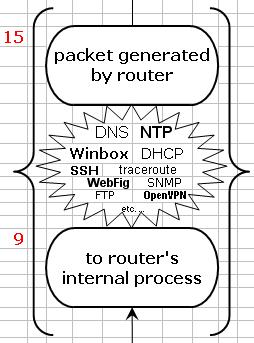
Now I like the 15/9 “local process” cloud in latest proposal! While MikroTik flow show it… it not initially clear what that is from their diagrams - so some examples do help I think (careless which ones are shown).
@Larsa:
I don’t know, maybe we are somehow talking past each other. MPLS uses ethertype 0x8847 (and 0x8848) - IP uses 0x0800, these packets aren’t handled by the IP firewall - their contents may be before encapsulation or after decapsulation, but then they’re just IP packets.
There is such a thing as MPLS-over-IP, and this does use IP protocol 137 (not 138). It’s not especially common (but does happen). MPLS is also transported over PPP, which Mikrotik I think supports (never tried it myself.)
Anyway, MPLS is not a service. The routing protocols of course all are.
@Amm0: IPSec packets do go through the firewall (and have the appropriate flags), but they do that in a roundabout way that is not shown in this diagram. They are actually diverted after “filter input” (for incoming) or “nat postrouting” (for outgoing) and after en/decryption they are reinjected to a prior stage of the packet flow. (Here I specified the last stage after which IPSec policies are filtered that is shown, there are some other things happening in between, which are not in this diagram.)
@jaclaz: I’m sorry to notice this only at this late stage, but logically reading your diagram (I mean the horizontal and vertical arrows at the left and top) it’s not easy to deduce that no. 10 would be used in Mikrotik as “nat add chain=dstnat” (not chain=postrounting), and similarly with no. 25. Is this intentional?
EDIT: That graphic with the floating services actually makes a lot of sense.
@Amm0: Once the diagram is finished, it’s time to start adding different use cases. I’m thinking maybe 8–10 examples should be enough to cover most of the common scenarios. And maybe then we’ll finally have some flowcharts that everyone can actually follow for things like WG, IPsec, and all the new cloud services. Honestly, I’ll probably get a lot of use out of the diagram myself when troubleshooting or just needing a quick visual reference.
Feels like this could turn into something really useful now that we can use numbers as clear references in the packet flow.
I don’t understand, but the idea of building something is to change it when it doesn’t do what it should do.
Do I need to add a chain? Or two? at the top?
Or only change the purple fat arrows on the left?
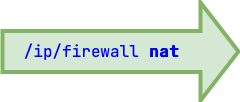
Or both? actually one of the things that I don’t like of the current diagram is the duplication of the purple /firewall nat, if there is a way to avoid that I would be happy, even if it implies adding chains, sections or whatever and complicating the path of links..
It is not difficult with the current base to provide unambiguous instructions in the form:
box#-X-Y-text
Example:
6-chain=input-/ip firewall mangle-mangle INPUT
Yup, some “overlays” with connection arrows (in “Dude terms”, “links”) might be one future approach
Yup, I kinda think so. I do find the MT’s packet flow useful — but it does not provide the initial overview of how it relates to actual configuration, nor provide an “overview”.
Minor, again, the “fat arrow” things are not process. Maybe use rounded corners label boxes with the arrows, or just put the text in arrow without any box. Just so they are even more visually distinctive from the “inner” boxes.
Very minor, but you could MikroTik’s official fonts. Like the /ip/firewall/… outer labels could use “JetBrains Mono” since they are commands… They also have “suggested colors” but since they cover a lot of the RGB space, you may already be good there.
The problem stems from the fact that Mikrotik renamed “nat PREROUTING” to “/ip firewall nat add chain=dstnat” and “nat POSTROUTING” to “/ip firewall nat add chain=srcnat”. This is not terrible naming, btw. And yes, they renamed just these two, in the other tables (mangle, raw) the chains were left as pre/postrouting.
The issue is that if - after licking off the Cheetos dust* from my fingers - I finger-trace “nat PREROUTING” from the left and top, I come up with “/ip firewall nat” from the left, which is perfect. But tracing from the top, I finish it with “chain=postrouting”, which should be “chain=dstnat”.
And I get this by following labels that are proclaimed to be “Mikrotik configuration naming”, which is not very becoming.
What to do about this? I currently have no idea. Maybe after a few hours… I’ll be sure to post it, if I’ve got something.
If we can’t come up with something better, as a last resort this exception could just be added to the boxes themselves, e.g. instead of “nat (dstnat) PREROUTING”, “nat POSTROUTING; chain=dstnat”. I agree that this is ugly and inconsistent, we really should come up with something nicer.
I actually understand why this renaming was done, but it’s really irritating for this project. I mean your diagram is the illustration for why it was originally named that way.
@jaclaz, just a minor detail: shouldn’t the text in the purple “nat” boxes to the left be something like “/ip firewall srcnat” and “/ip firewall dstnat” instead of just “/ip firewall nat”?
I think to be safe we should maybe leave “DHCP” out of this because DHCPv4 uses special sockets and for a large part isn’t affected by the firewall. IIRC you won’t see the DHCP packets on the output chain at all (try logging with raw output and mangle output for example). And even with explicit drop rules on the filter input chain of the router, clients are still able to obtain DHCP leases.
DHCPv6 does behave normally with regard to the firewall and can be blocked with the normal filter rules though.
Thanks, but my traceroute suggestion is already included
I would consider both ping and traceroute to be fine.
A possible issue is that especially ping can refer to the user space diagnostic tool, in which case it’s clearly fine. Or it can refer to the answering of possible incoming ping requests - which is done in the kernel. I don’t really think the “done in the kernel” bit should be a huge differentiator, we accept it everywhere else: for example, Wireguard as used on Mikrotiks is obviously the in-kernel implementation, but you couldn’t really tell if it was the user space wireguard-go under the hood (apart from the CPU load) - and the difficulties around its routing behavior are exactly the same regardless of whether the in-kernel or user space version is used.
ICMP connections are fully handled by the firewall (netfilter) in that the usual filter/mangle/nat apply to them in exactly the same way, they are even tracked and have their usual conntrack entries. Discussions on connection tracking don’t often deal with how exactly ICMP is tracked, but there’s a while lot of code inside netfilter to do so, so as an example of non-TCP/UDP traffic that’s firewalled the same as everything else it’s totally appropriate.
If you’d prefer other more characteristic examples, that’s another matter. In that case go right ahead
This obviously applies to all IP protocol types, so in this context ICMP isn’t really a special case. If you’re going to keep any ICMP tools, I’d say ping is short and to the point. WireGuard and IPsec are also protocols that get a lot of questions. Same goes for Winbox, NTP, DNS and probably a few others too.
I’m probably explaining this is a too convoluted manner, but IPSec (at least the policy based variant) is handled in a very special manner, different from basically everything else firewall-related.
Let’s look at an encrypted packet arriving, and let’s look at what happens with IPSec, and compare the same for Wireguard:
For IPSec: (Let’s assume tunnel mode, and no NAT traversal.)
the encrypted packet comes in through the WAN interface
the packet is addressed to the router, proceeds through input, it can be filtered/allowed, in-interface is wan, protocol=47 (esp) everything fine
now here come the differences:
after input, the policy match occurs, packet is decrypted, the decrypted packet is injected back into the packet flow
the decrypted packet has in-interface WAN
the decrypted packet has the ipsec-policy special packet marking - actually this is the only way we can tell that this packet didn’t just come in unencrypted
For Wireguard:
the encrypted packet comes in through the WAN interface
the packet is addressed to the router, proceeds through input, we can filter it, in-interface is wan, protocol=udp, dst-port=13231
the packet disappears into the “local process” cloudy thing
now come the differences:
the packet is decrypted, and is reinjected via the wg (virtual) interface as an incoming packet
the decrypted packet has in-interface wg
the decrypted packet has no special marking, it’s simply differentiated by its in-interface
Just as a bonus, if you apply a packet mark to an IPSec encrypted packet, it can be successfully matched when handling the decrypted version of it. If a Wireguard encrypted packet is marked, the decrypted version doesn’t carry the mark.
Wireguard behaves in the expected way, IPSec (especially policy based) is just f*cking weird.
 - the firewall is actually not hard.