The same two ccr1016s have the same firmware version 6.48.6, but one does not work after upgrading the 5.1 script. There is also a CCR1009-8G-1S that has the same problem. I checked the update log and other files, but I can’t see where the problem is. Can you tell me what the possible problem is?Currently temporarily restored to 4.9.

Not sure why 5.1 does not work for you. Just tested it on a blank 6.49 router and all works.
Try in Splunk to search for:
index=* host=your_router_ip
And also see in first post:
4) Debugging
Also, what does not work? You see the router in the device list. PS it may take a day for all to show correctly.
Using the 5.1 script, you can’t see any action in the log after manually running it, which can be understood as not running. After manually running the 4.9 script, you can see the output immediately.
5.1 Is this paragraph in the script the cause
“# Get RouterOS main version (used to run different script on different version)
:local train [:tonum [:pick [/system resource get version] 0 1]]”
PS, no need to quote the post above you, use “Post Reply”
Then I do not get what is wrong. v5.1 are coming as a part of the script, so you do get some data to splunk.
What are the output of:
index=* host=192.168.0.1 | fillnull value="-" | stats count by module script | sort -count
For one of my router it looks like this:
module	script	count
dns	-	127149
firewall	- 18190
script	kids	15744
dhcp	-		12544
script	address_lists	3213
script	neighbor	2776
script	if_traffic	1771
script	route	989
script	upnp	491
script	health	382
ipsec	-	255
script	ntp	192
script	resource	192
script	version	192
script	ipsec	109
script	pool	72
script	ppp	44
upnp	-	33
script	sysinfo	24
l2tp	-	10
script	IPSEC_failed	8
script	-	2
info	-	1
index=* host=10.0.0.1 | fillnull value="-" | stats count by module script | sort -count
script 5.1
dhcp	-	186239
dns	-	1017
script	-	12
system	-	4
e-mail	-	1
script4.9
dhcp	-	517849
script	kids	115519
script	neighbor	6456
script	upnp	4935
script	if_traffic	4785
script	address_lists	4060
script	route	3625
dns	-	3124
script	pool	300
script	health	145
script	ntp	145
script	resource	145
script	version	145
script	-	36
script	sysinfo	12
upnp	-	10
system	-	8
e-mail	-	2
Changed to script v5.1 at 9:00 in the morning, and it will not be visible in the device list.

Hi Jotne,
Great work you’ve done here, thanks!
Did you consider putting everything on github? People here could help with localization, also having a versions history on the script could help a bunch.
Can looks like some breaks the script getting data on your router.
If you can test part by part of the the script, we can see where it goes wrong.
Example Resources are missing, so test this first.
Section looks like this:
:if ($SystemResource) do={
	/system resource
	:local cpuload [get cpu-load]
	:local freemem ([get free-memory]/1048576)
	:local totmem ([get total-memory]/1048576)
	:local freehddspace ([get free-hdd-space]/1048576)
	:local totalhddspace ([get total-hdd-space]/1048576)
	:local up [get uptime]
	:local sector [get write-sect-total]
	:log info message="script=resource free_memory=$freemem MB total_memory=$totmem MB free_hdd_space=$freehddspace MB total_hdd_space=$totalhddspace MB cpu_load=$cpuload uptime=$up write-sect-total=$sector"
}
To test it out do the following.
- Remove first line up to first {, so remove here :if ($SystemResource) do=
- Change :log info message= to :put
- Optional, remove all tabs in front of all lines to not get extra info when cut/paste to terminal. If there are two tabs it shows commands etc.
- Then copy paste to terminal and see what you get out.
Example here would be
{
	/system resource
	:local cpuload [get cpu-load]
	:local freemem ([get free-memory]/1048576)
	:local totmem ([get total-memory]/1048576)
	:local freehddspace ([get free-hdd-space]/1048576)
	:local totalhddspace ([get total-hdd-space]/1048576)
	:local up [get uptime]
	:local sector [get write-sect-total]
	:put "script=resource free_memory=$freemem MB total_memory=$totmem MB free_hdd_space=$freehddspace MB total_hdd_space=$totalhddspace MB cpu_load=$cpuload uptime=$up write-sect-total=$sector"
}
Output on my test router:
script=resource free_memory=83 MB total_memory=128 MB free_hdd_space=102 MB total_hdd_space=128 MB cpu_load=8 uptime=6d17
:15:37 write-sect-total=163153
You can also set everything in the script to false, then on by on to true for testing.
Thanks, I am thinking of that, but still my git knowledge are some limited 
Tested the script on several mikrotik, but again there is no output, as shown in this picture. ‘print’ will output information
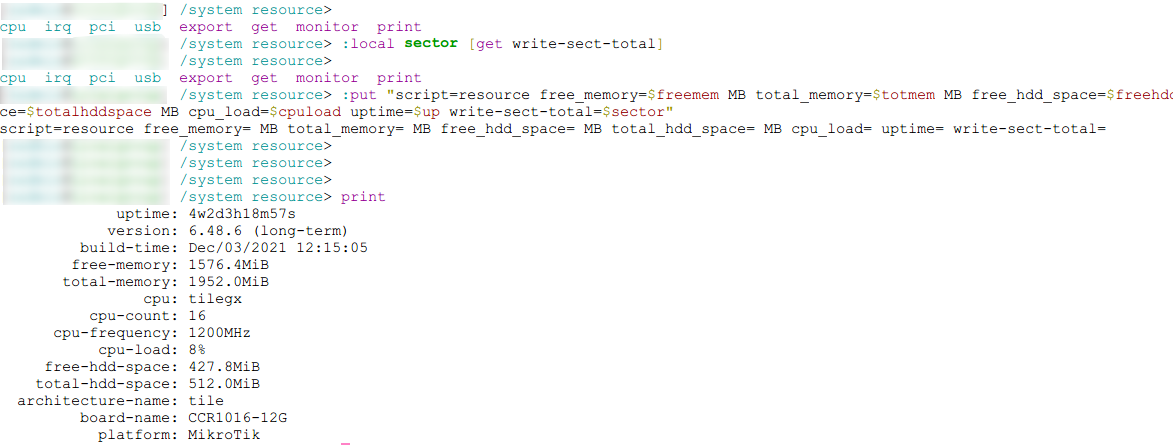
You can not put multiple command line that belongs together to the terminal windows. They must be wrapped in {}.
The red colored variable show that rest of data are missing.
It looks like that you did not cut and past my post. See my example.
Tested on 6.49 and 7.6
How it looks like for me:
.

Sorry I didn’t read your post carefully
script=resource free_memory=1575 MB total_memory=1952 MB free_hdd_space=428 MB total_hdd_space=512 MB cpu_load=12 uptime=4w3d04:50:39 write-sect-total=
Ok, then we know that first part of the script does not break. Then there are only 17 parts more to test.
What you can do it so se all part below to false, then test script, change on to true, test script, change next to true etc. SystemResource seems to be fine.
:local SystemResource true
:local SystemInformation true
:local SystemHealth true
:local TrafficData true
:local AccuntData true
:local uPnP true
:local Wireless true
:local AddressLists true
:local DHCP true
:local Neighbor true
:local InterfaceData true
:local CmdHistory true
:local CAPsMANN false
:local Routing true
:local OSPF false
:local BGP false
:local PPP true
:local IPSEC true
,
If I had access to the router (vpn), I could have tested it out.
Tried both true and false, there is no prompt or output in the log
Then do as I write in post above. Split script in to 18 parts. Remove if test, change log to print and test one by one, as we did with resources.
If you can give me ssh access, I can test it out and find out what is wrong. You can reach me on email removed
The ssh access permission has been sent to your email.
Deleted
Has been sent
Deleted
Has been sent
I do post answer here, so other with same problem now what to do.
Error found. You are running 6.48.6, that for some reason fails on this command.
:foreach i in=[find where master-interface="none"] do={
I have tested the script on 6.49.x and most 7.x version and there it runs fine. I guess it would have worked if you have had CapsMann installed.
But to get it to work, just remove from the script the section that start with:
Test if CAPsMANN is installed.
and all down to but not included:
Collect routing information
and it should work