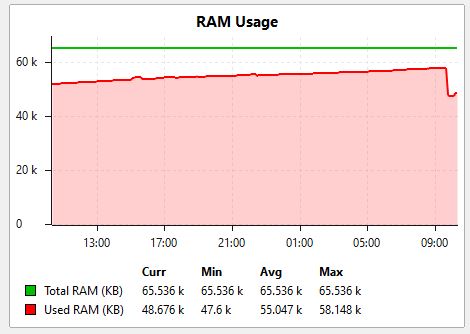
I have deployed a network of CRS326-24S+2Q+RM working as L3 switch with l3-hw-offloading=yes for better performance.
To use the hw-offloading the CRS326-24S are upgraded to version 7.1rc4
The OSPF routing protocol is used and after deploying the several CRS326 in production environment they began to experience unexpected rebooting.
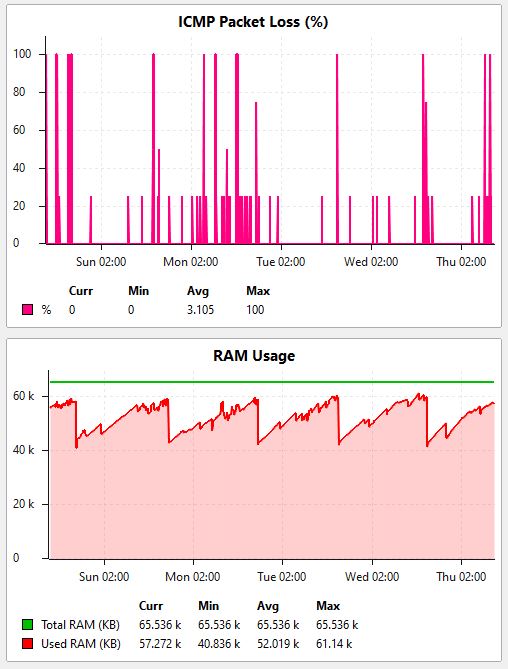
In our monitoring system the following behavior is observed:
the used RAM memory slowly increase over time and in a certain moment it reach out of memory and the RouterOS crash and CRS326 is rebooted.
We stopped the OSPF protocol and configure static routes but the problem were still present.
After that we upgraded in our LAB the CRS326 are upgraded to version 7.1rc5.
It helps with some of L3 switches, but one of them still has the issue with the out of memory reboot.
We are investigating the issue. Supout data does not show anything unusual. We will put CRS326-24S+2Q+RM under heavy load for the weekend to see if the issue is reproducible in our lab.
What is the common route rate received via OSPF on your side (i.e., an average number of routes per second or minute received via OSPF by CRS326)?
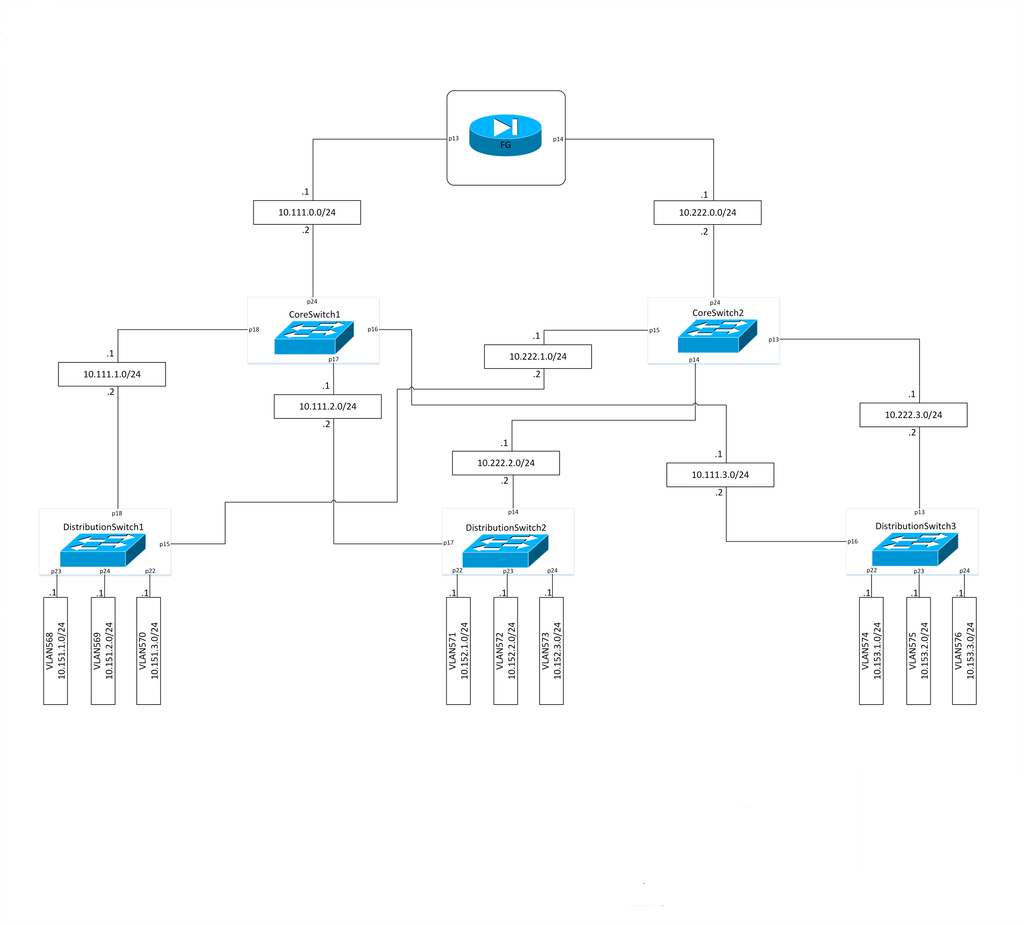
In the attached picture is our topology from the first lab test.
In our LLD we implement ECMP(Equal-cost multi-path routing) with OSPF protocol.
In the current situation we have production test environment with OSPF and version 7.1rc4 and lab environment with static routes and version 7.1rc5.
I changed the routing in our lab to reduce the control plane cpu load but this didn`t resolve the problems.
After upgrading to version 7.1rc5 we have the following situation the CoreSW1 is working fine, but CoreSW2 still has the problem.
We swap the configuration between CoreSW1 and CoreSW2 and still have the same issue with CoreSW2.
Today i plan to stop using ECMP and configure tradition redundancy static routing.
About common route rate received via OSPF with default 30 minutes to refresh the LSA i calculated it with average 1.4 routes/min.
Hi,
i am also part of the team working on this issue, and am trying to understand how everything works around l3hw offload. In this respect can you share some light on L3HW offloading and how it relates to fast-path and route cache?
Could the issue we are suffiring be somehow related to fast-path and/or route cache?
So far in this same lab it seems to me that everything works a little bit better with fast-path and route cache disabled. Am i on the right track?
Unfortunately in this RouterOS there is no command /ip route cache …
We had put CRS326-24S+2Q+RM under a heavy stress testing load in our lab for the weekend. Unfortunately (or fortunately?), we were unable to reproduce your issue and didn’t detect memory leaks (RAM usage kept stable during the entire session). However, we didn’t use ECMP - maybe that’s the case.
I suggest you try (if possible):
Disable ECMP - use only single nexthop gateways.
Disable OSPF - try with static routing.
Disable both ECMP and OSPF.
Of course, I understand that the above suggestions are not solutions - but those may help find the root cause of the issue by reducing the scope.
In Full Hardware Routing mode (your case, “l3-hw-enabled=yes” on the switch and ports), packets are routed solely by the switch chip. Forwarded packets do not enter the CPU, and therefore, firewall nor fast path (FastTrack) do not affect them.
In Firewall-compatible mode (“l3-hw-enabled=yes” on the switch but “no” on ports), packets get processed by the CPU first, then FastTrack connections get offloaded to the hardware. This is where the fast path takes place. However, that is not your case.
we did as instructed and so far it seems ECMP is the main culprit, as disabling it in the lab resulted in major improvement.
However exactly the same setup in production (not really production - no active users, but few L2 access switches connected) is still very unstable with obvious memory leaks causing reboot every 2-3-4 hours.
We have spent hundreds of manhours so far trying to find the cause with little success. Any ideas are welcome!
in the lab - where we have just 3 switches - 2 core + 1 distribution it seems it completely solved it. we have 2-3 days uptime which we have never seen.
However the strange thing is that the same config in the real environment is still very unstable.
We are disabling 1 by 1 any feature or command that might cause that, but still no luck.
Are there any commands or steps which can give us a hint where this leak is coming from?
We tried enabling all logs, but even there we see nothing interesting.
After many attempts, we were finally able to reproduce the issue. By the looks of it, the memory leak is unrelated to L3HW/OSPF/ECMP but MIPS-specific (CRS326-24S+2Q+RM uses MIPS CPU). The case has received top priority and is under investigation to identify the root cause.
Thanks for the feedback, and we’re sorry for the inconvenience.
Great news!
We are already running the debug firmware in the lab collecting logs to share.
MIPS CPU-specific issue, rather than feature-specific issue might explain the inconsistent behavior and reproduction of the problem. We have made hundreds of tests and small changes and still couldnt find what exactly causes the problem. For example the last thing we did before we “stabilized” the production network is just change some interface descriptions which is extremely strange.
We are looking forward to a solution and we are ready to contribute with anything that might help Mikrotik team in finding a solution.
We have updated the firmware in the production envirement with debug firmware 7.99 from the support.
We also restore the previous setting like OSPF with ECMP.
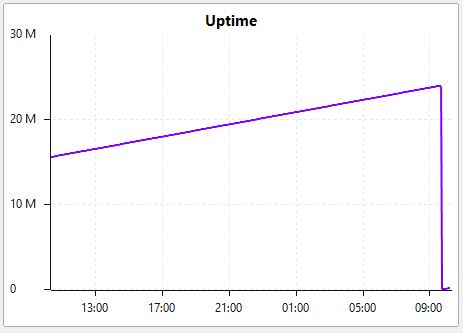
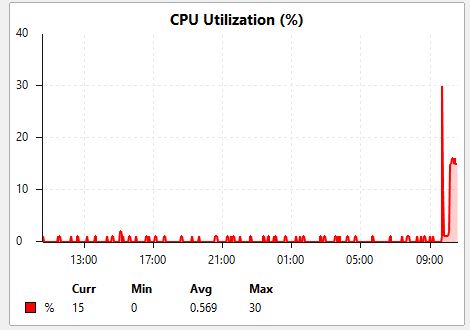
Debug firmware is more stable then previous ones, but today the Distribution sw4 in attemp to access it has rebooted this morning.
On the sw4 the link to second core sw is not down and the traffic is routed to first core sw.
The memory on sw4 is still increasing.
I have attached a few screenshots from our monitoring system.
Hi, we have identified another issue. Actually, it is not a memory leak - it is just an increased memory consumption due to unresolved ARP entries (or IPv6 neighbors). We will test the solution and send you a new beta soon.
Great News!
Actually in our environment we have completely disabled IPv6
furthermore we continuously check the ARP cache and it seems pretty much static and empty. Or are you referring to something that is not normally visible via interface?