on RB3011 with v 6.47 I can’t see the memory and CPU graphs anymore, does anyone know how to solve it?
So I followed the instructions from: https://wiki.mikrotik.com/wiki/IKEv2_EAP_between_NordVPN_and_RouterOS
I found that while the tunnel gets created successfully, no traffic gets routed down the tunnel or through the designated WAN port either. In fact, you cannot use the internet at all until you kill the tunnel.
This works fine in 6.46.6 (after downgrading). Using a RB1100AHx4.
I have emailed in the supout.rif files.
How do I lower transmit power without antenna gain?
using tx power mode “card rates” and “tx power” value
any news about the NAND writes? Is there a fix?
The manual page (https://wiki.mikrotik.com/wiki/Manual:Interface/Wireless) says:
"card-rates - use transmit power as defined by tx-power setting "
BUT:
- Is it the power used by the card amplifier, without counting the antenna gain? Or
- Is it the radiated power, after counting the antenna gain?
Finally:
How do I know what is the default value for tx-power, and how do I know what is it’s limit?
Hope they will react adequately to this issue at some point  .
Indeed this issue is painfull, as there are too small amount of compatible GePON modules available on the market(and no one from Mikrotik  ), so it is not easy/possible to find new or update current ones to support v.6.47.
@Mikrotik please take this into account.
My guess it that regression is connected to:
*) qsfp - added support for FEC mode (fec74), with the FEC mode disabled by default;
*) sfp28 - added support for FEC modes (fec74 and fec91), with fec91 mode already enabled by default;
Where they definitely touch the SFP hw related code.
Have you submitted suppout with the SFP module inserted into 6.46.6 / 6.47rc2 / 7beta8 to the ticket? Please post ticket number here, I will also submit mine.
This is becoming a bad joke. Normis what was the last release you have worked with a Mikrotik with built-in antenna? " Card rates" cannot be set with regulatory domain !!! (It can actually mostly never be set)
On neither 2.4 GHz or 5 GHz
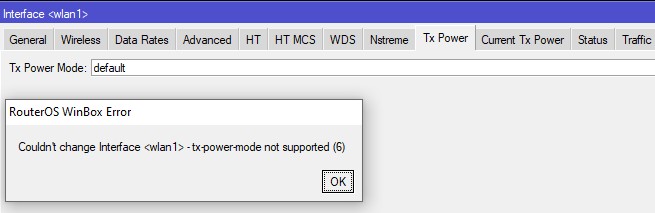
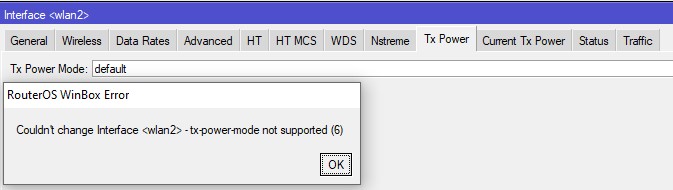
Tested on hAP ac2 and wAP ac, not uncommon devices.
“Card rates” do not work since a long time, you probably just confused it with the “all rates fixed”, what is is more difficult to keep in legal limits as the higher MCSes have higher frequency side-lobes and must be set lower to be legal. (That was the reason for the gone “card rates”). Who will use that lower value as fixed rate?
The only thing that works now is this, and that is NOT, absolutely NOT, what we want or need.
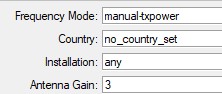

Your limit check on the minimal gain for built in antenna is strict enough, and is almost everywhere (except for LGH, where it makes a major difference)
What we want is this, not in % please, but in total dBm (Like the empty “Current TX power” would be if not empty.)
Dynamic power is just another beauty , but hey with this it will do:
(The % is not linear, but highly related to dBm, but they better gave exact dB’s instead)

When tracing IPv6 packets using the packet sniffer and displaying the packet list (in winbox 3.21), all lines have only :: as the source and destination address.
The IP protocol field is blank.
When I double-click on a line in the list to display the packet detail, the addresses are shown OK in the detail and then they also appear on that line in the list, and so does the IP protocol (e.g. 58 for ICMPv6).
wow! True. Tested on hAPac2…
What is default antenna-gain for wap ac and cap ac ? Because i cannot set even regulatory domain on my routers.
In documentation written 0 is default but if i set 0 then it is not possible to set regulatory domain.
2 on wAP ac on both radios.
https://mikrotik.com/product/RBwAPG-5HacT2HnD
https://mikrotik.com/product/cap_ac
and search for “Antenna gain dBi for 2.4 GHz” and “Antenna gain dBi for 5 GHz”
On RB951G-2HnD running V6.47, unable to successfully load a metarouter image.
Entered command response is as follows:
[admin@FasSat V3.05.03.U016] > /metarouter import-image file-name=openwrt-mr-mips-rootfs.v1.22.01.20200413.tar.gz
import failed: file in archive goes out of root directory: ./FasSat/
[admin@FasSat V3.05.03.U016] >
We are unable to load a metarouter image to ROS 6.47. This metarouter feature has worked successfully in ROS version 6.45.8 and prior.
My issue is related with DHCP Client. I have Clients on my two WANs. When some WAN go down (fiber lost, powerdown or disconnect) the status continues as “bound” and my scripts don’t run.
I did back to 6.46.6 and it works again.

I run IPSEC Lost connection after 6.47. Peer: was empty on boot, Peer was on line 2, put Peer in top, ^ other field, reboot, it moves down to second line. Peer Blank. Can’t figure out fix.,
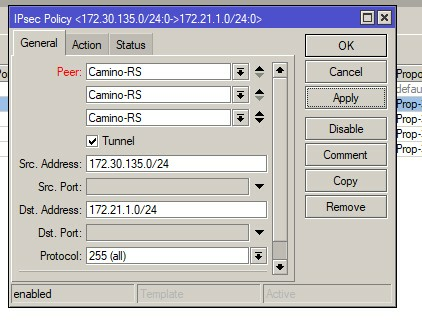
Also terminal report this error: jun/17/2020 21:20:36 system,error,critical, error while running customized default configuration script: no such item
Edit: Found post to clear Error customized. Change interface name of WiFi to default “wlan1”, reboot. error cleared. OK to change name back to custom.
/tool snmp-get not working!
/tool snmp-get 10.1.57.117 oid=.1.3.6.1.4.1.41112.1.5.1.1.0 community=public
error - contact MikroTik support and send a supout file (3)
Same error in version 6.46.6 and >=6.45.7!
For example, version 6.45.6
/tool snmp-get 10.1.57.117 oid=.1.3.6.1.4.1.41112.1.5.1.1.0 community=public
OID TYPE VALUE
1.3.6.1.4.1.41112.1.5.1.1.0 octet-string EP-54V-72W
support #[SUP-8826] from february 2020.
Hi, Where the truth ?
Capsman show 30dbm on 5g. Same interface on AP wap ac which connected to capsman show 19dbm and antenna-gain on same ap 2dbm.
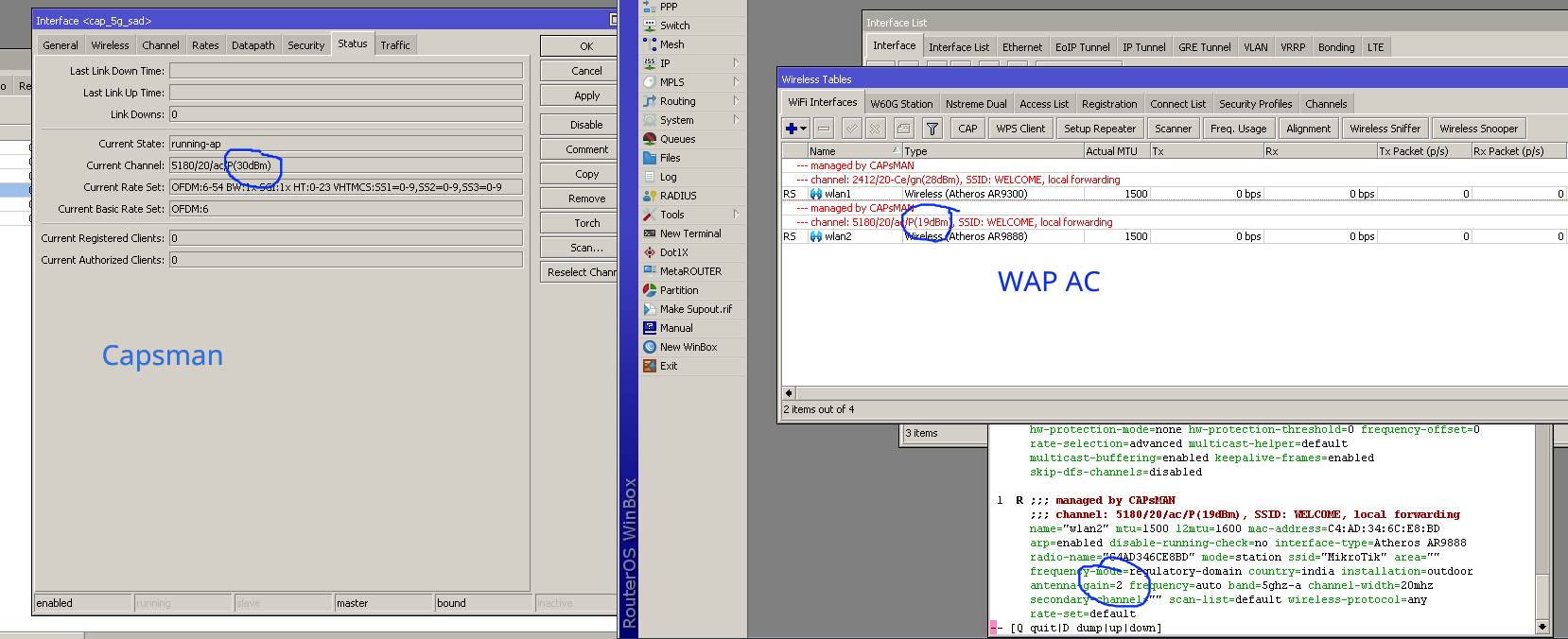
Hello !
Unfortunately, the problem known from old versions of RouterOS has returned. TL-WR841 cannot get IP from Mikrotik DHCP (still get defconf offering lease without success). Downgrade to 6.46.6 and everything is back to normal.
http://forum.mikrotik.com/t/dhcp-server-offering-lease-without-success/107119/1
Problematic configuration:
TL-WR841 ← WDS Client to MT → hAP ac^2
With the inability to lower transmit power with the new versions, looks like it’s time to look at other vendors.