CRS326-24G-2S+ after upgrade to 6.47 only available 10% of HDD space !
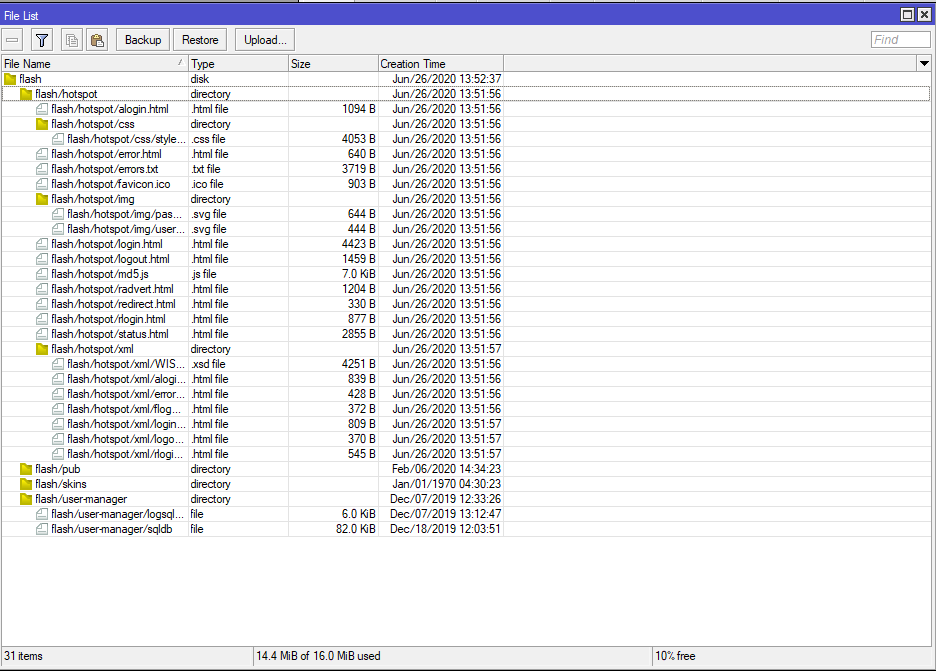
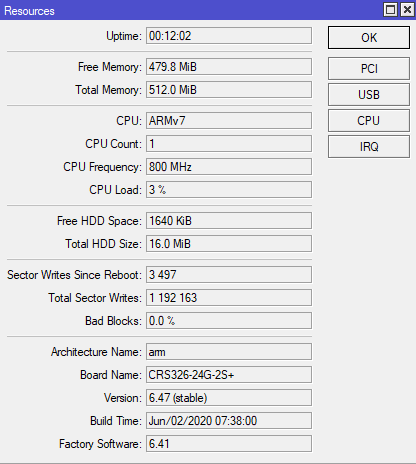
And before upgrade?
These numbers are not so bad for a 16MB device with additional package(s) installed, right?
We need more people to contribute to this Cloudflare thread I created about DoH issues:
https://community.cloudflare.com/t/cloudflares-doh-request-is-being-rejected-dropped-when-request-is-sent-from-a-mikrotik-routeros-device/184158/6
+1… there is NO GOOD REASON to do this.
Same for all other boards with UART pins on board, this port should be available and console spawn on it by default.
Hi, tested on hAP ac lite RB952Ui-5ac2nD.
What are we trying to achieve - make basic wireless configuration.
- Frequency Mode → regulatory-domain. (If apply is pressed after this step, it is accepted.)
- Country → select country (in my case Bulgaria).
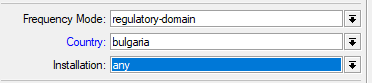
- Press Apply → error returned: “minimal antenna-gain for this country is 2 (6)”.
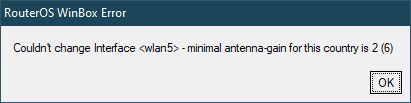
(Workaround)
It is worth to note that the CLI shows and allows the setting of the antenna-gain parameter (value-name).
/interface wireless> print advanced
Example:
2 name=“wlan5” mtu=1500 l2mtu=1600 mac-address=C4:AD:34:xx:xx:xx arp=enabled disable-running-check=no interface-type=Atheros AR9888
radio-name=“C4AD3XXXXXX” mode=ap-bridge ssid=“5GHz” area=“” frequency-mode=regulatory-domain country=no_country_set
installation=any antenna-gain=0 frequency=5180 band=5ghz-a/n/ac channel-width=20/40/80mhz-XXXX secondary-channel=“”
scan-list=default wireless-protocol=802.11 rate-set=default …….
The default value is 0: antenna-gain=0.
After changing the value through CLI to 2, the above settings are accepted.
The default value for antenna-gain is 0 for both 2.4 and 5 GHz.
Apart from the issues with working with Tx power, I would suggest that If the country is supposed to be set through WinBox (GUI), then an internal software check should be made and the corresponding antenna-gain value for the respective country be set automatically, so the country change is accepted. If the value is the same for all  , then it should be easier.
It is probably only your ISP or setup issue, we are using DoH Cloudflare without problems.
Please check your setup, this should work normally, as mentioned before several times:
/tool fetch url=https://cacerts.digicert.com/DigiCertGlobalRootCA.crt.pem
/certificate import file-name=DigiCertGlobalRootCA.crt.pem passphrase=""
/ip dns set use-doh-server=https://1.1.1.1/dns-query verify-doh-cert=yes servers=""
Yes, I followed those exact same instructions and still have issues with DoH on MikroTik. I don’t think it’s ISP since reachability isn’t a problem as stated in that Cloudflare thread.
Maybe it’s my IPv6 config? Please take a look: http://forum.mikrotik.com/t/ipv6-configuration-on-pppoe-interface/140890/1
Definitely not an ISP issue. 1.1.1.1 works great but when I go to use it for DOH my 2011 throws errors out at me usually the (6) and the (13)'s. Once in a while the 4011 will error but not as bad as the 2011 will. And a reboot will usually take care of it for a while then it comes back eventually
This one of those, it either works or it doesnt. If it doesnt, you know right away when you look at your logs. But mine will run for days and then start throwing stuff out at me. Once I turn off the DOH, all is well.
Now I have only tested with Cloudflare, I cant attest to how the other DNS providers fair.
Hi,
I’m facing with such errors
DNS warning DoH max concurrent queries reached, ignoring query
and
DNS error DoH server connection error: Network is unreachable
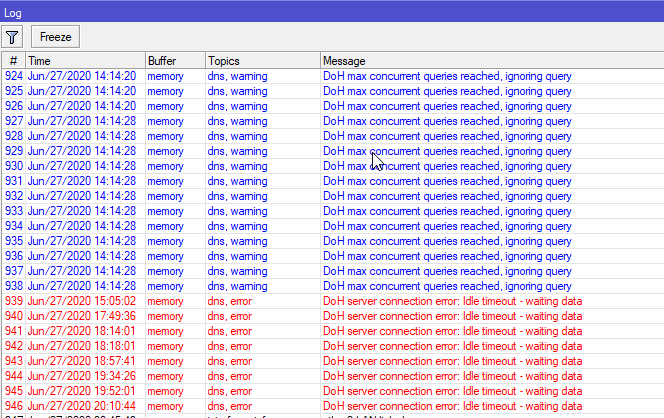
Mikrotik ac2, ROS 6.47
Once per day or two, router drops down L2TP connection because it can’t resolve L2TP server’s name.
Any ideas how to resolve my issue besides turning DOH off?
Upgraded my my home root switch CRS326-24G-2S+ from 6.46.6 to 6.47. This router has 2 x 10 GbE S+RJ10 connected to 2 x CSS326-24G-2S+RM (SwOS 2.11) also with 10 GbE S+RJ10 GBICs. Everything has been stable so far. After upgrading to 6.47 stable all hell broke loose. The link to 1 of the CSS326-24G-2S+RM suddenly starts to go down permantly. Only way to recover was to pull out the ethernet cable or reboot the switch. This event was happening several times a day, and made my home network unusable. Had do degrade the firmware to 6.45.9 (long-term) and everything was stable again. The last stable version was 6.46.6.
I think the problem is that the this CRS326-24G-2S+ switch could not recover after a short link down. I have to admit that the distance between these two switches are on the fringe how far you can have a 10 Gb connection, but this hasn’t been an issue before because the these switches recovered quite well. The other connection was stable with 6.47 but that link was only on 5 Gb because the distance is to far for a 10 Gb connection.
Is this a known issue with firmware 6.47 with Mikrotik S+RJ10 GBIC is unstable and can’t recover well? If this issue isn’t addressed I have to live forever with 6.46.6 or 6.45.9 (long-term).
Also upgraded my RB3011 internet router to 6.47 stable, but hasn’t had any issues with that router, but this router of course has no S+RJ10 GBIC.
For those having issues flushing the dns cache, from my experience, this is due to a winbox bug IMO.
If I have a large cache (a few mb) then through winbox the cache will never clear.
If I run a /ip dns cache flush, it works. I also tested with disabling remote requests, flush cache, and enabling remote requests via a script.
It’s worth a try for those having this issue.
EDIT:
It seems it only worked yesterday. Perhaps there are connections to the dns server stopping it from purging the cache consistently.
Also SMB is not available from Windows PC (7 and 10)
Installing SMB 1.0 also does not help.
By some reason Kyocera MFP can successfully scan documents to SMB share located on Mikrotik.
Checked on hEX S and RB1100AHx4 DE
Same or similar issue with hAP AC^2 - using Google’s DoH (not sure if it’s DoH related, just to mention for completeness).
Reported “cache used” was a bit high, e.g. 1200 - 1500 K for 500-600 entries, and kept growing over time.
Once it reached 2048K (the default limit) - the router started flushing the cache, but this did not reset “cache used”. Because of this, the router started flushing the cache every few seconds few seconds, again and again.
Flushing the cache manually (in web ui or Android app) is the same - “cache used” does not reset.
This effectively disabled DNS caching.
PS - ticket SUP-20427 - with supout.rif attached.
Not for me (hAP AC^2, 6.47). Same as flushing the cache in web UI or Android app - the cache does get cleared, but the “Cache Used” value is not reset.
Consequently, the router keeps flushing the cache over and over again, making the cache useless.
GRE is still handled incorrectly in connection tracking. No GRE “connection” ever appears in the firewall->connections tab.
An explicit match with protcol GRE is required before any drop rule for state “invalid”.
LOST ALL BRIDGES AND PORTS
on update from 6.46.6 to 6.47. It’s a CCR1009-7G-1C-1S+ (Tile 9 Core).
Luckily I have another Internet uplink in that network, so I can reconfigure remotely. Will revert to 6.46.6 to check if settings are still there.
Edit: In addition to bridges and bridge ports, Capsman settings (including manager) was gone as well. However:
Reverting and then doing another reboot brings everything back.
So, if you want to upgrade, do a full config export before and only do it if you have time for reconfig and another remote access.
No reply to this one, anyone else experiencing this? Why would the router (with all settings disabled in /ip cloud) regularly connect to the upgrade server?
Is there an auto-update mechanism? Or some desire to keep a statistic of versions in use over the world?
Try this:
/ip firewall address-list
add address=upgrade.mikrotik.com list=upgrade

/ip firewall filter
add action=accept chain=output comment="Upgrade server" dst-address-list=\
    upgrade dst-port=80 log=yes log-prefix=upgrade protocol=tcp
To see if you are affected as well…
(it will log attempts by the router to connect the upgrade server. you can add it to the forward chain as well when you have internal MikroTik devices)
Did the update to 6.47 on the same router 28 days ago and had no problem.
My CCR1009-7G-1C-1S+ is still up without any fault (current uptime 28d 23:34:00)
-faxxe
I did not have any issue updating two very differently configured CCR1009 either! It must be something particular to his config. I use many bridges as well.
Remember on the CCR1009 you can always use partitions to be able to go back to previous config. Many users do not know about it, it seems.
The port numbers returned in SNMP OID .1.3.6.1.2.1.17.4.3.1.2 are not correct anymore.
When doing an snmpwalk of that OID you should get a number of values for each MAC address in the bridge/switch table and each value should be an INTEGER with the interface number.
This used to work OK, but now the number returned is garbage.