IPv6 works a lot better in v7, ipv6 policy routing and ECMP coming soon
Great! I am looking forward to policy routing and hopefully the other mechanisms to do balancing/failover on IPv6 too.
(like NPT and connection-marking with per-connection-classifier)
router was rebooted without proper shutdown on RouterOS v7.0 Beta 7 and Beta 8
Every 10 minutes, router auto reboot.
I think maybe some scheduler Interval 10 minutes on RouterOS v7.0 Beta 7 and Beta 8 crash the kernel
Hardware offloading?
I tried setting it up this way, and it connects. That is, at first it connected and failed and then on the second attempt it connects and receives the routes.
Logged messages:
14:18:12 system,info  by admin
14:18:48 system,info  by admin
14:18:48 route,bgp,info Write to bgp failed (32) { #buf=1 max=64 sk=Socket{ 5[\00OUT] } }
Those “system.info by admin” messages are logged whenever config is changed, I think it is missing some info about what was done (like “bgp added template”).
I can’t set the MTU on an ethernet interface to be larger than 1500. L2MTU is 1580 and I can’t even set MTU to 1510.
Router: CCR1036-12G-4S
int eth set 0 mtu=1510
failure: could not set mtu
int set 0 mtu=1510
failure: could not set mtu
@pe1chl this message typically will appear when there is no local address set or not piicked automatically.
Is a know problem since the start of ROS 7. That is why did not start using this Beta yet.
The router has only a single interface (ether1) and it has an address (172.22.16.252/21).
The first attempt DID come in to the other side but was disconnected immediately, then connected again and it worked.
Log on the other router:
Jun  4 16:18:48 MikroTik N0212 Connection opened by remote host
Jun  4 16:18:48 MikroTik N0212     RemoteAddress=172.22.16.252
Jun  4 16:18:48 MikroTik N0212 Connection closed
Jun  4 16:18:48 MikroTik N0212     RemoteAddress=172.22.16.252
Jun  4 16:18:58 MikroTik N0212 Connection opened by remote host
Jun  4 16:18:58 MikroTik N0212     RemoteAddress=172.22.16.252
I am using a Chateau LTE12
v4 NAT seems a bit broken now.
- MTRs do not fully go through on some hosts with ipv4 only
on other hosts, if I run an mtr on my PC behind it, it will show the whole route, and then jump and cut out the whole icmp unreachables in between so I can see the mtr, until it’s complete, then it only shows 2 hosts -that’s with ipv6. weird.
-
SSH works on ipv6 only, to the same hosts. reducing the MTU on my machine to mtu 1300 on the PC didn’t fix it, so it’s not an mtu issue. it’s just frozen after SSH login
-
disabling fasttrack didn’t help
any ideas where I can troubleshoot more? it did work fine before, and a ssh connection using MOSH (UDP tunnel) works as well as SSH outbound over ipv6 now. it also works when I connect over an L2TPoverIPSEC tunnel
this only affects FORWARDED connections. it works fine originating from the chateau outbound!
happy to give remote access if MTIK staff wants to look at it more. It’s an elisa 4g connection…
Can’t believe my eyes. L3 HW offloading and Linux kernel v5.6.3, what a jump from v4.14. What’s next, WireGuard and HW NAT? 
You’re amazing, guys! Gonna play around with spare RB3011 to test everything.
.
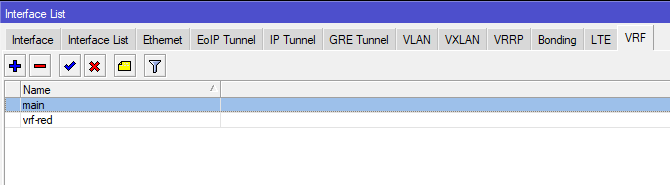
and VRF ! that’s rich !
.
[admin@chr] > ip vrf add list=vrf-if-list-red name=vrf-red
03:52:05 echo: radvd,debug skip Router Advertisement sending on bridge2: no prefixes to send
[admin@chr] > ip vrf add list=vrf-if-list-red name=vrf-red
[admin@chr] >
03:52:11 echo: system,info vrf-red added by admin
03:52:11 echo: route,debug,calc 3 Main publish
[admin@chr] >
[admin@chr] >
.
IPv6 fasttrack/path (or any form of faster ipv6) would be nice 
But it’s already a big step to see V7.0 here… Congrats !
Kernel 5.6.3, so little time after 4.x… Does it mean that RoS is using the official drivers, instead of Mikrotik’s?
Anyone seeing same increased amount of flash writes as seen for v6.47? Or does that not affect ROS 7?
My test results are kind of inconclusive… not sure if it’s higher than before or not.
new kernel mean better wifi performance?
Sent from my SM-A705FN using Tapatalk
it looks like it happens to a point, if i have to guess filesystem manages something and then it goes away, at least on my boards, maybe MT can comment, I have seen the same behaviur both in v6 and v7 now.
it feels a bit faster but maybe placebo
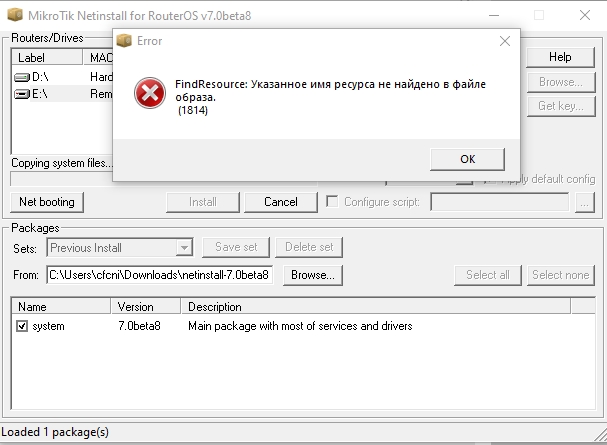
x86 version broken or its netinstall?
trying to install on usb flash and its error
AFAIK Mikrotik uses its own drivers to allow faster kernel upgrades