Maybe it is the direction that all parameters will be moving?
I see in BGP that there is things like “remote.address” too, apparently structuring several parameters under groups like “local” and “remote”.
(such a parameter would have been called “remote-address” before)
Configuration does not preserve across reboots, but log file does.
Expectation: Configuration preserves Steps to reproduce:
Create VM in Proxmox
qm importdisk chr-7.0beta8.img
Boot VM
Login. Make config changes. See working.
Reboot. Result: Configuration restored to default after reboot
When in WinBox 3.24 I go to IP → Routes, click “Add” and type “8.8.8.8@” in Dst. Address, WinBox hungs and, a few seconds later, disappears. Is it only me with Wine on MacOS, or the problem is repeatable everywhere?
Is the any hardware requirements for ROS 7 (Beta 8 )? I have tried to test it on RB411UAHR (with Sierra MC8792V modem installed).
First did regular upgrade but it ends in a boot loop.
RouterBOOT booter 7.0beta8

RouterBoard 411UAHR

CPU frequency: 680 MHz
  Memory size:  64 MiB
    NAND size:  64 MiB

Press any key within 2 seconds to enter setup..
trying bootp protocol............... failed
kernel loading failed

loading kernel... OK
setting up elf image... OK
jumping to kernel code
Starting...
Starting services...
MikroTik 7.0beta8 (development)
MikroTik Login:

RouterBOOT booter 7.0beta8

RouterBoard 411UAHR

CPU frequency: 680 MHz
  Memory size:  64 MiB
    NAND size:  64 MiB
Did netinstall after this, it said it couldn’t keep config so the box is back to defaults also. Still boot loop.
Downgrade to 6.47 (netinstall) works fine.
If I can provide any additional data to help debug let me know. If the box is just too old or something, oh well I would understand that. For me it’s just a test router anyway, but have no big one free at the moment for testing.
Very sad IP-accounting will be gone in ROS7 , can’t understand why. This “features” is not something cutting edge that needed works or was full of bugs to my understanding. It just basically works and is no rocket-science.
Friend, if you just read the whole topic, you will see that this same problem has already been solved in another way
then the mikrotik support indicates to download an ISO of the installer and install directly on the flash.
I’ll draw for you to understand: https://box.mikrotik.com/f/092549ada5484eeab7bb/
Download the file, write to the flash drive with the Rufus utility (https://rufus.ie/)
and boot.
If you have any other specific problem, I would like to open a post on the forum to avoid polluting this POST, dedicated to the BUG of the new version of RouterOS.
Concluding this matter.
Thank you and good luck!
I wrote my own in Perl, it uses Net::Flow and it writes tab-separated files (1 flow per line).
It is based on an example provided with Net::Flow. I could post it in a forum topic.
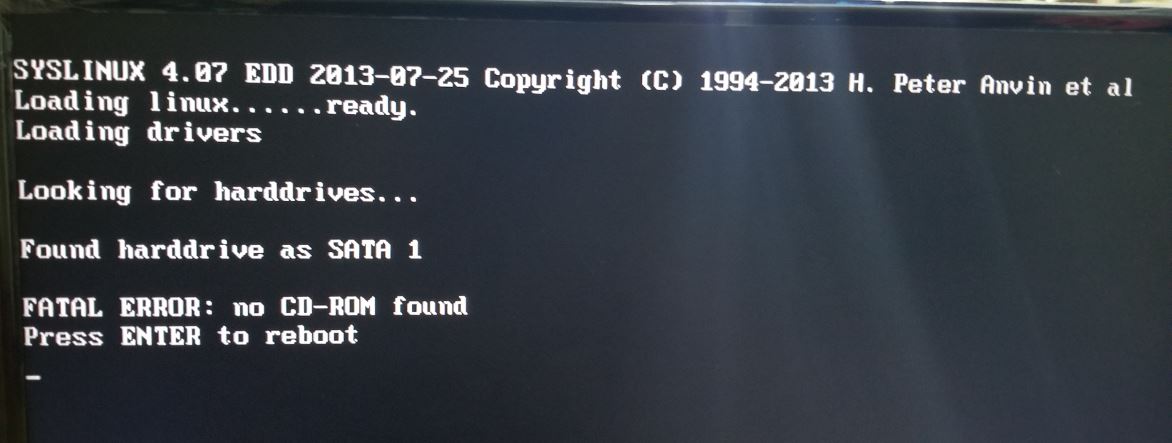
Not work! My system has two sata disk.I burned the iso into one and boot from it.Loading the linux kernel and report no disk found. I had changed the disk from sata to ide model. I does not work too.
I searched the comminuity and found this is a very old problem and did not solved till now.
Boot process (which is not the same as kernel) complained about CD-ROM not found. So the install package has to be started from a device which presents itself as CD-ROM, not as hard disk. Which is easy under VM, not so easy under barebone hardware.
But is it an ISO boot image? I never bothered with the x86 version.
If it is just an installation iso image, then one can just do a “cat file.iso > /dev/; flush” and be done with the iso image. If the ISO is a normal one (Windows needs something more than a Distro ISO), it should boot as a CD.
WARNING: This will ERASE everything on the destination flashdrive - even the partition table. Be warned.
Traditionally ISO images could only be used in CD and DVD physical media. And if software reading it wasn’t too smart, it would choke if ISO image was “burned” on some other type of medium (such as HD). Quite a few linux installers were made so that they were looking for installation medium on CD-ROM type of devices.
Initially wasn’t so, nowdays many USB sticks can present themselves either as HDD or CD-ROM to the host OS and modern linux distributions come as “hybrid ISOs” that can be simply written to USB stick … probably not to more traditional HDD or SSD. Additionally modern installers scan all storage devices for installation medium.
Mind that all of this is pretty modern stuff, we all know Mikrotik is curently lagging behind in many aspects so one should not be too surprised if something which is otherwise usual fails in ROS. Good knowledge of computing history (at least last 15 years) helps to understand the shortcomings.
Did try netflow for Splunk, but does not get it to work.
It also add a new port to listen to, not only Syslog. Not sure if nteflow work over long internet connection.
Why not just leave the working accounting that are in all Router OS up until 7.beta 6 (not in beta 8 )
Or MT can do a poll and ask if its ok to remove a function. Maybe its not only me and all the Splunk user who uses it…