Thanks for your feedback but I do not agree just yet … I am monitrring the LAB CCR1009 with wireshark and so far I do not see any activity from api.ipify.org under v7.13.4 [stable]
FWIW, I am NOT seeing those log entries on Hex and mAP running latest 7.14. Why only on CCR then ?
I even downloaded the complete default script, nothing to be found in there related to this api.ipify.org (or anything with “api” in it, for that matter).
But it “could” be CCR only …
Upgrade again to 7.14rc and check default script (which might already be pretty empty, I guess ?).
What do you mean by “check default script” ?
If this api is not appearing on your devices when running v7.14rc THEN its tied to something else and I suspect a Google Chrome extension …
But I am curiouse by that “check default script”
The changelog indicates that there is a change labeled “defconf”. You DO NOT see those changes on an existing router that you are upgrading, unless you reset the router to defaults. “defconf” = “default configuration”.
Sure enough it has happened several times in the past that very useful changes were made in defconf that never made it to customer routers because they were not in defconf at the time the router was shipped, but that is how it is and I doubt that will ever change.
(e.g. the recent new 6.49.13 release only changed defconf, if we have to believe the changelog. that is totally useless because a 6.49.13 release will only be installed as an upgrade, and an upgrade does not apply defconf)
About the “it is not a default queue type”: that has been explained by others. You (and defconf) can add new queue types.
api.ipify.org Mystery SOLVED …
I have a script that checks my WAN IP Address for changes … in that script a call is made to api.ipify.org … For some reason v7.14rc is now showing log info from this script that I have not seen before … in fact since v7.13+ MikroTik has made quite a few changes to how stuff now reports in the log file.
/system script add dont-require-permissions=no name=Dynu owner=aaaa policy=read,write,policy,test source=“:local ddnsuser "mmmmm"
\n:local ddnspass "^XxXxXxXxXxXXXXxxx"
\n:local ddnshost "zzzzzzzzzz.myddns.rocks"
\n
\n:local currentIP ([/tool fetch url="> http://api.ipify.org> " as-value output=user]->"data")
\n:local dnsIP [:resolve $ddnshost]
\n:if ($currentIP != $dnsIP) do={
\n :local update "> https://api.dynu.com/nic/update?username=$ddnsuser&password=$ddnspass&hostname=$ddnshost&myip=$currentIP> "
\n /tool fetch url=$update keep-result=no
\n :log info "DYNU $ddnshost updated: old IP was $dnsIP and new IP is $currentIP"
\n}
\n”
There you have it.
Self inflicted issue 
CCR2116, OSPFv3 has a problem on 7.14rc, downgrading to 7.13.4 solved the issue.
What problem? Any details? I don’t see any problems with OSPF (both versions) at my CHRs with RC.
CCR2116 is connected to 3810m, bonded connection LACP, OSPFv3 state is stuck on LOADING’
7.14rc1
CCR2116
/routing/ospf/neighbor> print
Flags: V - virtual; D - dynamic
 0  D instance=ospf-instance-ipv4 area=ospf-area-ipv4 address=10.255.1.2 router-id=10.255.255.2 state="Full"
      state-changes=5 adjacency=9m12s timeout=33s

 1  D instance=ospf-instance-ipv6 area=ospf-area-ipv6 address=fe80::bccc:ecdd:fe98:6600%bonding1 router-id=10.255.255.2
      state="Full" state-changes=5 adjacency=5m29s timeout=31s
Aruba 3810m
core# show ipv6 ospf3 neighbor

 OSPFv3 Neighbor Information


 Interface   Router ID       Pri   State      Rxmt QLen  Events
 ----------- --------------- ----- ---------- ---------- ----------
 vlan-510    10.0.0.1        n/a   LOADING    0          8
 vlan-520    10.255.255.3    n/a   FULL       0          5
Downgrading to 7.13.4 solves the problem,
core# show ipv6 ospf3 neighbor

 OSPFv3 Neighbor Information


 Interface   Router ID       Pri   State      Rxmt QLen  Events
 ----------- --------------- ----- ---------- ---------- ----------
 vlan-510    10.0.0.1        n/a   FULL       0          4
 vlan-520    10.255.255.3    n/a   FULL       0          5
@kreb, thanks for the info, my infra is MikroTik only and everything is ok with OSPF.
/queue type add name=fq-codel-ethernet-default kind=fq-codel fq-codel-ecn=no
/queue interface set [find default-queue=only-hardware-queue] queue=fq-codel-ethernet-default
>
>

Hey guys, what boards have this as default?
I was looking for those lines in a RB4011 default but it seems to me they are not there.Change log says:
*) defconf - use “fq_codel” queue as default interface queue for wired ports on LTE devices;
Since updating to this version, containers are completely defunct. I cannot access the /containers function at all anymore.
[admin@MikroTik] /container> print

action timed out - try again, if error continues contact MikroTik support and send a supout file (13)
They failed to add BQL:
http://forum.mikrotik.com/t/v7-14beta-testing-is-released/172080/149
After upgrading my RB5009, I noticed that I lost one of my WAN’s, could not get IP address via DHCP.
After some investigation I noticed that packets on port eth1 (member of bridge with the PVID set) still comes out with tagged packets on that vlan.
rolling back to 7.13.4 solves the issue.
SUP-144218
Rollback to v7.13.5 resolved the issue. This same Patriot USB stick formatted to ext4 and I was able to create a container on it.
So there definitely is an issue with USB disks on hAP ax^3 in 7.14rc1.
Thanks in advance for fixing it!
Mine works perfectly, maybe it’s just a compatibility problem with your hdd
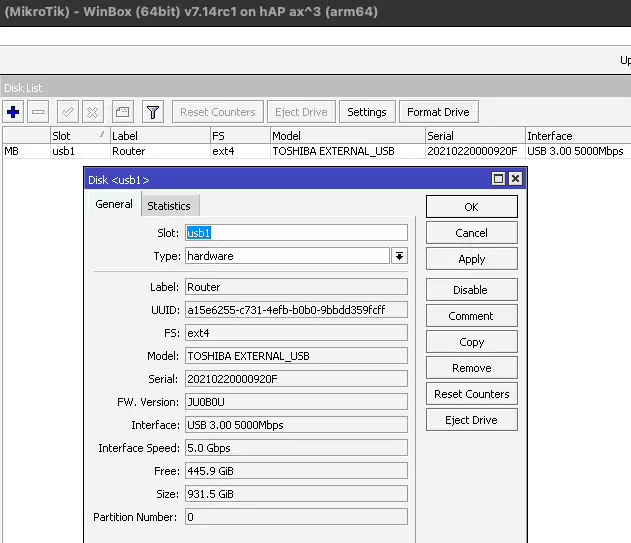
Could you please reach out to me through support system? I cant recreate disk disappear issue. I will also give you modified version with different formatting tools, that will fix other mentioned problems.
Done! SUP-144400
Hi,
Im not able to get work Netwatch/ fetch to send any notification. I had fetch thorough Teams I did not touch the config but it is not working anymore. Today I tried set it up with Telegram and there is info Fetch failed with status 400 or Mode not specify.
Is here anyone with working Netwatch/Fetch?