Hello
Has anyone checked this? Especially on NordVPN or ProtonVPN services
The problem is that I don’t know how to add the tls key, of course I used the import option but the problem still persists and it gives the tls error
require-same-version - CAPsMAN suggests to upgrade the CAP RouterOS version and, if it fails it will not provision the CAP. (Manual provision is still possible)
suggest-same-version - CAPsMAN suggests to upgrade the CAP RouterOS version and if it fails it will still be provisioned
I would expect it to be set on require-same-version currently? Set it to none to prevent updating.
Nowhere in the documentation does it say that the upgrade is done automatically. It doesn’t work for me unless I put the packages in the “Packge path” folder.
Here the text can be improved, as “suggests” seems to either “tried” or “performed”.
In regards to the packages:
Folder location for the RouterOS packages. For example, use “/upgrade” to specify the upgrade folder from the files section. If an empty string is set, CAPsMAN can use built-in RouterOS packages, note that in this case only CAPs with the same architecture as CAPsMAN will be upgraded.
MikroTik is always open to improvement, feel free to contact them to make an improvement in the documentation. Thanks for noticing (though it is not 7.17 related).
Trying Superchannel on HAP AX3, isnt it supposed to run all channels at max power? But when i set 5180 it runs at (tx-power: 17), i see briefly 60tx and drops to 17, i did try to set manually 28 it doesn’t help.
On the other hand if i set United States it does run on max power (tx-power: 28)
Also not related to superchannel but AP keeps dropping power after some time, interface gets enabled, runs at tx-power: 24, all great, but after few hours it drops to tx-power: 17, there is no channel change or anything in logs it just silently drops power, anyone else notice this?
We are working towards optimizing wireless-qcom-ac as we try to optimize other packages to be less resource heavy, but it is still a work in progress. As of this moment, wifi-qcom-ac is known and expected to take up more resources (including RAM) than legacy wireless drivers.
There is no superchannel in the new wifi-qcom(-ac) drivers, also there is no no_country_set. (BTW, superchannel was a mode, no_country_set was regulatory domain, so you’re doing wrong things in the first place.)
The router is probably kicking you back to a default of Latvia, which is at 17.
And yes, I’m also running my wifi as “United States” because of high TX power, despite being in the EU. Isn’t that great? But the only reason I have that is because I can’t remember which South American country is better Was it Panama?
What are you even talking about, its literary in changelog of 7.17 update:
) wifi-qcom - added Superchannel country profile;
And it does work for higher channels i just tried like 5500 and 5600 it runs max power and skips DFS check, just not for lower ones for some reason so it seams as a bug..
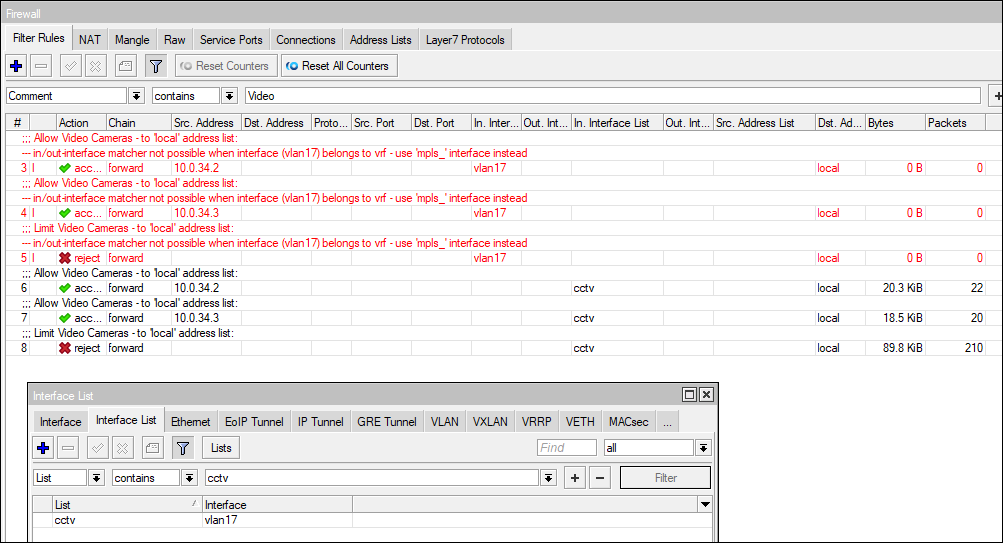
Why disable firewall rules that are part of VRFs? We use VRFs extensively on every CPE, to separate management interfaces from client traffic interfaces. All client interfaces are subsequently part of a VRF where we then filter forwarded traffic to prevent traffic from a Guest network towards an address list called local (includes 10.0.0.0/8, 172.16.0.0/12 and 192.168.0.0/16). Similarly for CCTV, we want to drop all traffic unless from DVRs or NVRs.
The change recently disables a firewall forward rule when an input interface is part of a VRF. It however works when we create a new interface list add the interface to that list and then adjust the firewall rule to filter the traffic.
NB: The problem here is that we now have to refactor every router’s configuration after upgrading. This introduces human error and will invariably result in routers not being upgraded for several weeks/months.
Filtering semantics really shouldn’t be affected whether or not an interface is part of a VRF. It worked perfectly before upgrading to 7.17 and continues to work if we use the above work around. Sounds to me that the config control is disabling the rule and not actually putting it in to the config based on a filter when it determines that the referenced interface is part of a VRF.
Please don’t disable the rules, they should work just fine. This should be optional and possibly recommended for many use cases but not when you have a larger single VRF with various VLANs being members and you want to selectively filter traffic ingressing via one of the VRF VLANs.
Ah, terribly sorry, the ax3 is wifi-qcom, I thought it was -ac and wasn’t added there as per the changelog. I’m still in the -ac phase after upgrading my Audience so I think everything is -ac.
erlinden: If you can tell me how to place an access point in the basement for my washer and dryer that doesn’t involve destroying walls and drilling through 0.4m of reinforced concrete, I’m all ears…
You don’t have to use the wifi variant, you can use the ethernet-only version and use your own AP of choice.
“sender” and “receiver” need to be on the same phase of your electrical installation and presence of solar power installations will reduce throughput drastically if on that same circuit (but I assume for a washer and dryer there is not much bandwidth needed).

 But the only reason I have that is because I can’t remember which South American country is better
  Was it Panama?