Unable to update RB450GX4. After rebooting the ROS version remains 16.2
What say LOG?
Smol homenet updated:
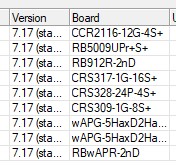
Works good so far 
QUESTIONS:
*) firewall - added support for random external port allocation;
What means this? A bugfix or something we can configure? What is “random” now and what works now what has not worked before?
*) snmp - added wifi fields to MIKROTIK-MIB;
Where can I view the .mib-file? Which OIDs?
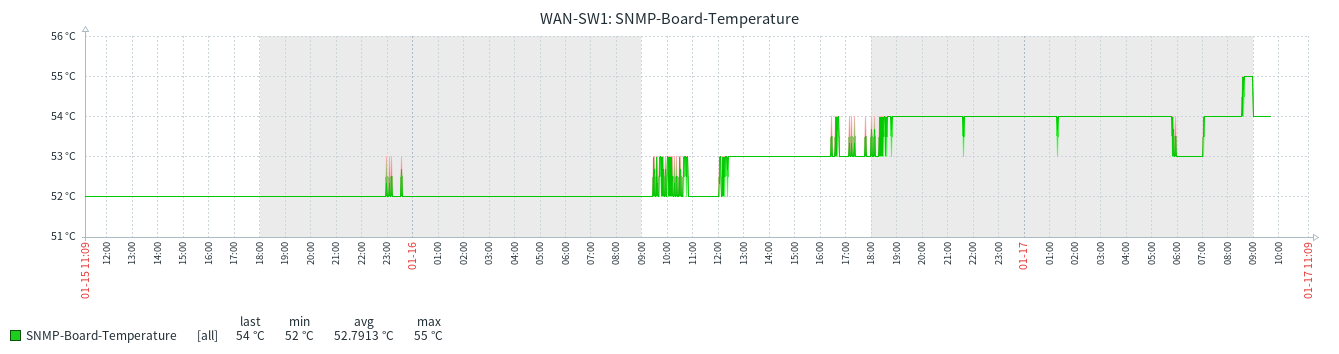
*) health - removed board-temperature on RB5009UPr+S+IN device;
WHY?! I used this as OID and it gave good reading!!
You removed it for the RB5009UPr+S+ (not “IN”) too 
Ah yes, that’s nice, except for the fact that I have 3-phase electricity at home With wifi-qcom-ac my appliances are just barely holding on, whereas the old wireless package with superchannel and no_country_set was great, and I really have no desire to spend a crapload of extra money just so my wife can get notifications when the laundry is done…
Hi
After upgrading, l2tp client is not connecting. In Webfig all ipsec tabs are empty and an /ip/ipsec/export results on an error.
2025-01-17 11:14:14 by RouterOS 7.17
software id = WZEK-CJNA
model = CCR2004-16G-2S+
serial number = XXXXXXXXX
#error exporting "/ip/ipsec/policy/group" (timeout)
#error exporting "/ip/ipsec/proposal" (timeout)
#error exporting "/ip/ipsec/mode-config" (timeout)
#error exporting "/ip/ipsec/policy" (timeout)
#error exporting "/ip/ipsec/profile" (timeout)
#error exporting "/ip/ipsec/settings" (timeout)
Any clues?
Due to a chip issue which reports board temperature MikroTik decided to remove this parameter from health.
Please send supout rif file.
Sad - it gave me good, plausible and reliable reading.
Opened a ticket (SUP-176683), because I can not relate.
Ok, I have serious problem with DHCP client after upgrade to 7.17, as it drops default route on multiple type of devices (RB4011, SXTsq 5 ac). I experienced this on RCs and betas too. Routers creating autosupout.rif file after dropping def route. I try to figure out what triggers this issue.
Edit: read next post, this is complex routing issue
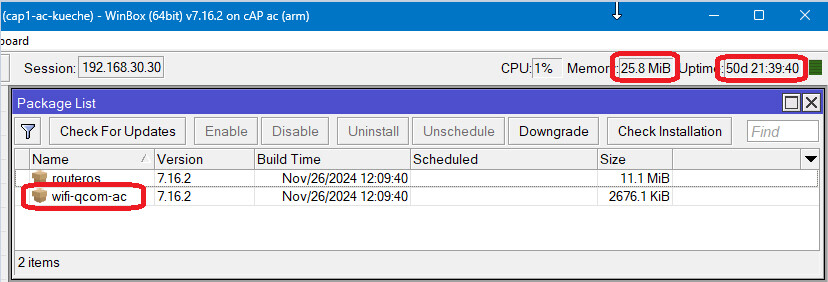
I can´t confirm that there´s a general problem with wifi-qcom-ac.
There are 4 devices running since 50days without any memory leaks or other problems:
upgrade failed, free 9 kB of kernel disk space
Free Memory: 617.6 MiB Total Memory:1024.0 MiB
Free HDD Space: 409.2 MiB Total HDD Size: 512.0 MiB
MikroTik asked to send supout to them for this. I already netinstalled so can’t, but if you can generate a supout and send it to them as the above post requested, I’m sure they will help them.
Brazil is better than ETSI most of times: 30dBm vs 20dBm on 2.4GHz, 30dBm vs. 14dBm on 5735-5875 MHz … but not always: ETSI has 30dBm vs. 24dBm on 5490-5730 MHz.
According to reg-info from wAP ax running 7.17, US is the same as Brazil … but starting with 2025-01-20 I’ll like Brazil better than US (regardless nationality of the first lady to be) 
Its strange! I using L2TPv2 tunnels, ip,ipv6,mpls over it. Using IGP protocol (RIP or OSPF doesn’t matter) to distribute Loopback addresses. MPLS LDP is active on it and using BGP to exchange VPNvX routes. On IPv4 BGP peers I echange VPNv4 routes, on IPv6 BGP peers I exchange VPNv6 routes.
Here comes the strange part. Until only IPv4 BGP peer is active nothing bad happens. When IPv6 BGP peer is comes up or it gets update(?) then it messing up the IPv4 routing table. For example it deleting the DHCP default route so L2TP tunnel goes down.
The questions was “WHY?” What is the chip doing to cause this decision?
First they have to figure out what does this message actually mean…
Sometimes the reported board temperature is ridiculously high, I have seen that in one of our devices (while others are OK).
[]) ppp - add routes in matching VRF;
Still not all routes added to the correct VRF for PPP interfaces added to an interface list (through PPP profile) and interface list added to VRF.
I’ll eat a broom if this bug ever gets fixed.
I’ve sent supout files from two devices to support regarding the ‘upgrade failed, free XX kB of kernel disk space’ error.
Maybe on some devices there is a separate partition for /boot ?
That used to be required/customary on some Linux filesystems or disk devices, to guarantee that the boot code was always within some area supported by the bootloader.
When for some reason the previous kernel version is not removed after upgrade, a next upgrade may be impossible.
(I know that issue from a server which was installed with a previous Debian version that by default created a “small” boot partition in certain circumstances)