That is expected. See the first line of the changelog:
!) container - package is getting updated and will be made available in future, if interested in container feature please use 7.1rc4;
That is expected. See the first line of the changelog:
!) container - package is getting updated and will be made available in future, if interested in container feature please use 7.1rc4;
Check yer routes. http://forum.mikrotik.com/t/v7-1rc1-development-is-released/151250/1
Also hAP ac2 here, MTU > 1500 works fine. Not using VLAN though.
/interface/print
Flags: X, R - RUNNING; S - SLAVE
Columns: NAME, TYPE, ACTUAL-MTU
 #    NAME          TYPE       ACTUAL-MTU
 0 R  ether1        ether            1520
 8 R  pppoe-wan     pppoe-out        1500
same question here.
Upgraded the following with no issues:
No major issues on any of the devices. Modem Firmware on the Chateau through winbox worked perfectly.
Small issues - 750Gr3 still shows voltage incorrect.
Upgrading the modem’s firmware, before upgrading LtAP mini firmware, did the trick for me.
After a downgrade back to v6.49 to be able to upgrade the firmware of R11e-LTE (from MikroTik_CP_2.160.000_v001) to MikroTik_CP_2.160.000_v018, the new upgrade to v7.1rc5 was smooth.
nice.
OMG this beta release fixed SUP-44801 (Chateau 12 loses configuration on each reboot) issue!!!
Glad I did not return this device to the seller for warranty reasons:)))
So right… we’ll have to wait. Let’s hope they implement it back along with interactive terminal in RC6.
When did you have that issue? Only with firmwares v7.1*, I suppose…
I was unable to upgrade LTE firmware on my Chateau 12 v7.1rc5 CLI (rebooted and like nothing happened). https://wiki.mikrotik.com/wiki/Manual:Interface/LTE#Modem_firmware_upgrade
However, it succeeded when using WinBox GUI, clicking on interfaces → lte1 → upgrade firmware. So in other words, all good.
I’ve had this since “18/Mar/21 3:12 PM” using beta 7.* and that’s the time when I raised this ticket. I don’t recall what ROS 7 version I used at that time. The storage issue seem to be appeared after sudden power loss and since then I was unable to use this device…
Time to time I’ve tried several ROS 7 betas and even 7.1 versions and I think I skipped previous version, but with this version this device seem to work just fine.
LTE firmware is updated directly when you hit it. You can follow the progress while updating. It needs no reboot.
Thank you! 
This is awesome! Thank you!
Hah, thank you for this. I think I'm responsible for this change log entry.
It actually took two attempts to convince support: nov 2020 they didn't see any problem.
Sep 2021 tried again, provided a full repro (expected result vs. actual result) and they fixed it.
So, after all, if you take the time to contact support, make sure you provide a full repro and clear description of what you'd expect vs. what you get.
Feature Request: Please add FastPath to igb, ixgbe, i40e and mlx5 drivers including the “virtual function” drivers.
I really thought it was the intended behavior, even though it did not make sense. That is why I didn’t ever report this issue to them.
I’m glad they took the time to fix this now (thanks to your report) 
v7.1rc5 broke /interface/wifiwave2/channel usage in wifiwave2 interfaces:
[cesar@MikroTik] > /interface/wifiwave2/channel/add name=foobar band=2ghz-n

[cesar@MikroTik] > /interface/wifiwave2/channel/export
# oct/27/2021 09:22:16 by RouterOS 7.1rc5
#
# model = RBD53iG-5HacD2HnD
/interface wifiwave2 channel
add band=2ghz-n name=foobar

[cesar@MikroTik] > /interface/wifiwave2/add name=wifi_foobar master-interface=wifi1 channel=foobar
input does not match any value of channel
This was working in v7.1rc4.
Usage in /interface/wifiwave2/configuration is still working fine:
[cesar@MikroTik] > /interface/wifiwave2/configuration/add name=foobar_config channel=foobar

[cesar@MikroTik] > /interface/wifiwave2/configuration/export
# oct/27/2021 09:25:26 by RouterOS 7.1rc5
#
# model = RBD53iG-5HacD2HnD
/interface wifiwave2 configuration
add channel=foobar name=foobar_config
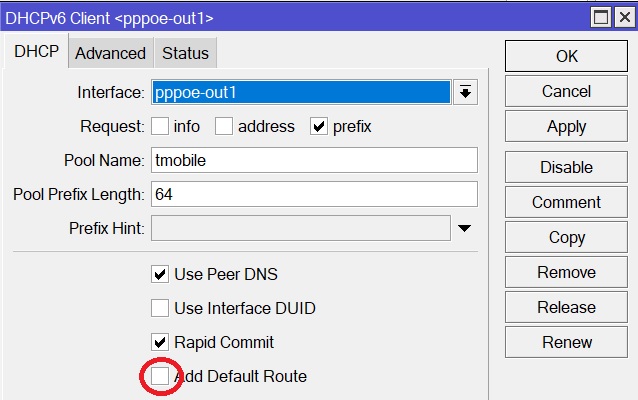
You were right. Problem has been solved with unchecking “Add default route” box in IPv6 DHCP Client section. Thank you.