what this dioes? /routing rule
add src-address=local-lan action=lookup table=vrf1 vrf=yes
You can read this old post of me for a bit of "history" related to that.
That flag was added in the early beta of 7.22 because MikroTik needed a way to express what the built-in lookup rules did in the routing rules. Because the built-in lookup sequence was presented as normal routing rules in early 7.22 beta. In the RC versions that idea of listing the built-in lookup rules by default was scrapped, and now we have /routing/settings/policy-rules. But you can still recreate the rules from the beta with the new actions and flags.
Sorry guys for a little OT, I was looking for info in the forum and documentation about cloud-init support (CHR in particular) and I got confused. There are forum posts in which it seems there is some automation support but it’s unclear. Do you have any info about it, is it a feature request already filed?
Hi,
When I try to update I get the following error:
system/package/update/check-for-updates
channel: stable
mode: https
check-certificate: yes
ip-version: auto
installed-version: 7.23rc1
status: ERROR: IPv4: ssl: crl not found for: "CN=mikrotik.com" (6)
IPv6: could not connect - Address not available
but only on the main router which is RB1100AHx4 Dude Edition / 7.23rc1 (testing).
I can only update if I set:
/certificate/settings/set crl-use=no
If I revert to version 7.22.1 the update works.
On other equipment such as CRS317-1G-16S+, hAP ax^3, CRS328-24P-4S+ I don't get this error.
I saw that there were other users who complained about this in version 7.23beta.
Thanks,
Geo
To tag onto this, after running /exporton my RB5009 I get the following directories being auto created and shown under /files. Like @CGGXANNX, I am not using any Apps on this router:
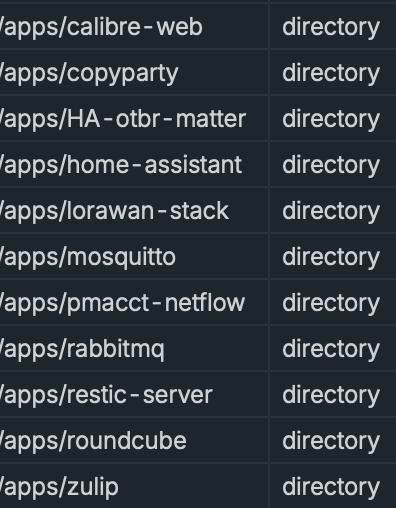
Why are these directories being created for some subset of unused Apps?
Oh, thanks, I see the exact same empty directories too.
Sometimes I have the feeling that some of the (stupid) changes the good Mikrotik guys make at each release are made just to see if users pay attention …
My bigger concern is this:
How and why is /export actively making changes to my router’s filesystem? I was always under the impression that export did nothing more than read (only) and return a list of current non-default configuration values to stdout, or redirect that output into a file if directed - nothing more…
Content deleted by author.
After all the years using ROS, I still haven't unveiled the USP of Detect Internet feature. 
Content deleted by author.
I tryed! I gave up!
My solution? One interface specific for MGMT on Out-OfBand VRF, and TR-069.
It was almost 2 years ago. So should not take as reference.
Your answer (in the other thread) reminded me of a question that has frequently caught my attention.
Until now, no official Mikrotik app (for RouterOS) has been released (except for CHR). Is that correct?
Shouldn't we already be seeing official apps (for RouterOS) being published?
Important!
I'm not talking about apps necessarily being open source.
Just because it's a container doesn't mean it has to be open source. This is a very common misconception.
In my view, what is still missing for this to happen?
A methodology for configurations made in RouterOS (CLI or Winbox) to be passed in real time to the containers.
And I believe the solution for this already exists... the REST API.
how/why?
In 7.23, on ARM64 hardware or CHR, not much.
The key thing that was missing was "secrets" for something like VTI container, which they now support in /app. The containers live a seperate process, in their own user-land... so they have no idea how to use REST or native API inside, some RouterOS login has to be provided which now can be at least on par with rest of policy system (e.g. "sensitive". So you/MikroTik/any have all the tools needed.
On ARM32, you can do same but more manual and some [read-only?] credential have to be plain text. It just more configuration and some of the update/restart/etc stuff is also not automatic. The RouterOS crowd might "hey that's what I want", until you try scripting /container to do ANY automation, it gets tricky quick – why most be better off understanding the /app mechanism (since you can turn off stuff you don't like).
MikroTik publishes CHR and few other ones they must repackage on their DockerHub:
https://hub.docker.com/u/mikrotik
On "building your own VTI [or other] container"...
I'm the last one to give advice on the building part. I'm on Mac, so Docker is not actually very handy/heavy. I use GitHub to build "Docker images" that works with RouterOS, so you create a project there with a Dockerfile in root, and add a GitHub Action workflow in .github/workflows/build.yaml, and it will spit out a URL to use in /app or /container – at the high level. So I can explain that method for you/@pe1chl/others...
In GitHub, create a new repo. You can hit . on new "repo"/project which bring up a web-version of VSCode to edit your files. You can put all the IPSec (or whatever Linux) command you want in the Dockerfile (or add scripts/whatever too), using ENV vars to get stuff from RouterOS at runtime. Again a few more things needed, but that the high level. Then GitHub Actions YAML file (plenty of example elsewhere, or copilot can do a GH action YAML build script in ~1 minute for you) will publish it to ghcr.io/fischerdouglas/my-container (or it can go to dockerhub but you need a different account/setup secret in GitHub for that & RouterOS does not care which). And after the build, you can use the ghcr.io\... URL as image in /app. YAML. That always worked to get a working RouterOS image, YMMV. And with /app auto-update... it pull a new version from GitHub for you (that's what tikoci/rosetta relies on keep updated: /app will re-pull a new image from GH when it checks for "latest", with new docs/changelogs/tests/devices/etc). If you have Docker or podman, that be way to go locally... for that google or AI or search forum.
On USB...
You can use a ramdisk, something like Alpine does not need much, you'd give up memory and need ARM32 with some RAM, but kinda possible, perhaps not recommend since few devices have enough extra RAM... Now ARM64, only the ax2 might be more limited, but all others I think have USB or a lot of ram. But something RB5009 with ARM64 and 1G can easily run a small container from ramdisk.
https://hub.docker.com/r/mikrotik/rke2
Hummm… Sounds tasty!
To be sincere, it is a bit more then that!
Yep, sensible configs are a problem, an need a decent solution.
IMHO, something like a vault.
Taking as references the recent changes in Confluence, I’m sure they are working on a solution to that.
Let’s wait.
But a feature that is really missing in RouterOS is a place to put Persistent Variables, other then those that are in the specific configs.
I remember the case, but I forget the who: Someone had used the /ip/firewall/L7filters to store variables that needed to be persisted in some way.
Well… I’m not good in programing, but what I imagine is that the secret vault they are probably implementing now are just Objects that can store an array of Key-Value, and something to encrypt that.
If it really goes this way, a place to store internal env-vars no obligatorily encrypted, and expose it selectively to the container seam not be to much complex to do.
Also, expose the respective Key-Value to the container on real-time(without restarting the container) sound like a feasible way.
But there are a lot of colleagues that can do better suggestions then this mine.
Please if they are going to support VTI make this as first class citizen in ROS not in a container
Sure, more trying to be encouraging. There is at least a rational path through containers now with /app. The /app stuff works well, but it contained on both sides (how containers/"Docker images" work & how RouterOS works). Far for ideal still...
I kinda view "better policy system" and alternative auth schemes for REST-API/native-API to be handle something OTHER than a username/password as kinda outside of /app problems.
Better stated: /app "secret" passwords are at least on par with Wi-Fi or PPP password/secrets. e.g. "sensitive" so they do not leak in an a plain :export (but will unlike /user, if use a secret in /app... it will appear in export show-sensitive (same as Wi-Fi, PPP, etc). So not really that "secret"...
The "missing" auth scheme in allowing a container access to RouterOS config is someway to make the process(aka container) as trusted (so there is no password need in ENV, and /container code would NOT need a password since it's from a trusted process. It need some map to the group the trust process be assigned (like user-manager). Otherwise, even with secrets, you do have a RouterOS credential more exposed.
Anyway, fair point.
On this...
 ... but for containers, ENV variables are "persistent". I'm still waiting for schema extensions to add you own commands/attributes, I'll be waiting a longer time for that. e.g. so a container could exposes it own commands/attributes at some CLI path to appear back to RouterOS, so that a "network function" container could look same as RouterOS ones.
Hum… that is the idea of a persistent key-values.
Imagine some app running on container.
Some App that needs to be controled by RouterOS Winbox/CLI.
-
You need to be able to deactivate or activar some paramenter inside of a container.
-
You go to variables menu, select the object “container-my-app”
-
Choose the Key “ServiceDesiredState”, and change from running to stop.
Or
-
You need to pass some dynamic Address-List that runs on Router-OS to inside of “container-my-app”.
-
You go to variables menu, select the object “container-my-app”
-
Choose the Key “Addres-List-Special-for-a-thing”, and change it to the name of an afress-list already existing in RouterOS.
How to do that??
There are several better persons to risk a guess here. But I will take my on:
1- Some kind of filesystem that could be shared between APP and RouterOS itself.
And some background job keeping it updated to be readed on container.
2- Some kind of pooling of informations via rest-api.
You don't ... because that opens a whole barrel of worms ... winbox (and CLI to certain extent) is tailored around exact ROS functions and syntax ... and MT has no control over how containerized apps want to do their own UIs. The best one can do is to use (now standard) reverse proxy function to expose WebUI from containers ... and use "native management app" to do management of containerized apps ... which in modern times is something HTML-based (or SOAP or REST) over HTTP/HTTPS.
It's more or less the same in the "true" container environments (such as kubernetes or docker or ...) ... the only difference is that in those environments one has more control over how container images are built (so one can "hardcode" some custom settings into images).