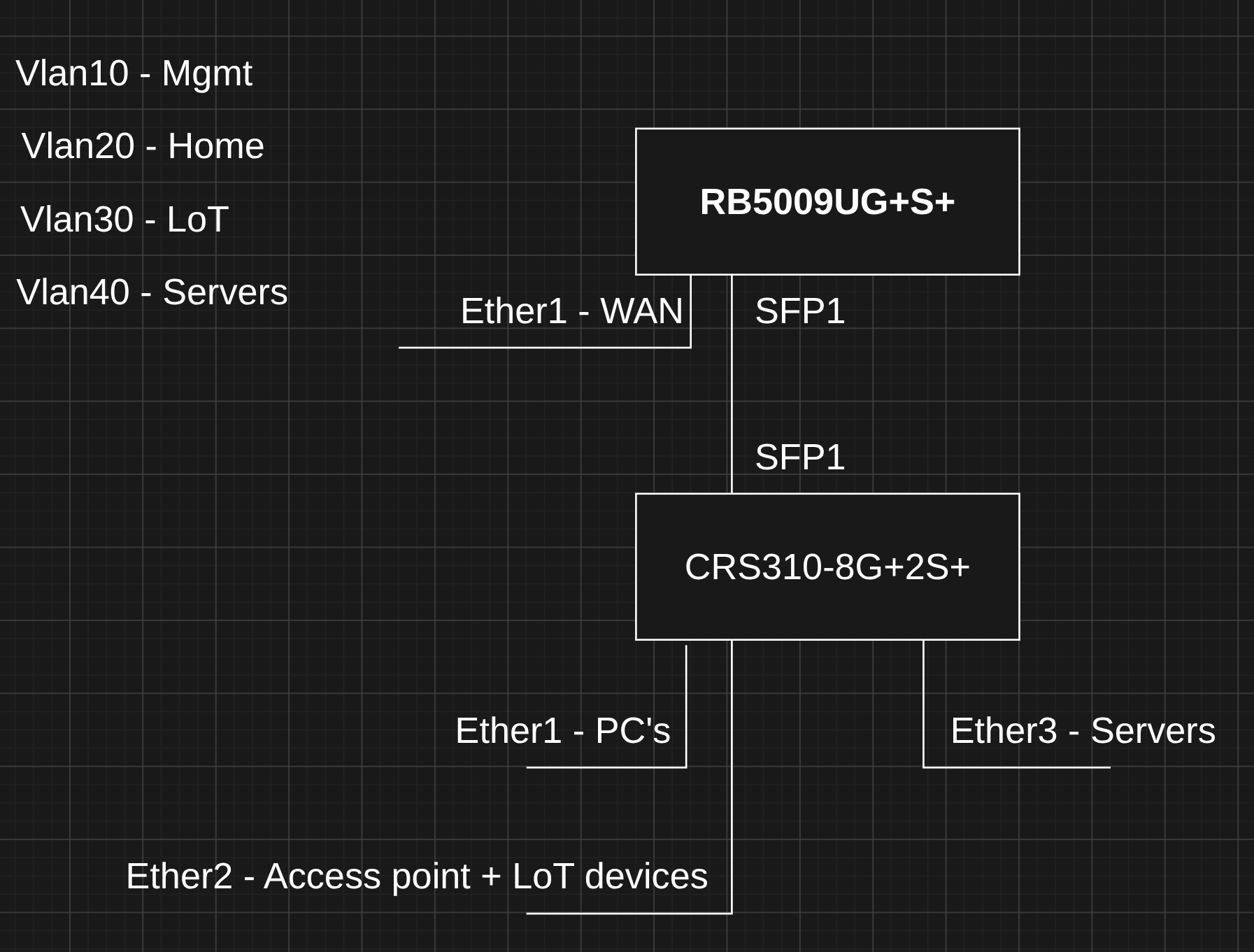
In a business you would definitly want your management on its own vlan that most users would not have access to. There isn't a reason they would need management access to the switches or routers.
At home where you control who has access, then only you can decide if the extra security is worth the inconvenience of access. At my home, I have one vlan for most of the family that does not have access to any of the management, and another vlan for my stuff (used for my pc and management of switches).
I am not sure what you mean by VPN. When I use the term it usually in in reference to something leaving my home.
What I do for remote management is a combination of things. My PC that I normally use is in a tailscale network (tailnet) so I can connect to my home pc with remote desktop (RDP) over tailscale into my pc at home, and from there I can manage my network devices. But normally I am at the same location as the network equipment, so that is only used when I am not at home.
In your situation, I would configure the RB5009 with vlan interfaces for each of the vlans, and all inter-vlan routing would be done by the RB5009. I would also configure the switch in the RB5009 as vlan-aware (with vlan-filtering=yes); then you would be able to use the remaining ethernet ports as an extension to the ports on the CRS-310 (and be able to configure each port as access port for a specific vlan, or as a trunk, or you could remove a port from the bridge and use it as a "emergency access" port. e.g. see Once and for all COMPLETE Offbridge Port setup
When you are switching to vlan-aware mode the first time, its common to lock yourself out. Having a port that isn't part of the bridge is the closest thing to a console port that the RB5009 comes with. It is possible to configure without a dedicated port, but until you are familiar with how ROS works, have a port that is dedicated to emergency access is worthwhile. Once you understand things, it is less important.
So on the RB5009 (ether1 WAN will not be part of the bridge), for learning mode, I would also remove ether8 (then the port becomes an interface) see previous link for how this is done. The other ports (ether2-ether7 and SFP1 will be part of the bridge. I would start with the "defconf" where ether1 is WAN with firewall etc, and all other ports are part of the bridge. Then remove ether8, turn on vlan-aware mode, create vlan interfaces, dhcp servers etc. There are several threads about how to do this, in the technical topics tag (poorly named rtfum), the one that may be most useful for you is Tutorial: Home VLAN configuration (RB5009, cAP ACs, multiple SSIDs) although it does not have an attached switch, but the access points are similar (with a trunk connection). One thing I don't like about the tutorial, is that it starts from an empty config, and if this is your only router, it may be exposed to the internet without any firewall until that has been configured. I prefer to start with the defconf, then add the vlans, but I can't find a tutorial that has the procedure to do that. Here is another thread that does cover vlans on RB5009 Help with vlans on RB5009
The CRS310 should have only one vlan interface, the one used to manage it. The bridge should be setup in vlan-aware mode, and it will contain all ports (possibly removing one during setup, but since the CRS310 has a proper serial console port, that isn't as necessary; the console (which is compatible with the RJ45 cisco serial console) is your ultimate get out of jail free card.
On the CRS310 use the /interface bridge port and /interface bridge vlan to configure the vlans on the ports. But you want only a single vlan interface (SVI in cisco lingo) for the management, then the CRS won't try to route traffic between vlans. The SPF will be a member of all vlans, (probably with every vlan tagged). The bridge itself will have pvid 1 by default in defconf and the bridge will have ip address 192.168.88.1 (if you remove the ip address, it will make switching to vlan-aware mode a bit more complex.
On the RB5009 and the CRS310 for access, think about the vlans, not the ports. This is similar to the way that Cisco switch work, a port is a member of possibly multiple vlans, with each vlan in a separate broadcast domain and (usually) its own single subnet (so dhcp will work correctly).
If you get stuck, feel free to ask more questions, but you will probably be requested to provide more information (like a spreadsheet similar to what are in this post).
And as always, a sanitized export of your config, and an explanation of the problem. Useful guidelines for what is useful in a problem report here.