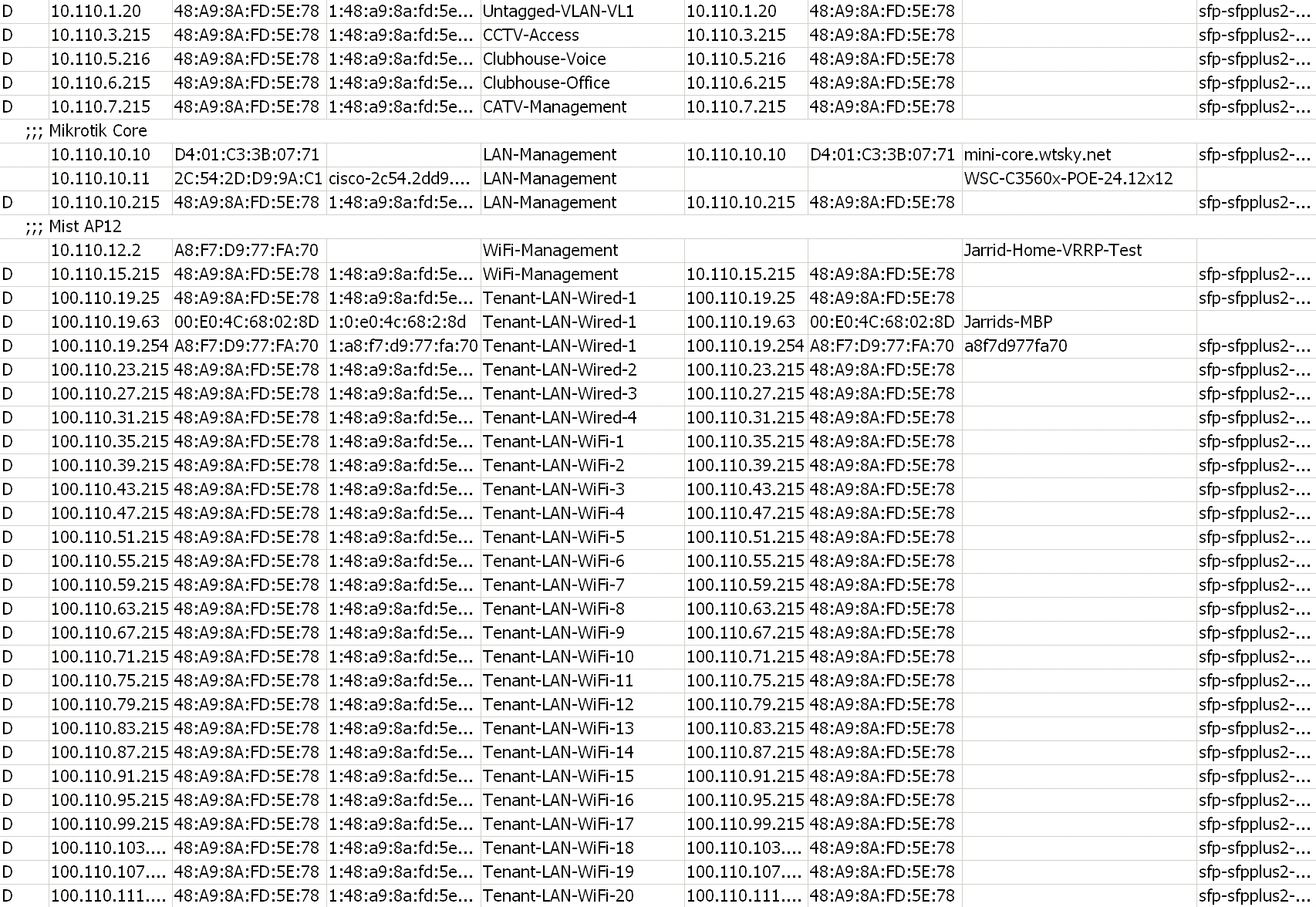
Hey all, I have not worked VRRP yet, but we trying to use it to have a backup router at any places that may request to have it. I have a weird issue where every single interface shows an IP address on the DHCP server, and then they will drop off and come back repeatedly. I have set up a floating IP on each network where the gateway address is on the VRRP interface and the routers IPs are on the VLAN directly. I have posted some snippets from my routers VRRP/IP addresses below, please let me know if you see anything odd I havent done correctly! I also attached a SS of the DHCP table and what its showing.
VRRP isn’t too hard. But the VRRP address needs to be /32 (which it is). But the VRRP and LAN do need to be in same subnet.
And looks like CCTV-Access has mismatched IPs (likely typo … but would for sure cause issues):
/ip address
add address=10.110**.3.2.**253/23 comment=CCTV-Access interface=CCTV-Access network=10.110.2.0
add address=10.110.2.1 comment=CCTV-Access-VRRP interface=CCTV-Access-VRRP network=10.110.2.0
Also make sure the vrrp interfaces are all also in the “LAN” interface list, otherwise default firewall may block.
I have looked and looked, and I dont see where the IP is missmatched on my config, could you show me where that is a little better? That is a /23 so and I decided to use the last usable addresses which would be 3.253 and 3.254. If I missed something, please let me know!
Fair enough. I didn’t notice the /23…assumed /24. Otherwise the VRRP part looks right.
I’d look at your bridge configuration, on why clients are getting address on all. Some VLAN filtering misconfiguration could cause that. e.g. /interface/bridge/vlans vs PVID/frame-type etc…
What interface is the DHCP server listening on? i.e. is it listening on the VRRP interface on BOTH routers, or is DHCP only on one router?
Also, do you have the VRRP interface in the LAN interface list (or whatever /interface/list you may be using for LAN/VLANs in firewall rules)? (AFAIK, that wouldn’t cause DHCP issue you’re seeing)
It is listening directly on the VLAN interface currently. I am moving them both to the vrrp interface instead, as I just tested a single network and it appears that clears it up since it disabled DHCP until needed.
Our bridge config is pretty simple, not a whole lot to it, and we are actually not doing any type of VLAN filtering on here, we just loaded all of the VLAN up on the BRIDGE-LAN that we created and leave it at that. I am aware of how to set up filtering, so if that is what we need to make it resolve, then I dont mind setting it up.
/interface bridge add comment=BRIDGE-LAN name=BRIDGE-LAN
/interface bridge add comment=BRIDGE-WAN name=BRIDGE-WAN
/interface bridge port add bridge=BRIDGE-WAN horizon=1 interface=sfp-sfpplus1-WAN
/interface bridge port add bridge=BRIDGE-WAN horizon=1 interface=sfp28-1-WAN
/interface bridge port add bridge=BRIDGE-WAN horizon=1 interface=ether1-WAN
/interface bridge port add bridge=BRIDGE-LAN interface=sfp-sfpplus2-LAN
/interface bridge port add bridge=BRIDGE-LAN horizon=1 interface=sfp-sfpplus3-LAN
/interface bridge port add bridge=BRIDGE-LAN horizon=1 interface=sfp-sfpplus4-LAN
/interface bridge port add bridge=BRIDGE-LAN horizon=1 interface=sfp-sfpplus5-LAN
/interface bridge port add bridge=BRIDGE-LAN horizon=1 interface=sfp-sfpplus6-LAN
/interface bridge port add bridge=BRIDGE-LAN horizon=1 interface=sfp-sfpplus7-LAN
/interface bridge port add bridge=BRIDGE-LAN horizon=1 interface=sfp-sfpplus8-LAN
/interface bridge port add bridge=BRIDGE-LAN horizon=1 interface=sfp-sfpplus9-LAN
/interface bridge port add bridge=BRIDGE-LAN horizon=1 interface=sfp-sfpplus10-LAN
/interface bridge port add bridge=BRIDGE-LAN horizon=1 interface=sfp-sfpplus11-LAN
/interface bridge port add bridge=BRIDGE-LAN horizon=1 interface=sfp-sfpplus12-LAN
/interface bridge port add bridge=BRIDGE-LAN horizon=1 interface=sfp28-2-LAN
So I tested vlan filtering and it seems to kill everything on both routers when enabled. I added all VLANS to be tagged on the bridge and the physical interfaces on the LAN as well.
Was you VLAN+bridge without filtering working before VRRP? Also, looks like sfpplus-2 is the one with issues, and that’s the one with horizon=0 while rest are horizon=1.
FWIW, If you don’t want to use vlan-filtering approach. You’d need seperate bridges for each VLAN, which is going to be bigger PITA than figuring out the bridge VLAN table approach…
I would love to use VLAN filtering, but the routers seemed to have compeltely killed VRRP now even after disabling it lol. I am going to reboot and see if that helps anything.
Also, I disabled horizon on sfp2 on both routers just in case it caused any p2p issues for vrrp.
sorry ,yes, it was working just fine with VRRP and before I added VRRP. I did enable filtering, and then added the vlans to the bridge and tagged them all on all interfaces on the LAN under interface/bridge/vlans
So if I enable filtering on the routers with 0 ingress filtering, router 1 stays up, but r2 never brings any IPs up, its kind of odd to be honest that I didnt see the same results between the 2.
Obviously its completely up to you, but I am down to hop on a call of somesort and let you see my config first hand and maybe we can work it out togeher?
I’m pretty sure this is a VLAN tagging issue – this is not easy to get right as all the parts have to align… So just enabling vlan-filtering=yes is not the whole story for sure…
Can you post a redacted config of one of the routers, and some description of what VLANs should be tagged/untagged on what port?
Sure I can attach them here, and also you will see here I didnt just turn on VLAN filtering, I also created the VLANs for it which are currently disabled. All VLANs should be tagged as we will be trunking them all down stream to a ag core switch that will feed each individual IDF closet throughout any property we deploy to. All of our configs are pretty cookie cutter, so they will end up all mimmicking this for the most part (I did remove a couple of items for security reasons). But the files are below, and I did disable preemption mode and enabled sync connection tracking on both routers as well. r2.rsc (85.1 KB) r1.rsc (84.4 KB)
Okay, so you want all trunk ports, that make sense.
I still recommend using bridge vlan-filtering=yes. Your issue with that is the BRIDGE-LAN itself needs to be in the tagged= list.
/interface bridge vlan add bridge=BRIDGE-LAN disabled=yestagged=BRIDGE-LAN,sfp-sfpplus2-LAN vlan-ids=2,5-7,10,12,16-39,101-800,3000
Also noticed you have sync-connection=yes enabled. While not sure what effect it have on DHCP if VRRP isn’t failing over… Might disabled that to see if it has an effect.