Why do the docs not mention adding "bridge" as its own tagged interface when doing a VLAN trunk?

I have an existing Cisco switch, and I’ve configured one of its ports as a Trunk port, with VLAN tagging using 802.1Q. I wanted to get that working with my Mikrotik RB4011iGS+RM, using ether1 as the trunk port, and ether2-ether10 each being access ports for various VLANs. However after following the tutorials in the docs it did not work as I expected. I did eventually get it working, but not after the failed attempt below, which was based off of the following two tutorials:

Based off of these, this was my bridge’s configuration:

## Add bridge1

/interface bridge add name=bridge1 vlan-filtering=yes

## Add trunk port to bridge1

/interface bridge port add bridge=bridge1 interface=ether1 frame-types=admit-only-vlan-tagged

## Add access ports to bridge1

/interface bridge port add bridge=bridge1 interface=ether2  pvid=10  frame-types=admit-only-untagged-and-priority-tagged
/interface bridge port add bridge=bridge1 interface=ether3  pvid=10  frame-types=admit-only-untagged-and-priority-tagged
/interface bridge port add bridge=bridge1 interface=ether4  pvid=10  frame-types=admit-only-untagged-and-priority-tagged
/interface bridge port add bridge=bridge1 interface=ether5  pvid=10  frame-types=admit-only-untagged-and-priority-tagged
/interface bridge port add bridge=bridge1 interface=ether6  pvid=30  frame-types=admit-only-untagged-and-priority-tagged
/interface bridge port add bridge=bridge1 interface=ether7  pvid=30  frame-types=admit-only-untagged-and-priority-tagged
/interface bridge port add bridge=bridge1 interface=ether8  pvid=20  frame-types=admit-only-untagged-and-priority-tagged
/interface bridge port add bridge=bridge1 interface=ether9  pvid=99  frame-types=admit-only-untagged-and-priority-tagged
/interface bridge port add bridge=bridge1 interface=ether10 pvid=99  frame-types=admit-only-untagged-and-priority-tagged

## Add vlans, and tag them on ether1 (trunk)

/interface bridge vlan add bridge=bridge1 tagged=ether1 vlan-ids=10
/interface bridge vlan add bridge=bridge1 tagged=ether1 vlan-ids=20
/interface bridge vlan add bridge=bridge1 tagged=ether1 vlan-ids=30
/interface bridge vlan add bridge=bridge1 tagged=ether1 vlan-ids=99

However with this configuration, I stopped receiving any traffic once I enabled vlan-filtering=yes on the bridge.

After some digging around, I found this post: http://forum.mikrotik.com/t/bridge-vlan-not-getting-arp/168612/3 which says:

You need to add the name of the bridge itself as a tagged port.
This represents the “CPU side” of the bridge.

This makes sense after reading more in the documentation. So I changed the last section of my config to the following, which worked great:

## Add vlans, and tag them on ether1 (trunk)

/interface bridge vlan add bridge=bridge1 tagged=ether1,bridge1 vlan-ids=10
/interface bridge vlan add bridge=bridge1 tagged=ether1,bridge1 vlan-ids=20
/interface bridge vlan add bridge=bridge1 tagged=ether1,bridge1 vlan-ids=30
/interface bridge vlan add bridge=bridge1 tagged=ether1,bridge1 vlan-ids=99
#                                    Added bridge1 here ^^^^^^^

I’m confused why the tutorials I was looking at didn’t even mention adding bridge1 as a tagged interface under the VLAN bridge. Am I misunderstanding what the tutorial was trying to do? Or maybe the tutorial made some assumptions about pre-existing configuration?

My config is functioning as I would like for now, so I don’t need immediate help. But I’m just wondering what I maybe missed, or alternative just confirmation that the tutorials missed something.

Because this is the official tutorial, those docs are an imposter :wink:http://forum.mikrotik.com/t/using-routeros-to-vlan-your-network/126489/1

Do agree though, the first article only notes tagging bridge for managment vlan, which is certainly true for using an MT device not as a router but as switch or switch/AP

Awesome thanks! But even in that link, the provided switch.rsc file only mentions the bridge with regards to the management VLAN (99) - shouldn’t the other VLANs have the bridge as a tagged interface? Or maybe (probably!) I’m still not understanding something.

# egress behavior
/interface bridge vlan

# Purple Trunk. L2 switching only, Bridge not needed as tagged member (except BASE_VLAN 99)
add bridge=BR1 tagged=sfp1,sfp2     vlan-ids=10
add bridge=BR1 tagged=sfp1,sfp2     vlan-ids=20
add bridge=BR1 tagged=sfp1,sfp2     vlan-ids=30
add bridge=BR1 tagged=BR1,sfp1,sfp2 vlan-ids=99

Thanks!

No. You only need to add the bridge as a tagged member for traffic which interacts with services provided by the CPU, e.g. a router-on-as-stick setup with multiple VLANs. See http://forum.mikrotik.com/t/routeros-bridge-mysteries-explained/147832/1 for more information.

I believe that he is asking in the case an MT device is being used as a ROUTER, I already noted its only required for management network (network device gets an IP from) for an MT router being used solely as a switch or switch/AP

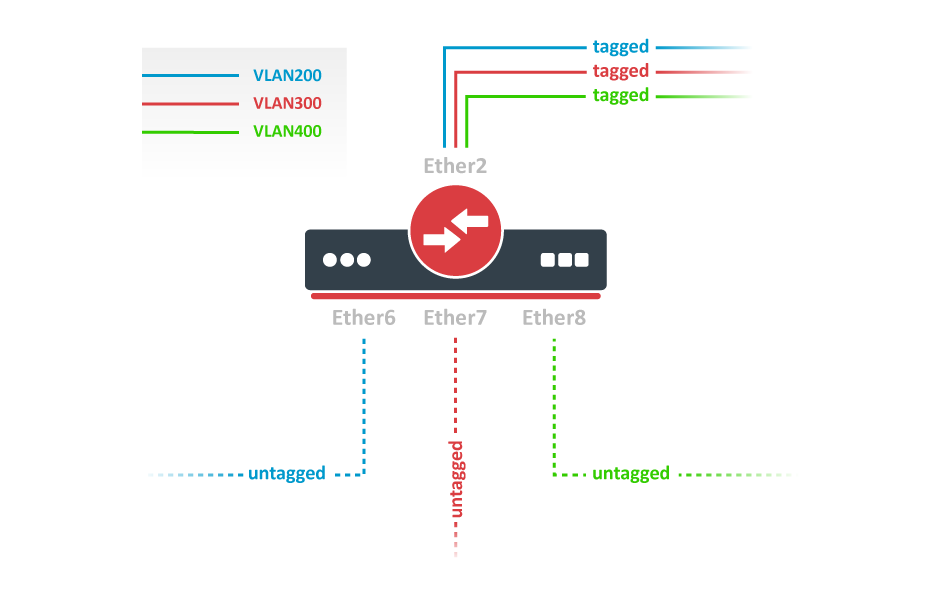
No, I am only attempting to use the MT as a switch. There is another switch upstream (Cisco), and they are connected by a trunk port. I can run Wireshark and sniff the trunk port on the Cisco, and I see that the upstream switch is indeed sending VLAN-tagged packets as expected. I am now trying to have the MT receive/forward packets to various etherX ports on the MT based on the packet’s VLAN tag. Basically the setup shown in this pic (taken from https://help.mikrotik.com/docs/display/ROS/Bridging+and+Switching#BridgingandSwitching-VLANExample-TrunkandAccessPorts):

The reason I’m confused is that when I followed that tutorial (which does not mention adding the bridge as a tagged interface to the VLANs), it did not work the way I expected. I used Wireshark to listen on one of the MT’s Access ports, and I saw none of the traffic that was occurring on the upstream switch. As soon as I added the bridge as an untagged interface on the VLANs, I immediately saw the traffic I was expecting on the Access ports.

RB4011 is peculiar because it actually has two switch chips. There was a bug[] (acked by MT) in how bridge set up switch chip for (L2) HW offload. Both switch chips are interconnected via CPU (one switch chip runs block of ether1-5 and other switch chip runs block of ether6-10). The switch-cpu link is set up according to bridge port settings, which is fine if there’s only one switch chip. But in RB4011 both switch-cpu links are also used for connecting both switch chips.
So the workaround you discovered (set bridge as tagged member of all VLANs that are present on both ethernet port blocks) is what needs to be done … only on devices which have multiple switch chips and are capable of L2 HW offload (i.e. RB4011).


[
] I think that this bug is supposed to be fixed already but I don’t know since which ROS version. So if you’re not using fairly recent ROS, you may want to upgrade (I’d suggest you to go with 7.12.1, 7.13 came with quite a few radical changes and seems to suffer from a few related bugs). And check, if the workaround is still needed.

Aaah! This would explain both my original problem, and one oddity I had noticed while troubleshooting this morning - I WAS seeing the correct traffic when plugged into ether2-ether5, but NOT when plugged into ether6-ether7. By pure coincidence, I had ether2-ether5 assigned to one specific VLAN, which had me scratching my head why ONE VLAN looked like it was working correctly, but not the others (despite not being configured differently).

Thank you so much! I think that was the key I was missing. :smiley:

EDIT: I just checked, and I’m currently on 7.10. Don’t know how recent that is, but I’ll look into the changelogs and see if that particular bug is mentioned. Thank you again!

Yeah dont stay on 7.10, 7.12 or 7.13 are better choices.

This may be a case of me being a simpleton, but that main post linked didn’t really answer why a bridge interface must be specified as a tagged or untagged port. It explains how VLANs work to a degree, but doesn’t explain why a bridge interface must be tagged.

Your comment around CPU based services answered the question quite succinctly. I’ve been wondering whether I should be tagging bridge on various VLANs on my switches, and why the router itself needs the bridge interface to be tagged. Based on your explanation, I understand that the router needs bridge to be tagged because it offers DHCP. The switches do no L3 (other than the MGMT vlan) and so all VLANs (except MGMT) don’t need the bridge to be specified as a tagged member.

Read this excellent post!

http://forum.mikrotik.com/t/routeros-bridge-mysteries-explained/147832/1