Again, as TeslaSystems mentioned – this is the current needful on Winbox4 -
(window background color, input fields background color, active/inactive window frame/header color, input field frame colors/thickness, text size/style/colors for every place and so on)
Need better active window coloring
Better current selection coloring / highlighting.
Better shading of buttons
Better color choices – current is “too soft”
Just make what teslasystems suggested about how windows 7 allowed you to configure every aspect of the UI (colors, borders, backgrounds, whatever) and let users come up with whatever work for them and their monitors.
Follow what Paternot suggested. Daily drive Winbox 4 strictly in the shittiest monitor you can find by the oldest staff member (or relative or whatever). If it’s usable under those conditions it will probable be usable (colors/contrast-wise) for everyone.
One interesting thing is that in terms of contrast, it looks better on my shitty notebook monitor than on the modern 4K monitor. Just because it’s possible to “adjust contrast” by changing the lid angle
Do you have multiple interface running on Mac? i.e. Wi-Fi and Ethernet
I have sometime seen issue where that caused some issue with MAC winbox. So if that’s the case, you might try disabling the other interface not connected to defaulted MikroTik.
I noticed an annoyance in beta21 on Windows. In “File” every time you click Download, the file save dialog always begins with “C:\Windows\System32”. Can you please make it remember the previously selected directory?
In my case interface order helps, putting interface which is used to connect to MT device on top along with disabling Mac firewall, same thing needed to detect device in Netinstall. Scenario for eg. when one wants to have internet over wifi through mobile hotspot and connect to MT device over network usb adapter at same time (in this case gateway/router ip must not be set for this usb adapter network to avoid setting default route on it for internet connection).
What’s new in 4.0beta22:
*) correctly show limited entry count in Ping form
*) do not sort radio buttons by text and improve UI style
*) make certain drop-down menus editable (e.g. legacy wireless Frequency property)
*) add support for new RouterOS field types
*) fix legacy Wireless “Setup Repeater” action
*) fix some complex field read-only states
*) do not apply default configuration to objects received from RouterOS or copied objects
*) form: layout checkboxes in available width if column count not defined
*) accept Enter/Esc keyboard actions while connecting in Login panel or Reconnect panel
*) terminal: fix output in some cases when using top command through /container/shell
*) prevent opening read-only with empty array widget
*) do not show empty buttons in form panel with empty names
*) fix crash when closing connection with table filter opened
*) terminal: ignore legacy shift-out (SO) character
Ever since the tabs is back it’s much acceptable to use winbox4, the tool tip on various places and multi window ping should be implemented soon, thanks a ton on MT for doing a great job for routerOS in general with the past two release and this v7.20beta2 keep it coming the goodies how about VTI or L2TP LAC? ahaahhaha
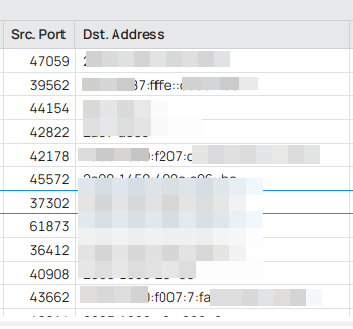
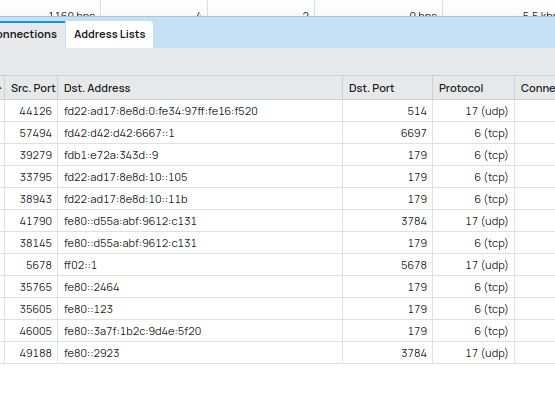
I hope some day the zoom render issues are addressed. On 100% zoom level it looks OK but is way too big compared to other applications on my system. Maybe Winbox does not respect xorg settings/xsettingsd. So I need to reduce the zoom level but unfortunately this lead to most of the font rendering (most noticeable on number character) gets distorted and unreadable. But even on 100% it is not free of issues. Here for example on the “IPv6 Firewall Connections” list:
I use it with 92% zoom (it really is a tad bigger than the rest), but didn’t get these distortions. Maybe it’s something to do with GPU drivers and/or desktop used?
I’m on KDE and Xorg, using NVidia proprietary drivers.