Do you suggest choosing a phone specifically for the router? Because not all phones work well with your devices. Are you seriously???
If that’s true chipset incompatibility, why the physically same MikroTik device with LEDE firmware installed works fine?
He said “Either solution works fine”, so you can choose a different phone if you must keep using the RB951, or choose a different AP if you must use a specific incompatible phone.
It sounds strange and absurd, choose a phone for the router, or i something don’t understand???
Hi everyone.Normis,where i can change wifi chip of one of my 100…1 miktiks FOR FREE? I think you must make return of all your "bad"devices.
Why do you think the problem is in hardware? I have info from support - it is software problem.
Hello,
we will work on this problem but first we need to finetune the new wireless driver for the new hardware and then we would try to implement the fix for the old wireless hardware.
Best regards,
Uldis C.
Yes, it is software problem. Because with LEDE works Mikrotik hardware better then original software (ROS)
Uldis/Normis: When you do your development and testing on Wifi modes do you validate the signal with a suitable Rhode&Schwartz/Agilent/Anritsu/Keysight/etc spectrum analyser and 802.11 protocol tester at all? It would seem to me such a device would reveal your problem very quickly! It seems to me like you’re guessing!
I have read through the topic and is clear to me that Mikrotik via Normis as representative, is either lying or the Mikrotik developers really have no much idea about wifi, although they are supposedly writing code for wifi devices. Both possibilities are really sad and show that anyone who takes wifi seriously should not invest much in Mikrotik Access Points.
Reportedly, LEDE works just fine in the very same devices for which MkTik initially responded that they need too much work to fix and later changed to that they are fundamentally incompatible and thus cannot be fixed. My guess? Of course the problem is not in the chip and can be fixed, but the Mikrotik Atheros driver is a highly proprietary patchwork, too alienated from the upstream code to backport any fix, especially since the current Mikrotik devs are clearly not very competent in low-level wifi coding: everything that requires hacking deeply into the hardware are off-limits for them, like NV2 for example.
In this respect, it looks like the initial reply by Normis was the more sincere one, while the second was just a clumpsy cover-up of MkTik’s severely limited coding ability for anything wifi-related.
I can confirm the same issue here with 2 devices - Xiaomi Redmi Note4 and a wireless usb stick with RTL8811AU chip. Both tested on 2.4 Ghz band.
Same problem here.. RX and TX <20Mbps
CAT S60
LG G3
Any news on a software fix?
Does the new hAP ac² suffers from the same issue?
I also have big problem with now one phone on my network, it’s Xiaomi Redmi 3. User told me thet biggest problem is form a week (probably last update for the router and CAPs). I see that RX connect is only 1-13,5Mbps, TX connect in the same time is to 150Mbps. I mustrun one AP on OpenWrt/LEDE to give use possible to use internet. In this case is biggest problem only for download speed because speed connect to APs is mostly 1Mbps.
I also have problem with TX rate now for one phone on my network, it’s Xiaomi Redmi 3. User told me that big problem is for a week. Then I’ve upgraded my router and CAPs to 6.41.3
He get TX rate mosty 1Mbps and of course can’t use internet connection.
Apparently, there is a serious flaw in your hardware design process. Here is the screenshot of my wap AC connected devices which shows quite a few devices none of which is low-end Chinese phone, as it was said previously. Especially interesting is the Tx rage of iPhone 6s which is even lower than that of Moto G2.
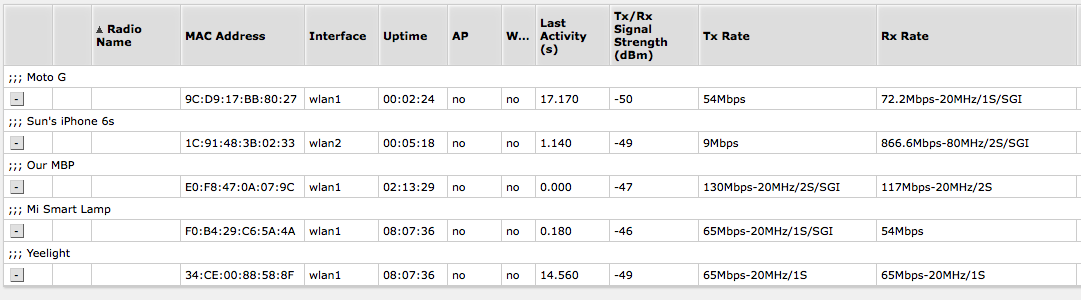
I am also having this exactly same problem.
My Mikrotik device is a RBCAPL-2ND (CAP Lite). The phone is a Moto G5 plus, which has a Qualcomm Snapdragon 625 chipset, probably the same processor as the Xiaomi’s phones.
Interestingly, my Moto G5 plus initially is shown on the registration page with the Tx Rate set to 14mbps-20MHz/1s/SGI. But after a few seconds the Tx Rate changes to 54Mbps. When my phone is connected to the Mikrotik CAP Lite, the download bandwidth measured using IPERF3 is ~20 Mbps and the upload bandwidth is ~50 Mbps.
Another problem with this CAP Lite device is that the channels 7 and 8 cannot be used properly because they provide a max bandwidth of about 3 Mbps.
My Google Chromecast and my Lenovo ThinkPad T430 have no problem to connect to this CAP Lite at 802.11n speeds (72 Mbps and 144 Mbps respectively).
The same phone connects successfully at 802.11n speeds (2.4 GHz) to the following wireless devices:
TP-LINK TL-WR842ND.v2 running LEDE firmware 17.01.4 - Tx 72Mbps - Rx: 72Mbps - actual bandwidth measured using IPERF3: ~51 Mbps.
TP-LINK EAP115.v1 running firmware version EAP115(US)_V1_170106: Tx: 72Mbps - Rx: 72Mbps - actual bandwidth measured using IPERF3: ~52 Mbps.
TP-LINK Archer C20.v4 running firmware version Archer C20(BR)_V4_170309: Tx: 72Mbps - Rx: 72Mbps - actual bandwidth measured using IPERF3: ~50 Mbps.
So until this driver problem is fixed, this device is useless to me.
Okay, I followed your recommendation and got another issue http://forum.mikrotik.com/t/hap-ac-lan-wifi-5ghz-performance-issue/118005/1
WHEN?!
Hello.
I was tormented with the same problems.
Today I updated one access point wAP AC to 6.43rc3. Result - It works as it should !!!
Problems with mobile devices have been fixed!
6.43rc3
*) wireless - improved compatibility with BCM chipset devices;
This includes XIAOMI devices. Please upgrade and test - fixes soon will be included in current releases as well
ISP link 1Gb
AP - wAP AC
Devices:
Xiaomi mi max2 (down - 54 Mbps, up - 72Mbps)
Lenovo P2 (down - 90 Mbps, up - 70Mbps)
Tested only on 2.4 GHz