Accessing router-hosted services (DNS, HTTP, etc) from a VRF

Hello,

I’ve got a setup where I have one VRF with a bunch of interfaces in it. I also have manual routes set up between the VRF and the main routing table, such that a host on the VRF interface can talk to a host on the “main”/non-VRF interface and vice-versa. Here’s an example:

main interfaces:

  • eth1 - 10.1.1.1/24
  • eth2 - 10.1.2.1/24

main-side hosts:

  • 10.1.1.2 connected to eth1
  • 10.1.2.2 connected to eth2

VRF interfaces:

  • eth3 - 10.2.1.1/24
  • eth4 - 10.2.2.1/24

VRF-side hosts:

  • 10.2.1.2 connected to eth3
  • 10.2.2.2 connected to eth4

All hosts can ping each other thanks to the manually set up routes between the VRF routing table and main one.

Now the problem is that the router hosts a handful of services such as DNS, HTTP web UI as well as Wireguard responder. Any hosts on the “main” side can talk to it using either of the router’s IPs (10.1.1.1 or 10.1.2.1). Problem is that the VRF-side hosts can’t talk to the router at all using either the VRF-side IPs (somewhat expected) or the main-side IPs (which I’d expect to work thanks to the manual routes).

Anyone knows a solution?

Any ideas?

@Rjevski I have 100% the same issue, specifically with DNS and the wireguard responder which must be available in multiple VRFs.

Did you ever have any progress on this?

@divB haven't looked at it since then, sorry.

In the most recent versions of RouterOS you can change the order of routing Policy Rules
in /routing settings

You could change the order so local is higher in priority.
Which might work.
But will very likely break other things.

@rplant like this?

/routing/settings/print
single-process: no
check-gateway-ping-interval: 10s
check-gateway-ping-timeout: 1s
check-gateway-ping-count: 2
policy-rules: mangle
local
vrf-lookup
vrf-unreach
user
main

I have a hard time understanding the routing policies and how this is related to this issue. Could you explain why it doesn't work with the original setting but works when local comes lower (I assume before vhf-lookup?) ?

Sorry, I haven't actually tried it.
But yes, as you have specified.

It specifies how it goes about looking for routes.
Having local higher means if the destination is an IP address in any VRF on the router, it will go there.
instead of using the VRF it would use normally.

Not sure about Getting the return traffic back though.

Based on the tunnel idea from this thread, here is a minimal example configuration to access the router services (all listening on main) from another VRF.

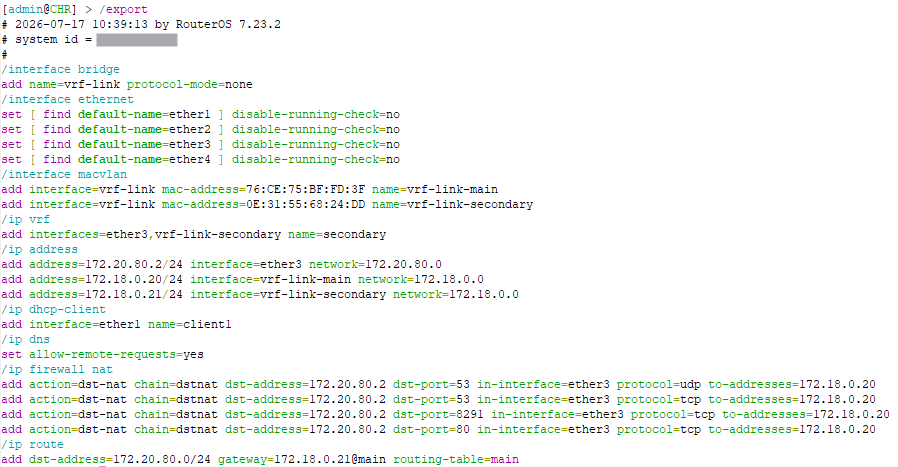
This is the whole configuration export of the test installation:

In this test configuration, ether3 has the 172.20.80.2/24 subnet assigned, and is in a VRF named secondary.

/ip vrf
add interfaces=ether3 name=secondary

/ip address
add address=172.20.80.2/24 interface=ether3 network=172.20.80.0

We want the clients connected to ether3 with IP addresses 172.20.80.x, to be able to use the router for DNS, WinBox, and WebFig. All 3 services are by default in the main VRF.

Similar to the other thread:

  1. First, add a dummy bridge and two MACVLAN interfaces above it, with mode set to bridge:

    /interface bridge
    add name=vrf-link protocol-mode=none
    
    /interface macvlan
    add interface=vrf-link mode=bridge name=vrf-link-main
    add interface=vrf-link mode=bridge name=vrf-link-secondary
    
  2. Next, make sure vrf-link-secondary is added to the secondary VRF (easier to do it with WinBox :stuck_out_tongue:).

    /ip vrf 
    set [find name=secondary] interfaces=ether3,vrf-link-secondary
    
  3. Add IP -> Address entries for the two MACVLAN interface:

    /ip address
    add address=172.18.0.20/24 interface=vrf-link-main network=172.18.0.0
    add address=172.18.0.21/24 interface=vrf-link-secondary network=172.18.0.0
    
  4. We can now add the DSTNAT rules for traffic from 172.20.80.x, with the router as destination (172.20.80.2) coming into ether3 (which is part of the secondary VRF) for DNS, WinBox, WebFig to direct them to 172.18.0.20, which is the IP address of the router on the MACVLAN interface vrf-link-main in the main VRF:

    /ip firewall nat
    add action=dst-nat chain=dstnat dst-address=172.20.80.2 dst-port=53 \
        in-interface=ether3 protocol=udp to-addresses=172.18.0.20
    add action=dst-nat chain=dstnat dst-address=172.20.80.2 dst-port=53 \
        in-interface=ether3 protocol=tcp to-addresses=172.18.0.20
    add action=dst-nat chain=dstnat dst-address=172.20.80.2 dst-port=8291 \
        in-interface=ether3 protocol=tcp to-addresses=172.18.0.20
    add action=dst-nat chain=dstnat dst-address=172.20.80.2 dst-port=80 \
        in-interface=ether3 protocol=tcp to-addresses=172.18.0.20
    
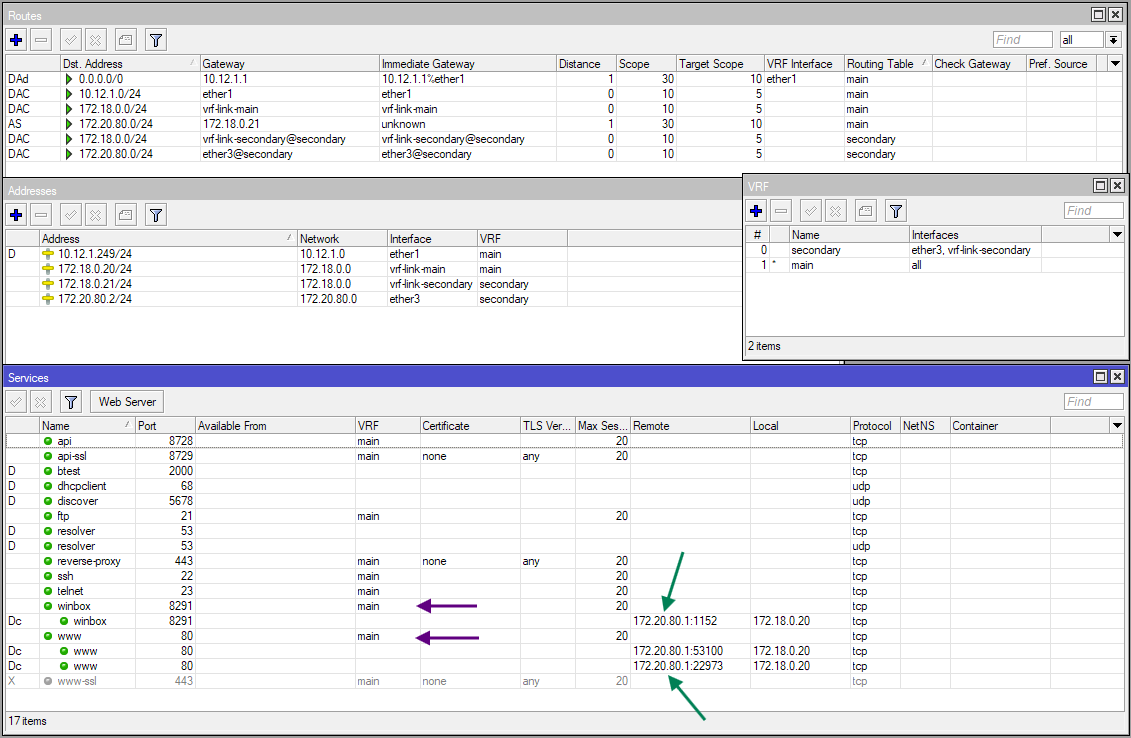
  5. After this step, the router's services will be able to receive and process the incoming packets, however, we still need to properly route their responses, by adding a route for destination 172.20.80.0/24 (subnet of ether3) in main:

    /ip route
    add dst-address=172.20.80.0/24 gateway=172.18.0.21@main routing-table=main
    

    The gateway address used is 172.18.0.21, which is the address of the router on the vrf-link-secondary interface in the secondary VRF.

    With this setup, a client on ether3 (172.20.80.1 in the screenshot below) can access the services without issue:


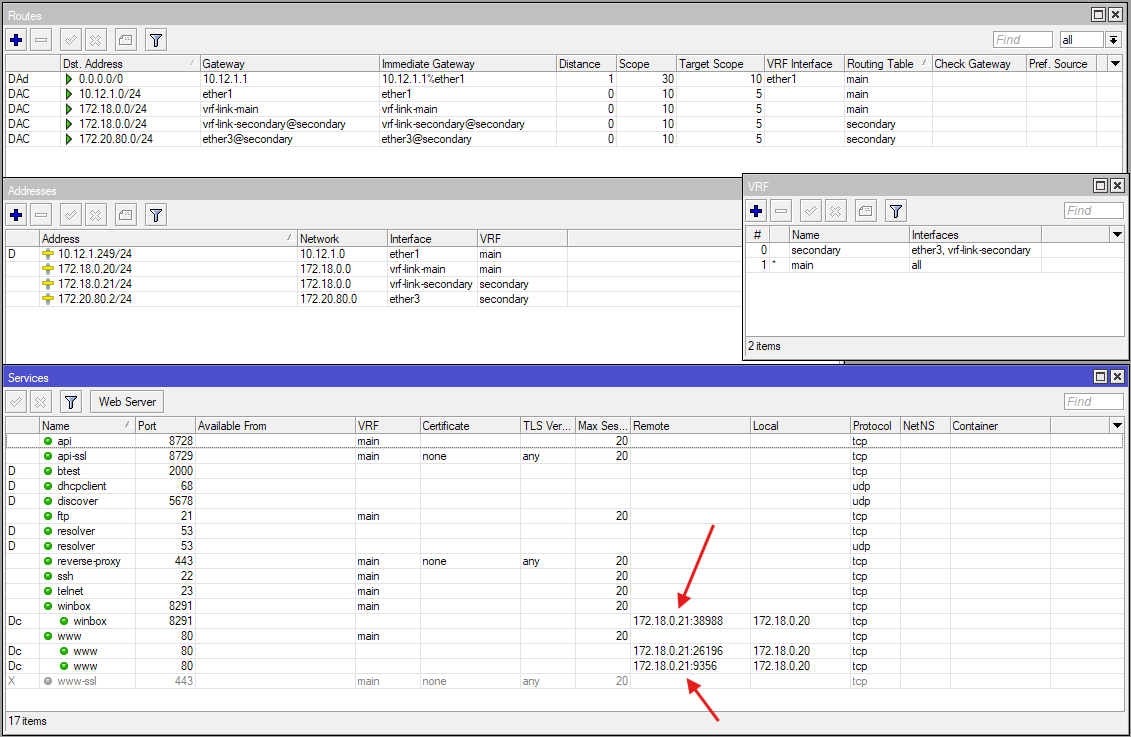
  1. Now if the route at step #5 bother you, and you don't want to leak the route towards 172.20.80.0/24 in the main routing table, then you can remove that route and apply a SRCNAT rule instead:

    /ip firewall nat
    add action=src-nat chain=srcnat dst-address=172.18.0.20 \
     src-address=172.20.80.0/24 to-addresses=172.18.0.21
    

    The downside, however, is that now the source addresses of the clients are masked, and all become 172.18.0.21:


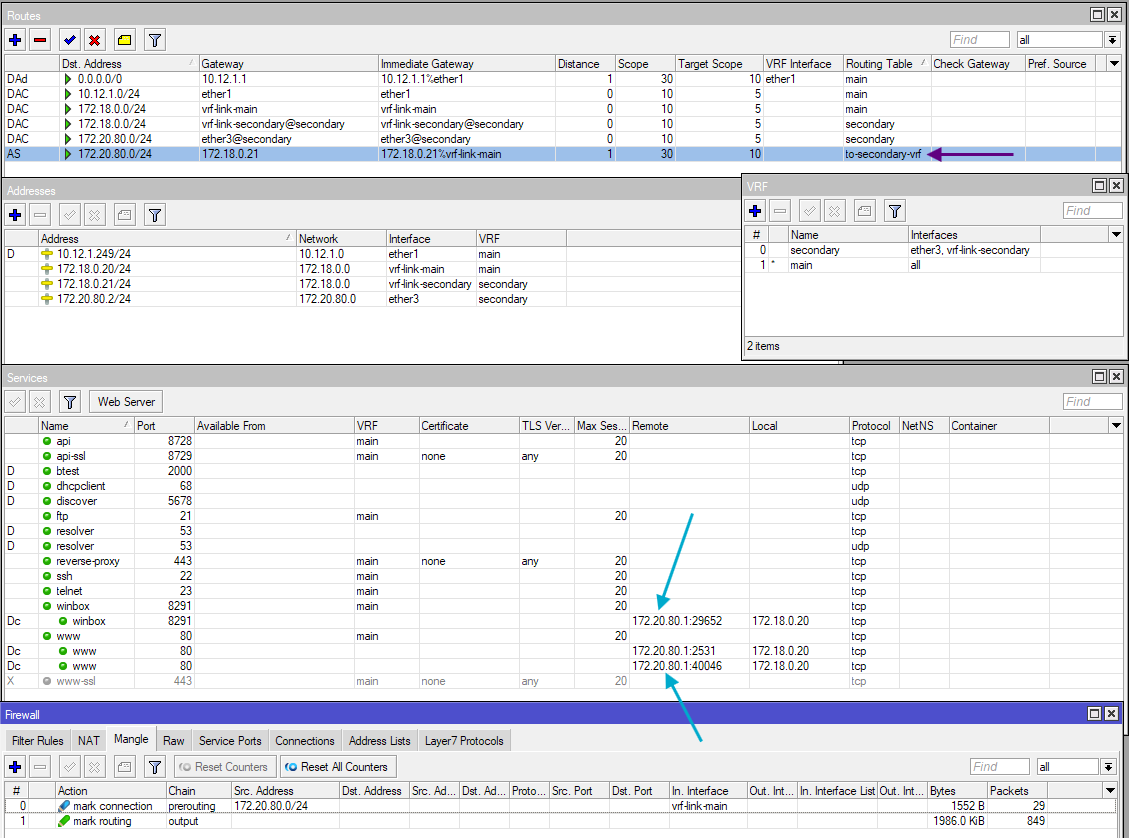
  1. If that also bothers you, then you can get rid of the SRCNAT rule, add a new FIB routing table to-secondary-vrf with the route:

    /routing table
    add fib name=to-secondary-vrf
    
    /ip route
    add dst-address=172.20.80.0/24 gateway=172.18.0.21@main routing-table=to-secondary-vrf
    
  2. And add mangle mark-connection rule to mark incoming connections to 172.18.0.20 from 172.20.80.0/24 and corresponding mark-routing rule on the output chain for the response:

    /ip firewall mangle
    add action=mark-connection chain=prerouting connection-mark=no-mark \
        connection-state=new in-interface=vrf-link-main src-address=172.20.80.0/24
    add action=mark-routing chain=output connection-mark=from-secondary \
        new-routing-mark=to-secondary-vrf
    

    With that, the source IP addresses are retained (no SRCNAT) and there is no route leaking in main needed, only in another routing table (to-secondary-vrf)


You can pick between those three alternatives for step #5 onwards depending on your preference.

When access need to be given to clients from more VRFs, we just need to add more MACVLAN interfaces. As an example, with ether2 being member of a VRF tertiary with the IP address 192.168.88.1/24 assigned:

/ip vrf
add interfaces=ether2 name=tertiary

/ip address
add address=192.168.88.1/24 interface=ether2 network=192.168.88.0

We add the MACVLAN interface and address:

/interface macvlan
add interface=vrf-link name=vrf-link-tertiary

/ip vrf
set [find name=tertiary] interfaces=ether2,vrf-link-tertiary

/ip address
add address=172.18.0.22/24 interface=vrf-link-tertiary network=172.18.0.0

To keep the NAT and mangle rules minimal, we use interface lists and address lists.

/interface list
add name=VRFs

/interface list member
add interface=ether2 list=VRFs
add interface=ether3 list=VRFs

/ip firewall address-list
add address=172.20.80.2 list=VRF-LOCAL
add address=192.168.88.1 list=VRF-LOCAL
add address=172.20.80.0/24 list=VRF-RANGES
add address=192.168.88.0/24 list=VRF-RANGES

We give the previous routing table to-secondary-vrf a more common name to-vrfs and add the routes to this table:

/routing table
add fib name=to-vrfs

/ip route
add dst-address=172.20.80.0/24 gateway=172.18.0.21@main routing-table=to-vrfs
add dst-address=192.168.88.0/24 gateway=172.18.0.22@main routing-table=to-vrfs

Our DSTNAT rules are modified to use interface lists and address lists:

/ip firewall nat
add action=dst-nat chain=dstnat dst-address-list=VRF-LOCAL dst-port=53 \
    in-interface-list=VRFs protocol=udp to-addresses=172.18.0.20
add action=dst-nat chain=dstnat dst-address-list=VRF-LOCAL dst-port=53 \
    in-interface-list=VRFs protocol=tcp to-addresses=172.18.0.20
add action=dst-nat chain=dstnat dst-address-list=VRF-LOCAL dst-port=8291 \
    in-interface-list=VRFs protocol=tcp to-addresses=172.18.0.20
add action=dst-nat chain=dstnat dst-address-list=VRF-LOCAL dst-port=80 \
    in-interface-list=VRFs protocol=tcp to-addresses=172.18.0.20

Same for the mangle rules:

/ip firewall mangle
add action=mark-connection chain=prerouting connection-mark=no-mark \
    connection-state=new in-interface=vrf-link-main src-address-list=VRF-RANGES \
    new-connection-mark=from-vrfs
add action=mark-routing chain=output connection-mark=from-vrfs \
    new-routing-mark=to-vrfs