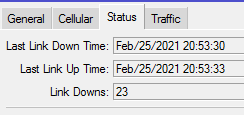
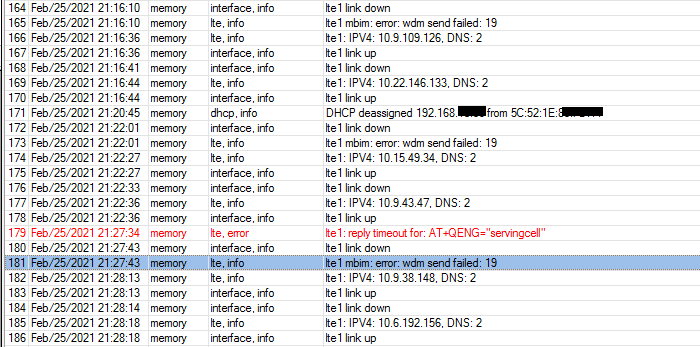
I have a problem with LTE connection. Recently mikrotik started to dropping LTE connection/interface, when an issue occur there is no LTE interface visible in winbox. I know that I do not have the best signal strength but it was working fine for few months. I am also planning to buy external antenna for it. However, I would like to understand if the issue is caused by weak signal or possible hardware/software issue.
Thank you for the advice. I kind of expected this might have to be for the support. I have just raised a ticket, let’s see what they are going to say.
I also noticed there is newer FW version available:
installed: EG12EAPAR01A06M4G
latest: EG12EAPAR01A09M4G
I am just thinking to try it but I do not want to lose my router. Do you know if this has been already tested or if there are any release notes available?
When you say to try on one Band, do you think about possible carrier aggregation issue which can be found on mikrotik/quectel forum?
Just to confirm that the new firmware is an amazing improvement for me. I was going to return the Chateau LTE12 as it has been honestly so terrible with the previous firmware, but as of this update it is an order of magnitude better and now probably a keeper again. I have gone from the LTE link flapping in double/triple digits a day to still single digits over the past few days since the release of the firmware.
I have upgraded firmware to the latest version (EG12EAPAR01A09M4G) but the issues was the same. I tried to put only single band (B3) but I was suprised on the next day that I have CA running so it looks like the settings was dropped/ignored.
The connections were dropped so often that I put my sim card into hAP ac3 LTE6.
In the mean time I looked at Chateau LTE12 and noticed it is running old firmware! That was a suprise and I do not understand why it came back to previous firmware.
I put my sim card back into Chateau because support asked me to provide support file again with LTE logging. I am sure I did it when I raised a ticket but never mind. I have just provided them new file and waiting for next step.
What is a bit interesting that I also had some connections drops on hAP ac3 LTE6 but I did not have logs configured so I did not capture the issue. However, the logs seems to be less verbose compare to Chateau.
I am getting a bit desperate with it and thinking to buy external antenna but I am not sure if this going to solve my issue. I am waiting for support what they say about it.
hello, do you know if this was related to when you put some bandwidth on the router?
i had a similar issue, where LTE interface was dropping as soon as I actually got some real traffic on it with a few 10s of megabits…
Some people have got a problems with a speed/bandwidth when they loose CA connection, and they must do some action like disable disabled Cell Lock or setup CellLock when they have got CL because that action is fast, recovery connection is fast and CA back to work.
And they do own scripting to detect and do some action.
OK, User at forum Sebastii share code for me and I can share it for you.
He use it as
*) Check if Chateau have CA connected, if it’s is then exit.
*) No CA then do a Bandwitch Test with one of Public BTest Servers, details here: http://forum.mikrotik.com/t/public-mikrotik-bandwidth-test-server-s-now-shutdown-as-of-april-1st-2025/94863/1 who can restore CA
*) Still NO CA then if SPEED is wrong do again CellLock to his favourite BTS/SectorAntenna as .“at+qnwlock="common/4g",1,3350,187”
You should do a Cell Monitor, or check what EARFCN & Phy-CellID you use and replace it at the end of scirpt.
This code can be paste into a scheduler like every 30minutes.
You should read details about Public BTest Servers to not do a speedtest to often.
I have been in touch with support but they asked if they can access the router remotely to do more debugs. The problem is that I do not have public IP address available on LTE. I suggested to have a remote session i.e.zoom but they do not do it due to security reasons.
If you have alternative ISP… I can help to access internet from that unit by/via LAN site and we can share unit to MikroTik support.
You can use any Public Cloud for build CHR with Public IP, or use VPN who give you Public IP…
You can write me at Telegram,
Hi, I back from big offline time… one big project is end now and I can back to hobby like LTE & MikroTIk.
Good that case was solved in your scenario. I think the MikroTik firmware upgrade solve issue.