MikroTik Wireguard server with Road Warrior clients

This document is a tutorial on how to set up wireguard VPN on MikroTik for road warrior clients like iOS devices. RouterOS v7.x is needed.

Wireguard is like a series of point to point tunnels, but the same IP can be used on the side of the Wireguard system itself.* In this example, we have assigned a dedicated Wireguard subnet 192.168.66.0/24, separate from our main internal network on the Mikrotik. The Wireguard server router has the IP 192.168.66.1/24, and the Wireguard clients are 192.168.66.2, 192.168.66.3, etc. You end up with the following point to point tunnels formed:

192.168.66.1 (the Wireguard server router itself) <-----------> Wireguard client on 192.168.66.2
192.168.66.1 (the Wireguard server router itself) <-----------> Wireguard client on 192.168.66.3
etc.

These Wireguard client IPs are assigned statically, and typically use private IPs that are completely unrelated to their public IPs that these clients may actually be on. There is currently no dynamic means (ex. DHCP) for handing out IPs to Wireguard clients, which might make it unsuitable for very large RoadWarrior setups as manual configuration is needed for each user.

* Note: Technically, the Wireguard server router does not need an IP on this subnet, but if you do not give it one, you need to create static routes for your clients to be accessible. These routes are unnecessary if the Wireguard server router has an IP on this subnet as a “dynamic connected” route will exist, auto-created by the MikroTik, and this strategy will be easier for most users.

MikroTik Wireguard server config:

# a private and public key will be automatically generated when adding the wireguard interface
/interface wireguard
add listen-port=13231 mtu=1420 name=wireguard1
/interface wireguard peers
# the first client added here is ipv4 only
add allowed-address=192.168.66.2/32 interface=wireguard1 public-key="replace-with-public-key-of-first-client"
# the second client is dual stack - public IPv6 should be used - replace 2001:db8:cafe:beef: with one of your /64 prefixes.
add allowed-address=192.168.66.3/32,2001:db8:cafe:beef::3/128 interface=wireguard1 public-key="replace-with-public-key-of-second-client-dual-stack"
/ip address
add address=192.168.66.1/24 interface=wireguard1 network=192.168.66.0
/ipv6 address
add address=2001:db8:cafe:beef::1/64 interface=wireguard1

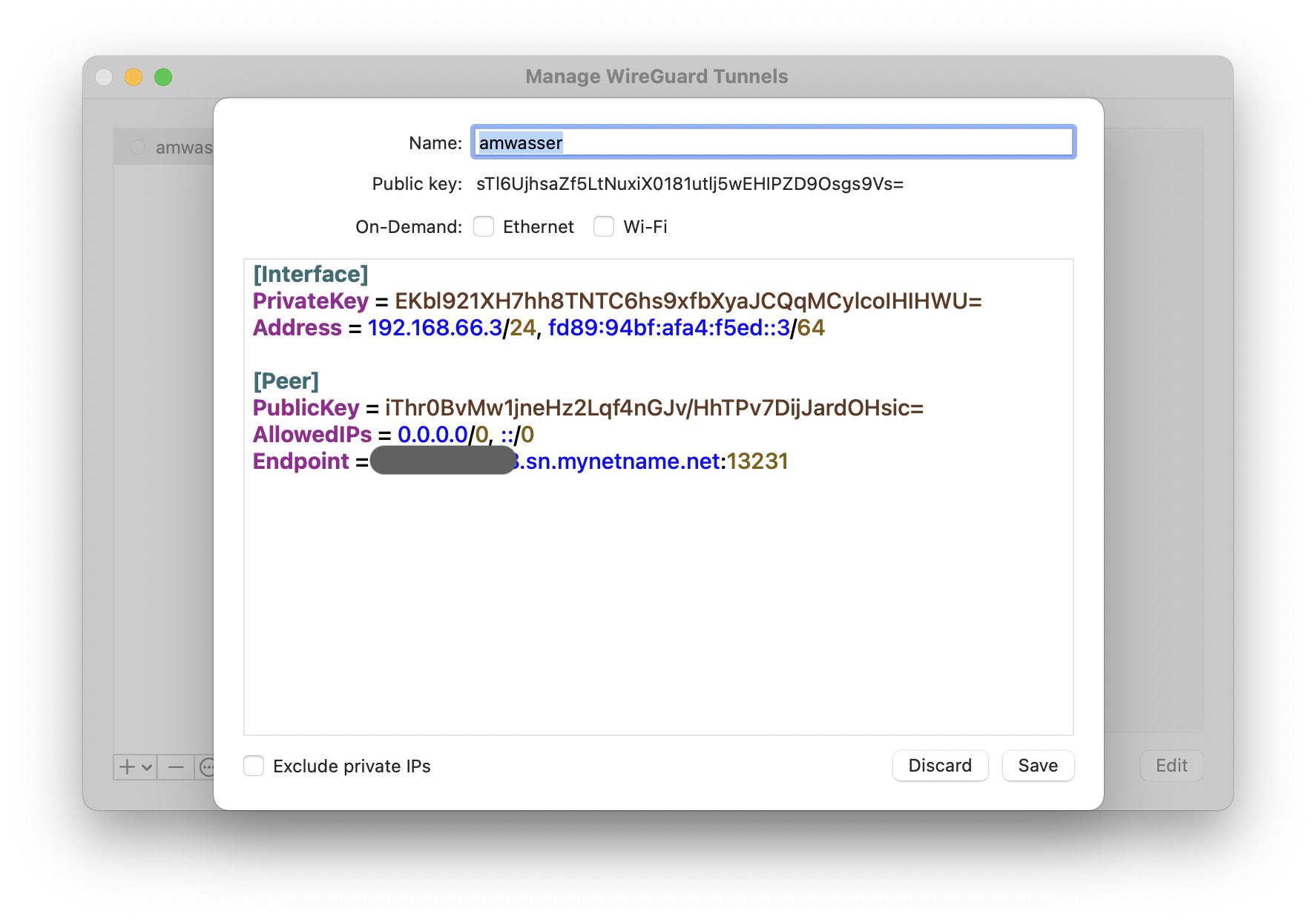
Example iOS wireguard client config (acts as “second client” above):

Interface: (whatever name you want to specify)
Public key: the client should automatically generate this - add this to the server above replacing "replace-with-public-key-of-second-client-dual-stack"
Addresses: 192.168.66.3/24,2001:db8:cafe:beef::3/64          (note these are different subnet masks than in the server config)
DNS servers: as desired - if you want to use the wireguard server for dns, specify 192.168.66.1

Peer:
Public key - get the public key from the wireguard interface on the mikrotik and place here
Endpoint - mydyndns.whatever:13231
Allowed IPs: 0.0.0.0/0, ::/0

This config will result in the client sending all traffic through the MikroTik Wireguard server. If you do not want all traffic sent through (i.e. split include), limit the peer’s “Allowed IPs” to whatever subnets it should access through the tunnel rather than 0.0.0.0/0 and ::/0

You also need to create an input chain firewall rule to allow UDP traffic to destination port 13231 in order for the Wireguard tunnel to be established in the first place.

/ip firewall filter add action=accept chain=input comment="Allow Wireguard" dst-port=13231 protocol=udp

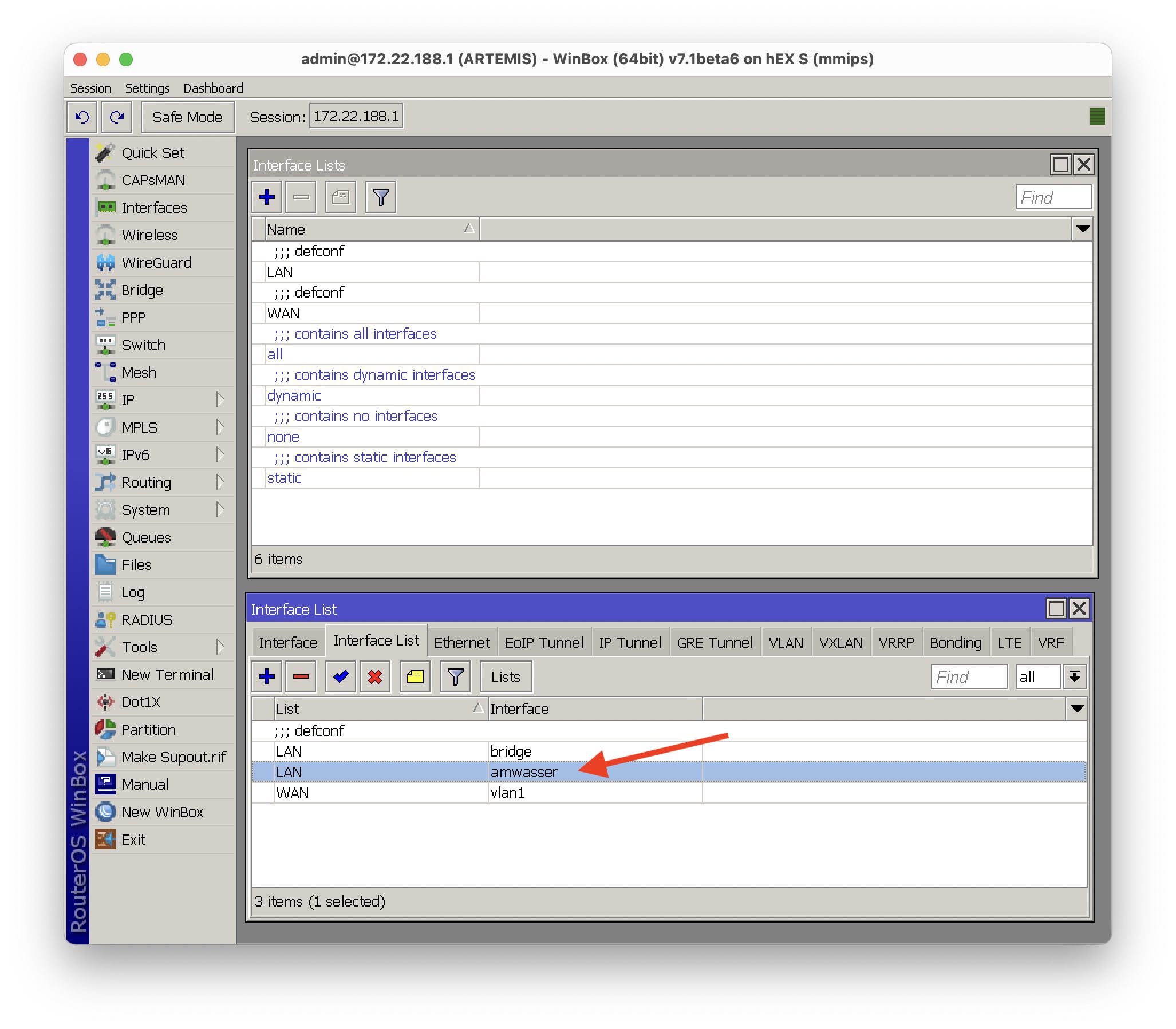
The traffic you send when connected to Wireguard will come from your Wireguard client IP, 192.168.66.2 or 192.168.66.3 in my example. As a result, you have to make sure that your MikroTik firewall is allowing this traffic, that it is being NATted etc. If your config is based on the MikroTik default configuration, one way you can do this is by adding the Wireguard interface itself to your LAN interface list, which should take care of both allowing the traffic through and NATing it.
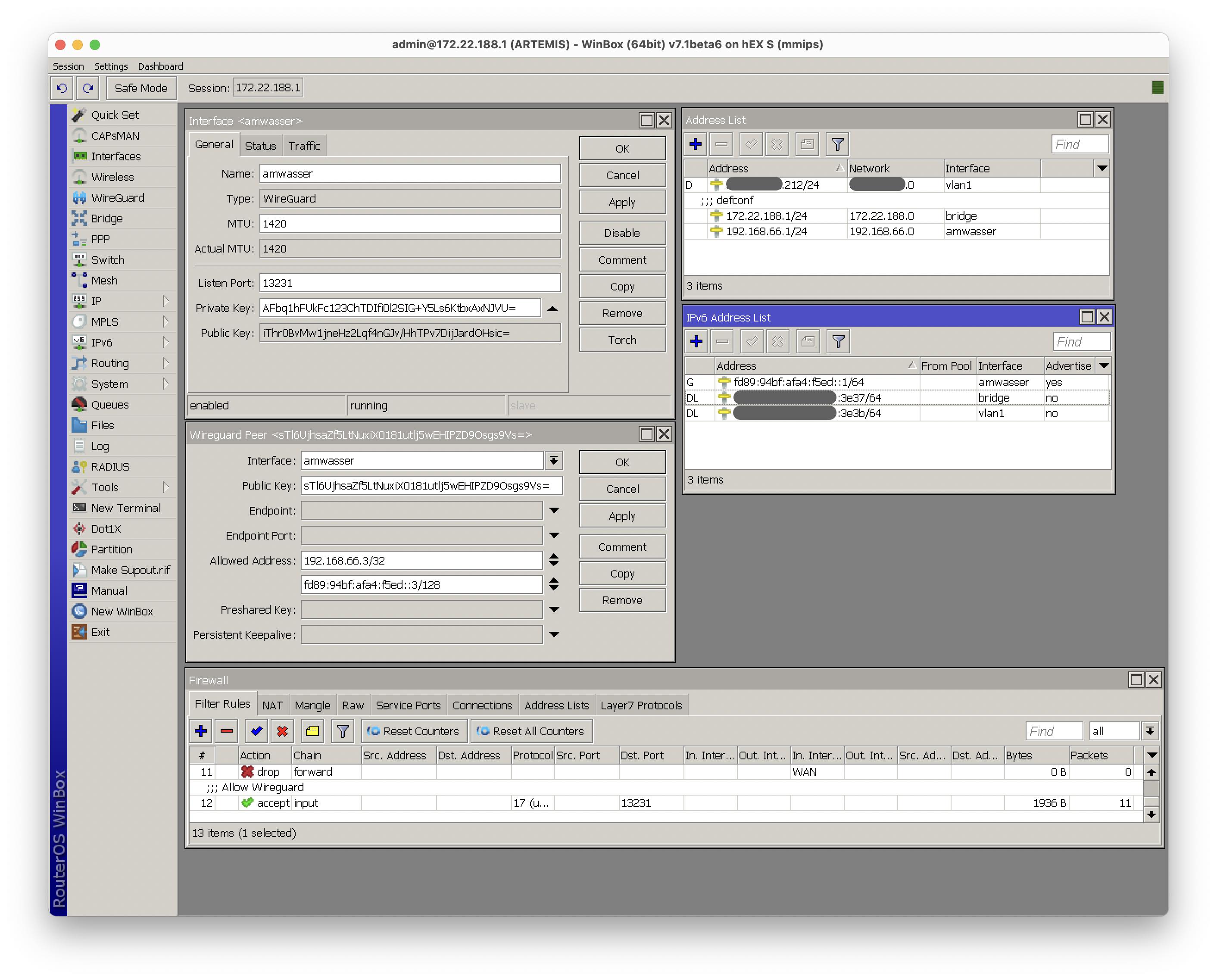
I would like to apply this setup on 7.1b5 in Webfig. However I’m not able to set the allowed-address for the server peer config, the field gets cleared when pressing Apply and is not saved when pressing OK. Is this some bug? Any other way to make this work? Thanks… I’m new to RouterOS.

Yes, I have had this happen a few times - you have to set them from the command line for now. For example:

/interface wireguard peers print

prints the list of wireguard peers - note the ID number of the peer you want to change, and then set it from the command line:

/interface wireguard peers set <ID> allowed-addresses=whatever,whateverelse

Could you please explain the correct firewall addition to allow this to work? I have tried a number of things without success. Also, does it need a static route? Is WireGuard assigning the IP address to the client as the peer IP? Can it be on the same network as my DHCP subnet everything else is on? Thanks in advance!

Four questions, four answers:

  1. You will need a firewall rule like this:
/ip firewall filter add action=accept chain=input comment="Allow Wireguard" dst-port=13231 protocol=udp
  1. It doesn’t need a static route, no

  2. No, wireguard has no means of dynamic address assignment for clients - everything is static and is specified on the client side too

  3. No, it cannot

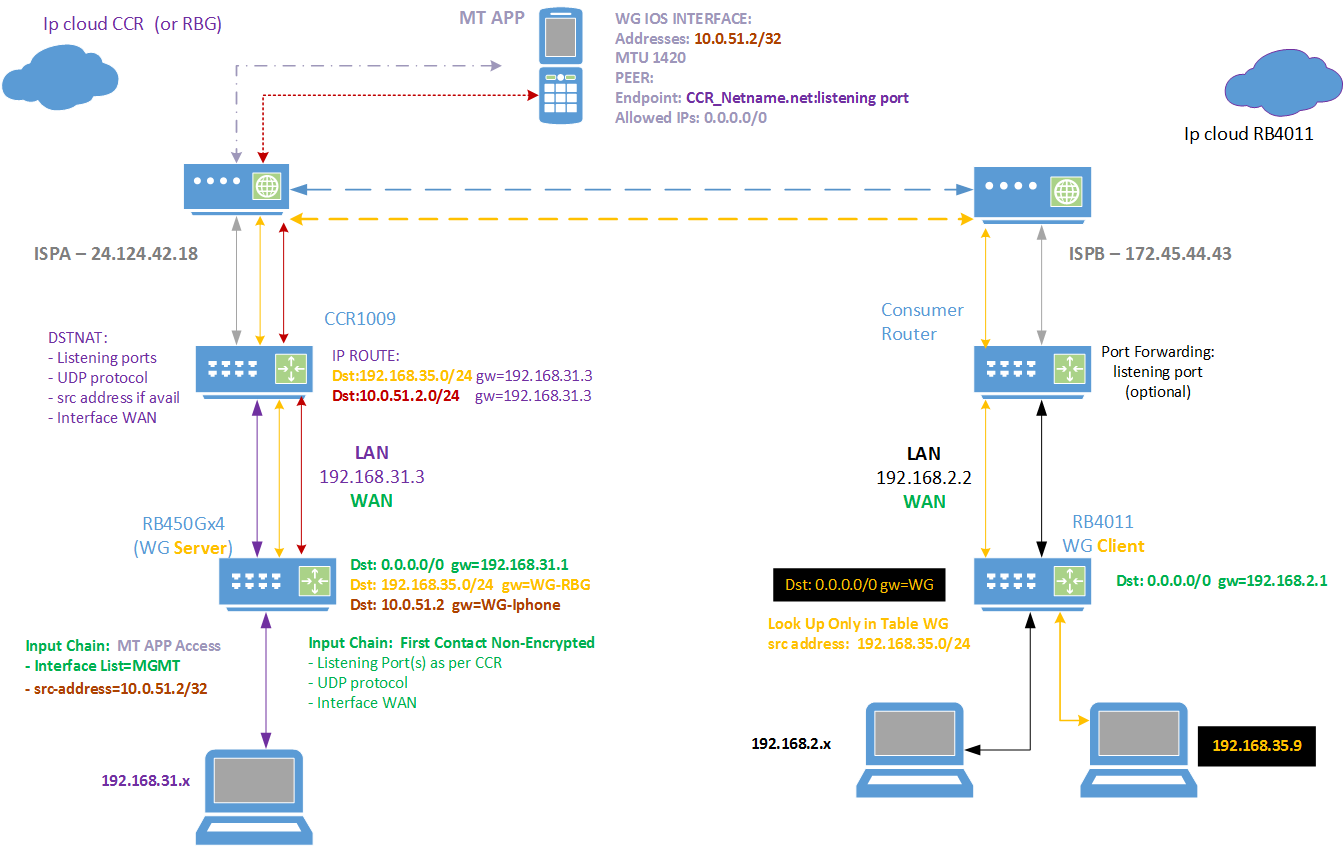
My Wireguard Diagram using Beta5.
A. IOS phone to RBG wireguard server
B. External PC behind an MT RB4011 router acting as a wireguard client connected to a different RBG wireguard server.
C. The iphone and external PC are associated with a different WG server Interface on the RBG (2 WG interfaces each with one peer, vice ONE interface and two peers).
D. The WireGuard interfaces do not require any subnet or IP address.

Notes:

  1. Both MT wireguard devices (server and client) are behind a primary router.
  2. The IOS smartphone connection is used to manage the CCR1009, the RBG and the RB4011 routers through the wireguard interfaces.
  3. The IOS smartphone and external PC wireguard connections are used to provide internet through the CCR WAN connection.
  4. Throughput is approx 300up and 300down with primary routers connected to the same 1Gig fiber network (within 15km).
  5. Plan will be to remove RBG once wireguard is moved out of beta.

    Drawingwireguardvers4.png

Hi

Thanks for your example. Very appreciated.

Unfortunately I cannot replicate it. May you have any hint based on my configuration?

After activating the client in macOS (same applies to iOS), it shows “activated”, but I cannot ping the wireguard server (nor access the webfig. I tried all ip-addresses). The keys are for test purpose only.

Wireguard-Server on Mikrotik hEX S, which is attached to ISP with fiber


Wireguard-Client on macOS

Thanks in advance.

Simon


Your wireguard interface for roadwarriors should also be in the LAN interface list - make sure you have done that.

Thanks for your swift reply.

Still NOT working. Do you have any more ideas?

I added the following entry in the list section. Not sure if this is what you asked me to do.


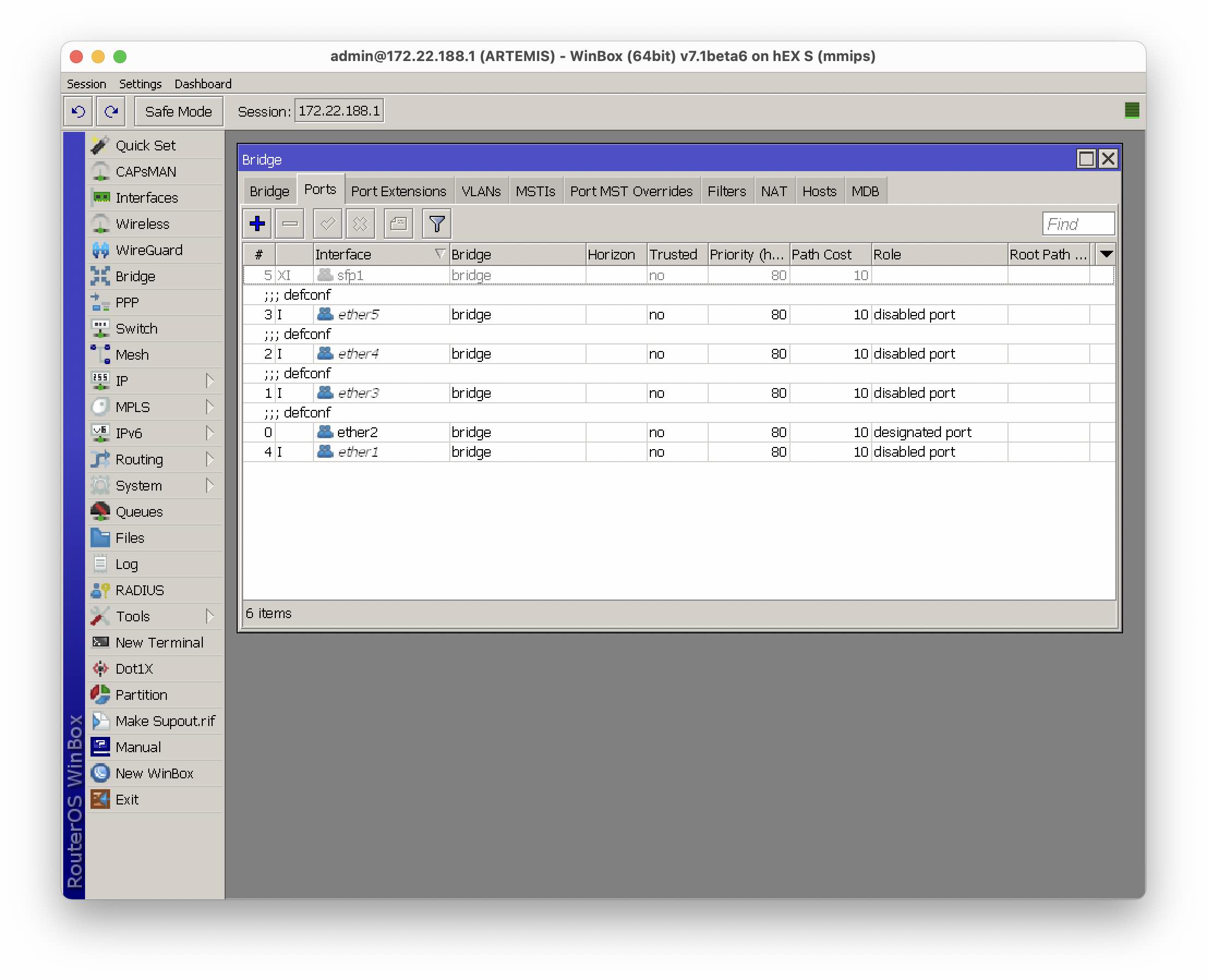
I also tried to add it to the bridge, but this was not successful either. So I deleted it again.

Looking forward to your feedback.

Best,
Simon

Make sure the “allow wireguard” rule is above your drop rules on the input chain, specifically it should at least be above the “drop all” final input chain rule. It looks to me like you have it at the very end instead, which is too late. On mine I have it just above the “drop invalid” rule for the input chain, although that may not strictly be necessary.

Server Router Key points:

  1. The wireguard is a service on the router and thus one has to allow the initial unencrypted traffic to the router via the INPUT CHAIN, which entails the listening port, protocol UDP, interface (coming from) the wan. With a road warrior one cannot narrow it down further by source address. As stated already this needs to be right after the input chain default firewall rules (like after accept ICMP ping) and before any drop rules etc…

So what happens is that the client traffic will hit the internet, hit the server router and then be directed to the wireguard service. If you log this rule, you should get basically a one log entry if successful. The tunnel will be negotiated and established. Once that is done, the client will be able to travel through the tunnel to the wireguard interface. The traffic will be routed out the available main table routing already in place at the server router.

[2. Ensure one puts an IP Route on the MT Server Router that will direct return traffic from the internet back through the wireguard tunnel to the client device. Therefore the destination address is the lan subnet of the client device or the IP of the client device) and the gateway is the wireguard interface

This is only necessary if there isn’t already one - for instance, if the wireguard is not being done by the same device. If it is being done by the same device (as in most cases), there will already be a connected route (C) to deliver the return traffic, and manually adding an extra route on the MikroTik is unnecessary and unhelpful.

Thanks @mducharme @anav for your extensive support.

I will test this next Sunday and give you an update

Best,
Simon

When the server router gets return packets from the internet for a subnet or IP address that is not known to the router (wg client devices using the tunnel) not configured on the router, the IP route tells the router, oh, for these packets send them to the WG interface. Without these routes for both my client MT device and associated PC, and the iphone, there is no other magic way for them to get the return traffic??

As far as I am aware, wireguard config does not automatically create IP routes?
Perhaps, my example is unique being behind another MT router?
In this case you can see that I have to create an IP Route for internet return traffic, on the CCR first router, specifically for the return traffic of the client devices (iphone or external pc) to the LANIP/WANIP of the secondary wireguard server router. Then I do the same at the Server Router to point the return packets back at the tunnel.

Are you saying this is all done automatically when using only a single router? I do have masquerade sourcenat on both routers but this is not enough!

Yes, it is automatic when using a single router. Your situation is different in that your Wireguard server is behind another router.

As an example, the router as a wireguard server directly connected to the internet with a public IP as the main gateway will have an IP of, for instance, 192.168.66.1/24. As a result of having this address, the router has a connected route to the wireguard interface for the subnet 192.168.66.0/24. Suppose the client is assigned 192.168.66.2/32. The client goes to a website, and since allowed-ips on the client side are 0.0.0.0/0, it sends everything across Wireguard to the router. The router masquerades this (as long as the wireguard interface is in the LAN interface list) and sends it to the internet. The response coming back is received by the router which knows it has to get the packet back to 192.168.66.2. It checks its routing table to see where 192.168.66.2 is, and sees that it already has a connected route for that subnet and that it belongs to the wireguard interface.

No still dont see it nor agree but I think you are missing a key point ----> I do not assign an IP or IP address to the wireguard interface in my design. It is only an interface period.

EDIT: This is a possible approach but creating the wireguard address IS the BETTER approach. Sob drilled it into me finally

OK I see. What benefit is there to not using an IP address on the wireguard interface? (Other than saving one IP address)

Why do you need an IP address? What functionality does adding an IP address on the WG provide??
Currently, from my iphone I can manage/configure every MT router attached somehow to Wireguard.
I can get internet from the WG server from my iphone.
The external PC connected to the wirguard server can get internet.
The external PC connected to the wireguard server can reach my printers on a different vlan if necessary…

I do not completely know, but it is present in all Wireguard documentation and tutorials that I have found to do this. You seem to have invented your own method that is different from all other Wireguard tutorials out there, and deviates from what the documentation states. I would suspect since all of the documentation shows to do this, that there is a reason for it, and it isn’t just some completely useless practice.

Although I haven’t tried it, something I suspect might not work with your setup is if you had two Wireguard clients connecting to your Wireguard server and you want them to be able to connect to each other. For instance, two iPhones connecting may not be able to ping each other, but be able to reach everything else. This works fine with an IP on the Wireguard server end, with one wireguard interface with 192.168.66.1/24 and two configured peers on 66.2 and 66.3.

I am not discounting your approach because their may be instances where it is useful, just haven’t stumbled across them yet.
Out of curiosity do you just assign an IP address to a wireguard interface or do you assign a subnet and then give client devices an IP in that subnet??

When you say you can connect two clients together, what practical purpose is that used for?? Once folks have an internet connection through the server, they can use discord or a other apps to chat for example so looking for practical examples of why its necessary. I think its not a good idea for users to have a party on your wireguard server LOL, In fact having them on the same subnet if automatically allows connected client users to see each is bad security especially if you have no way of blocking them!!!!
I suspect that having two peers on the same interface WITHOUT an ip address structure probably prevents them from seeing each other automatically but not sure since havent tested it.