Problem with VLANs and Bridge

Hi everyone.
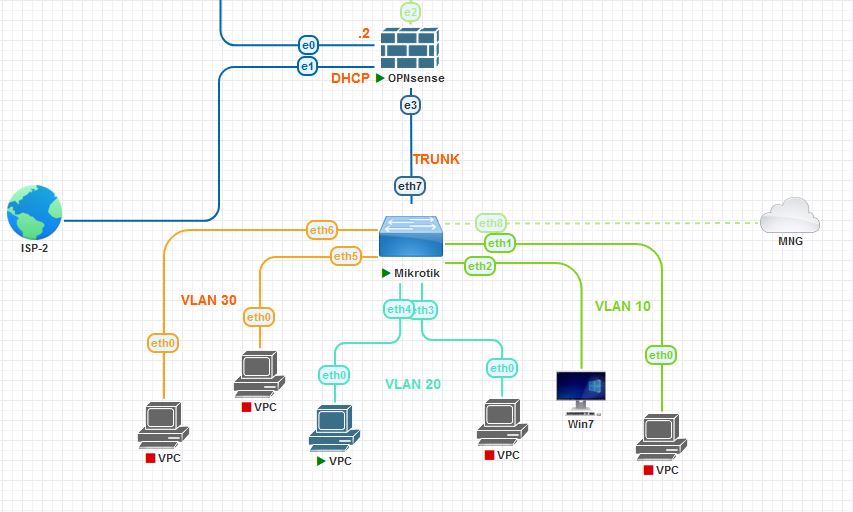
I set up OPNsense as the main firewall and a Mikrotik device as the managed switch in a LAB.
I had some problems to make VLANs work as expected until I also set the bridge as a tagged port too.
For instance, If I don’t set the bridge as a tagged port too, the device on the access ports don’t get their IPs from the dhcp servers running
on OPNsense in which I also set the VLANs interfaces. Could you please explain to me why?
Here is the Mikrotik config:


/interface bridge
add name=BR1 vlan-filtering=yes
/interface ethernet
set [ find default-name=ether7 ] comment=TRUNK
set [ find default-name=ether8 ] comment=MNG
/port
set 0 name=serial0
set 1 name=serial1
/interface bridge port
add bridge=BR1 frame-types=admit-only-untagged-and-priority-tagged interface=\
    ether1 pvid=10
add bridge=BR1 frame-types=admit-only-untagged-and-priority-tagged interface=\
    ether2 pvid=10
add bridge=BR1 frame-types=admit-only-untagged-and-priority-tagged interface=\
    ether3 pvid=20
add bridge=BR1 frame-types=admit-only-untagged-and-priority-tagged interface=\
    ether4 pvid=20
add bridge=BR1 frame-types=admit-only-untagged-and-priority-tagged interface=\
    ether5 pvid=30
add bridge=BR1 frame-types=admit-only-untagged-and-priority-tagged interface=\
    ether6 pvid=30
add bridge=BR1 frame-types=admit-only-vlan-tagged interface=ether7
/interface bridge vlan
add bridge=BR1 tagged=ether7,BR1 untagged=ether1,ether2 vlan-ids=10
add bridge=BR1 tagged=ether7,BR1 untagged=ether3,ether4 vlan-ids=20
add bridge=BR1 tagged=ether7,BR1 untagged=ether5,ether6 vlan-ids=30
/ip dhcp-client
add interface=ether1
/system identity
set name=MK-Pnet
/system note
set show-at-login=no
/system package update
set channel=development

Thanks
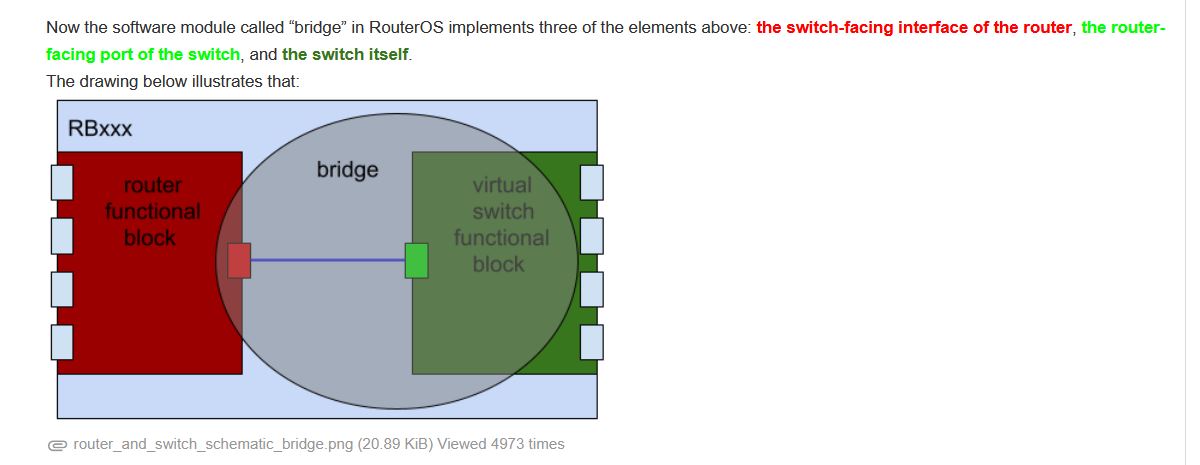
This is normal. Bridge needs to be tagged for this, you need to think of the bridge as your layer2 “link” between the ports.

Bridge has multiple personalities (and the distinction between them in ROS configuration is not made at all). One of personalities is a “CPU-facing switch port” (and by “switch” I’m referring to bridge’s switch-like functionality).

Have a look at this excellent explanation, I believe it’ll clear the mental picture you’ve got. BTW, the way @steveocee mentions it is not exactly right. Bridge doesn’t have to be tagged (or set with PVID for that matter) with some VLAN for that VLAN to between member ports, port properties (and VLAN properties) govern it.

This is strange. I thought that we need to tag the bridge only on the router in which the VLAN interfaces are set, since it can work as a router and a switch at the same time
as it is shown here:
bridge.jpg
In my case, the VLAN interfaces are set in OPNsense.

Why should I tag it on the switch/AP too?
Thanks

Yes, I know that the bridge can be a though matter to deal with on the Mikrotik devices.
Anyway, I took a look at this article again:
http://forum.mikrotik.com/t/using-routeros-to-vlan-your-network/126489/1
The bridge is only tagged for the base VLAN to set an IP for the AP itself.
Thanks

What MikroTik device is this?

Is the intervlan routing happening on the OPNsense device?

And are devices connected to ether1 (vlan 10) getting a different dhcp address than for ether3 (vlan 20) or ether5 (vlan 30)?

The reason I ask is that once you add the vlans to the BR1 device, then you have connected the vlans to the MikroTik router.

If intervlan routing is occurring on the MikroTik, then yes, you need to add the vlans to BR1 (since that is the “connection” to the MicroTik router). And the excellent explanation by @sindy is well worth reading in any case.

I haven’t used a vlan-aware (vlan-filtering) bridge on a MikroTik device without a hardware switch ASIC built in (I only have a hEX S RB760iGS and a RB5009, which both have built in switch ASICs. But I would at least expect a non-hardward assisted bridge to “behave” the same when using the “new” method.

Here is something to test.

If you disconnect the trunk connection to ether7 of the MikroTik device, then connect PC’s to the MikroTik device’s ether1 and ether2, do they still get an ip address via dhcp (if they do, they aren’t getting them from the OPNsense device). But even without a trunk connection, they will probably get an APIPA (169.254.x.x) address.

and change
add bridge=BR1 tagged=ether7**,BR1** untagged=ether1,ether2 vlan-ids=10
to
add bridge=BR1 tagged=ether7 untagged=ether1,ether2 vlan-ids=10

i would expect that the two PCs connected to ether1 and ether2 would be able to communicate at layer 2. i.e. if a PC based firewall doesn’t prevent it, you should be able to ping the other PC (get the ip address with ipconfig from a cmd prompt).

If you go back to your original config where BR1 didn’t have a tagged connection to the vlans, then move one of the PC’s to ether3, you shouldn’t be able to have any communication between the PC’s on vlan 10 and vlan 20 because they are on different vlans, and there is no connection to the router in the MikroTik device. And even if you remove the tagged BR1 from all the vlans, as long as you still have ether7 as tagged, it should allow the tagged traffic to reach the trunk port on the OPNsense device (when the connection between ether7 and the OPNsense box is restored).

What are the symptoms you are seeing?

It is a CHR in a virtual lab I set in Pnetlab


Is the intervlan routing happening on the OPNsense device?
And are devices connected to ether1 (vlan 10) getting a different dhcp address than for ether3 (vlan 20) or ether5 (vlan 30)?

Yes, everything works fine as long as the bridge is tagged along with Ether7 as you can see in my setup above


The reason I ask is that once you add the vlans to the BR1 device, then you have connected the vlans to the MikroTik router.

If intervlan routing is occurring on the MikroTik, then yes, you need to add the vlans to BR1 (since that is the “connection” to the MicroTik router). And the > excellent explanation > by @sindy is well worth reading in any case.

There is no MK router; the chr is set as a simple switch. The Vlans are managed by the OPnsense firewall


If you disconnect the trunk connection to ether7 of the MikroTik device, then connect PC’s to the MikroTik device’s ether1 and ether2, do they still get an ip address via dhcp (if they do, they aren’t getting them from the OPNsense device). But even without a trunk connection, they will probably get an APIPA (169.254.x.x) address.

No, of course. The dhcp servers are running in OPnsense.


and change
add bridge=BR1 tagged=ether7> ,BR1 > untagged=ether1,ether2 vlan-ids=10
to
add bridge=BR1 tagged=ether7 untagged=ether1,ether2 vlan-ids=10

i would expect that the two PCs connected to ether1 and ether2 would be able to communicate at layer 2. i.e. it PC based firewall doesn’t prevent it, you should be able to ping the other PC (get the ip address with ipconfig from a cmd prompt).

If you go back to your original config where BR1 didn’t have a tagged connmove one of the PC’s to ether3, you shouldn’t be able to have any communication between the PC’s because they are on different vlans, and And even if you remove the tagged BR1 from all the vlans, as long as you still have ether7 as tagged, it should allow the tagged traffic to reach the trunk port on the OPNsense device.

What are the symptoms you are seeing?

If I remove BR1 as a tagged port and restart the switch, I can’t even get access to it via the management port Ether8 (which is not part of the bridge BR1) via Winbox from my PC anymore.
Here is the topology to make it clearer:
topology.jpg
Thank you very much

Well I obviously don’t understand it as well as I thought I did.

I will have to try some things on my RB760iGS to see if it works the way I thought it did when an ASIC is involved. But I have a lot of other things on my plate at this time, and probably won’t be doing that soon.

As long as you don’t have more than one interface defined on the CHR (whether vlan interface or ethernet interface), then the CHR will not be able to route. It seems the bridge “connection” to the CPU may still be needed, because in the case where there is no hardware switch ASIC, even layer 2 traffic needs to be “forwarded” by the CPU via the bridge. So it seems that what @Steveocee said may be true even when there are no vlan interfaces to “connect” to the trunk.

Having the BR1 set to tagged shouldn’t hurt anything, as long as you don’t have vlan interfaces. The traffic will be forwarded by layer 2 to the trunk and the OPNsense device and the traffic will not be routed by the CHR to bypass the OPNsense device. In other words, any intervlan (between vlan) traffic will still have to occur at the OPNsense device, if the routing engine on the MikroTik device has no “connection” to the vlans via a vlan interface. For intervlan routing to happen on the MikroTik device, connections to the “BR1” device, vlan interfaces, and ip addresses applied to the vlan interfaces would all be required, at least that’s my understanding.

So, it seems that if your only question was “why is in needed” is so the MikroTik “CPU” can see the traffic and deal with it, whether that is at layer 2 (bridging between ether1 and ether2) or bridging between ether1 and the trunk link on ether7.

The most surprising thing to me was that ether8 was affected. But the behavior may change when vlan-filtering is enabled or disabled.

I just went back and skimmed First attempt to set VLANs up where @tdk (should have been @tdw) posted this about the need to have BR1 connected to the vlans for the link between the bridge and the vlan interface. Perhaps it is more than that, maybe it is needed for the link to the CPU whether bridging or routing is involved.

Yes, I have no problem to let the setup as it is in my first post, it doesn’t hurt anythig as you said, but I just wanted to figure out what actually happens and why it doesn’t work if I don’t tag BR1 or every port. In the article by pcunite you linked me, as you can see the bridge is only tagged for the vlan interface created on the switch itself too(the management BASE_VLAN). No need to tag the bridge for the other vlans, just the trunk ether1:

/interface bridge vlan
add bridge=BR1 tagged=ether1 untagged=ether2 vlan-ids=30
add bridge=BR1 tagged=ether1 untagged=ether3 vlan-ids=10
add bridge=BR1 tagged=ether1 untagged=ether4,ether5 vlan-ids=20
add bridge=BR1 tagged=ether1,BR1 vlan-ids=99
/ip address
add address=192.168.99.2/24 interface=BASE_VLAN network=192.168.99.0


The most surprising thing to me was that ether8 was affected. But the behavior may change when vlan-filtering is enabled or disabled.

yes, very odd. I still don’t get it. Whatever.


I just went back and skimmed > First attempt to set VLANs up > where @tdk posted > this > about the need to have a the BR1 connected to the vlans for the link between the bridge and the vlan interface. Perhaps it is more than that, maybe it is needed for the link to the CPU whether bridging or routing is involved.

TDK was right, but int that article we were talking about a MK device which was working as a router and switch/AP. So tagging the BR1 on every vlan was expected and needed

ok, but why does this setup (pcunite’s article) on the switch/ap work here:

# Purple Trunk. L2 switching only, Bridge not needed as tagged member (except BASE_VLAN)
add bridge=BR1 tagged=ether1     vlan-ids=10
add bridge=BR1 tagged=ether1     vlan-ids=20
add bridge=BR1 tagged=ether1     vlan-ids=30
add bridge=BR1 tagged=BR1,ether1 vlan-ids=99

For more details, please take a look at the article
http://forum.mikrotik.com/t/using-routeros-to-vlan-your-network/126489/1

the AccessPoint.rsc file.

Thanks

As a recap, in order for the PCs to get IPs from the dhcp server on OPnsense, and to get access via the MNG ether8 interface,
I need to both set the bridge “Frame Type” to “admit all” and tag it on all vlans like this::

/interface bridge vlan
add bridge=BR1 tagged=ether7,BR1 untagged=ether1,ether2 vlan-ids=10
add bridge=BR1 tagged=ether7,BR1 untagged=ether3,ether4 vlan-ids=20
add bridge=BR1 tagged=ether7,BR1 untagged=ether5,ether6 vlan-ids=30

It sounds odd to me, but it works only this way.

For what it’s worth, it just found this with google
Why do the docs not mention adding “bridge” as its own tagged interface when doing a VLAN trunk? which has the solution post by @mkx which implies it is a bug that affected devices with multiple switch ASICs for the communication between the ASICs.

Since the CHR has no switch ASICs, perhaps the same applies to it?

What version of CHR are you using?

Quick thoughts:

  • When 7.16 comes out, the bridge will be automatically marked as tagged, by virtue of use of a pvid= on /interface/bridge/port and/or having a /interface/vlan that listens on VLAN-enabled bridge (or using MVRP). So the need to muck with /interface/bridge/vlans should be limited to only cases where hybrid ports are needed, once 7.16 comes out.

  • To that point, tagging the bridge is NOT needed IF the router is merely bridging traffic - i.e. NOT the router for the VLAN, e.g. acting as “smart switch”. So if the router does not have an IP address (and /interface/vlan) on something “passing through” the bridge, then tagged= is not needed in /interface/bridge/vlans. That why @pcunite example does not have bridge as tagged in that one case.

  • vlan-filtering=yes bridges logically works same on all platform, including CHR. Now RouterOS will try to “hardware offload” if possible but HW offload is not possible on CHR. And, what exactly may allow hardware offloading does vary by platform (since ASIC/similar have different abilities). RouterOS will just automatically use CPU if offload is not possible in the /interface/bridge - so config is same regardless of ASIC.

That was my understanding as well, but if that’s the case, how do you explain what @broderick is seeing? He is using it as a switch, not as a router. It may be a bug.

And how do you explain that ether8 which wasn’t a “member” of the bridge was also affected? This is assuming that what he reported was accurate.

The current full config be helpful to know what’s going on at this point. It hard to follow all the changes/testing to know what is going on where.

One tip is that /tool/torch can sometime help clarify what traffic is flowing where when dealing with the bridge.


Well, ether8 needs some IP address I suspect. While winbox does support L2 connection, I think you still need an IP address.

Similar even if bridged, the port may not allow winbox if the bridge is not marked tagged. As noted, tagged=bridge is what allows “CPU Layer3/IP”, so I’d imagine to allow winbox to the router, tagged=bridge still be need even if only for winbox.

I’ll note I haven’t tested these cases, just theorizing.

The problem with RB4011 (and a few other devices) is that they have more than one switch chip and bridge does L2 HW offload to them. With CHR, there is no L2 HW offload AFAIK, so it’s not the same case as in the thread you linked.

Now what’s going on in a CHR with bridge and ports, fast path etc. it’s everybody’s guess … I guess. Could be that recent ROS versions still try to offload something to underlying “hardware” and it gets into the way.

Conceptually it’s not wrong to set bridge port as tagged member of some VLAN even though device doesn’t have to interact with that VLAN (on IP level) … as long as one doesn’t construct corresponding VLAN interface (anchored to bridge) ROS still won’t be able to communicate … not even on L2 (since CPU doesn’t do tagging/untagging unless there’s a VLAN interface), so even mac-server is still safe form being exploited. Setting bridge as untagged member of some VLAN, OTOH, can be dangerous (but a few other things have to align as well).

I don’t know. Maybe.


What version of CHR are you using?

CHR 7.15

That was my understanding too.


And how do you explain that ether8 which wasn’t a “member” of the bridge was also affected? This is assuming that what he reported was accurate.

Yes, exactly. It doesn’t make sense

I posted the full conf of the CHR in my first post above.

Well, ether8 needs some IP address I suspect. While winbox does support L2 connection, I think you still need an IP address.
Similar even if bridged, the port may not allow winbox if the bridge is not marked tagged. As noted, tagged=bridge is what allows “CPU Layer3/IP”, so I’d imagine to allow winbox to the router, tagged=bridge still be need even if only for winbox.

I set an IP on ether8, same behavior. I know it’s very strange.
By the way, I untagged BR1 on every VLAN, ran Wireshark on ether1, then started PC1. I tried to get an IP via command ip dhcp
Wireshark didn’t intercept any data in this case.
Thanks

Has this been solved? I think I am having the same issues as you. What is your current working MikroTik config?