new bug in 4011
showing mac address doesn’t a routers. when i put these new mac - doesn’t connect to router, connect only when i put a correct mac.
On a test today I started capsman and connected a client, it provisioned client and is still running. Not using it for anything, just test device.
2004 is still running.
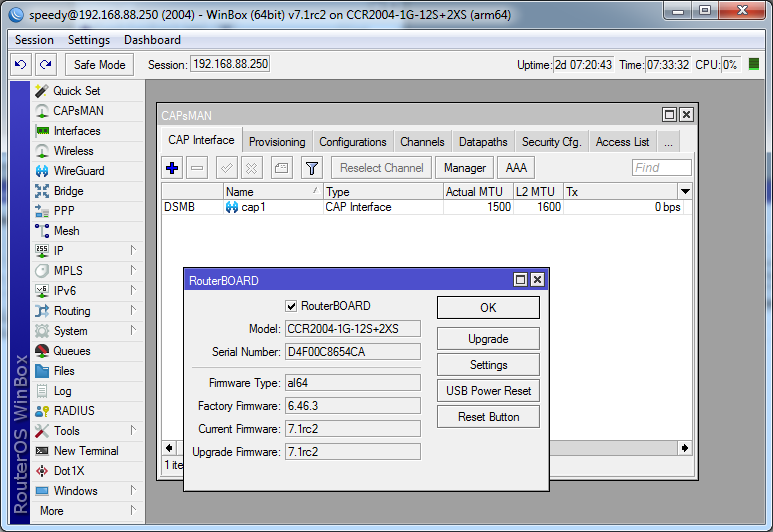
EDIT: ccr2004 with rj01 sfp will only negotiate 100 mb/s, is that a new feature for them?
with DAC it will negotiate 10gb/s.
That is a typo/omission - it should say v7.1rc2, not 7RC2. There is no such thing as v7.0rc2.
CCR2004 Still crashes when a cap tries to register, but not provision.
I want a formal apology.
So its this version 7.1rc2 that also contain ZeroTier. Thanks. MT should correct the thread header for the other thread.
Currently there are no known issues with CAPsMAN in v7.
Please open a formal bug report through support@mikrotik.com
HotLock mode hotkey has been changed too. Now it is F7 (Ctrl-V removed). Winbox Terminal still doesn’t support Ctrl-V, though. You have to press Shift+Ins to paste. But at least now you won’t accidentally activate HotLock mode while trying to paste.
Are those types of changes documented somewhere?
Preferably a list showing what changed from v6 to v7.
What is bad in this picture?

10.10.10.2 Is the router sitting in front of this router and between the internal network.
As soon I installed the RC the IP address of the router became unresponsive even when it was a default config. The router was only reachable by using the MAC/RoMon.
The whole ordeal: http://forum.mikrotik.com/t/v7-1rc2-development-is-released/151458/1
Used this method because Netinstall refused to do it’s work: http://forum.mikrotik.com/t/v7-1rc2-development-is-released/151458/1
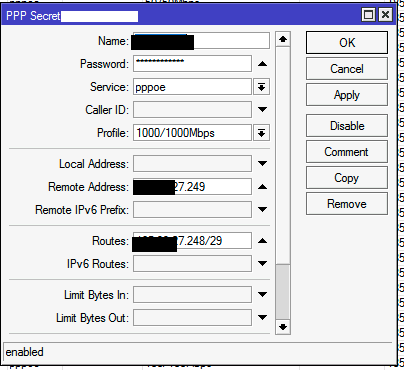
We do have a small problem with PPPoE server.
In some cases we give the client also a subnet, in v6 we dit it with the “routes” in the PPP secret, but it looks like this is not working in v7..
Had two random crashes today on my RB5009 on rc2. I’m actually not running anything special except many wireguard-connections and one l2tp. No queues.
rc1 was running for 4 days without any crash. rc2 was crashing after about 28 hours (while everyone was sleeping so nearly no traffic), then after about 5 hours.
well …
from my point of view, rc2 is unusable (yes, now everyone could drop a stone on me)
same config, on two device, rb750gr3, hapAC2 (without WIFI)
nothing special
inter vlan routing, 4 WG peers, ipv4, ipv6 firewall, dhcp server and this is it
load under 20%, memory 70% free
started from scratch
netinstall, hand made config, nothing imported
devices are up to MAX 4 hrs
AC2 reboot, luckily config is (mostly) preserved
rb750gr3 reboot, config is blank, no defaults, nothing
both device make unusable binary backups, cloud/flash no difference
only way to recover is RSC, but lose certs, users, ssh keys
autosupout is sometime generatet,sometime not
if it is generated, it is blank, nothing usable
so
rebooting, no backups = alpha testing
far from production environment
I have the impression the backups are OK but the router denies import them. I had four months of backups being denied despite they where from the same router with the same ROS version 6.49beta36.
Going back to 6.48.2 I could restore and then go the working 6.49beta36. From there the RSC helped me to restre about 99% of my lastest settings.
Can you send a supout.rif file to support@mikrotik.com? I am unable to reproduce the issue, the route is properly installed on the router.
My ISP tells me they fixed their bufferbloat issues, i.e. guessing they switched to fq_codel, or cake.
So, it’s time to also switch our mikrotik devices ques and buffers.
Apparently I would have to upgrade to the latest 7.1 rc version, and then add the queue types?
Is there a short how-to for that anywhere? I got here because it was mentioned in this thread.
TIA
I had the same problem, so I rollback to rc1.
Thank you very much for your reports, they help us a lot to proceed further.
Currently our very big concern is random configuration lost on some occasions. It would be great anybody experience configuration lost provide us with information,
- routerboard model used;
- configuration used on the device
You can send information to support@mikrotik.com
“Currently there are no known issues with CAPsMAN in v7.”
I just found it, and no I will not log a ticket. It gets old hearing “We were unable to recreate the issue”.
Ya’ll couldn’t recreate a ham sandwich if i sent you the schematic in CAD.
Could you provide me with the ticket number?
Unrelated to your issue, I have upgraded few capsmans to v7.x and it seems to work fine.